Breaking Changes
[DT-046917] Make It Possible To Remove unsafe-eval: Customers who use external forms with a CSP header will need to include unsafe-eval. Servers without a CSP header will not be affected.
[DT-048603] Portal: Various areas need Platform-Wide Font Family:
In Version 10.3, [DT-046731] v10 Adopt New Platform-Wide Font Family introduced font changes across the product.
In 10.4, a few remaining areas were updated to include these font changes. Areas include Project and System Pages, Textual Comparison Dialog, System Data Project, Resource Center, Inputs and Outputs on the inspection dialog, and Tabs on Mobile Portal.
Users who relied on previous font-specific styling may notice visual changes after upgrading.
10.4 New Features (10/26/2026)
| Feature | Link | Description | Product Category | Screenshot |
|---|---|---|---|---|
| [DT-046541] Edge Case Testing | Edge Case Testing | Added Edge Case Testing to automatically generate reusable unit tests from a validated baseline input set, helping identify issues caused by boundary and unusual input values before deployment. Generated tests integrate with the existing Unit Tests framework and support String, Integer, Boolean, DateTime, and Decimal input types. Available for Flows, Rules, RuleSet Elements, Truth Tables, Rule Tables, External Truth Tables, and Matrix Rules that accept input parameters. | Flows | 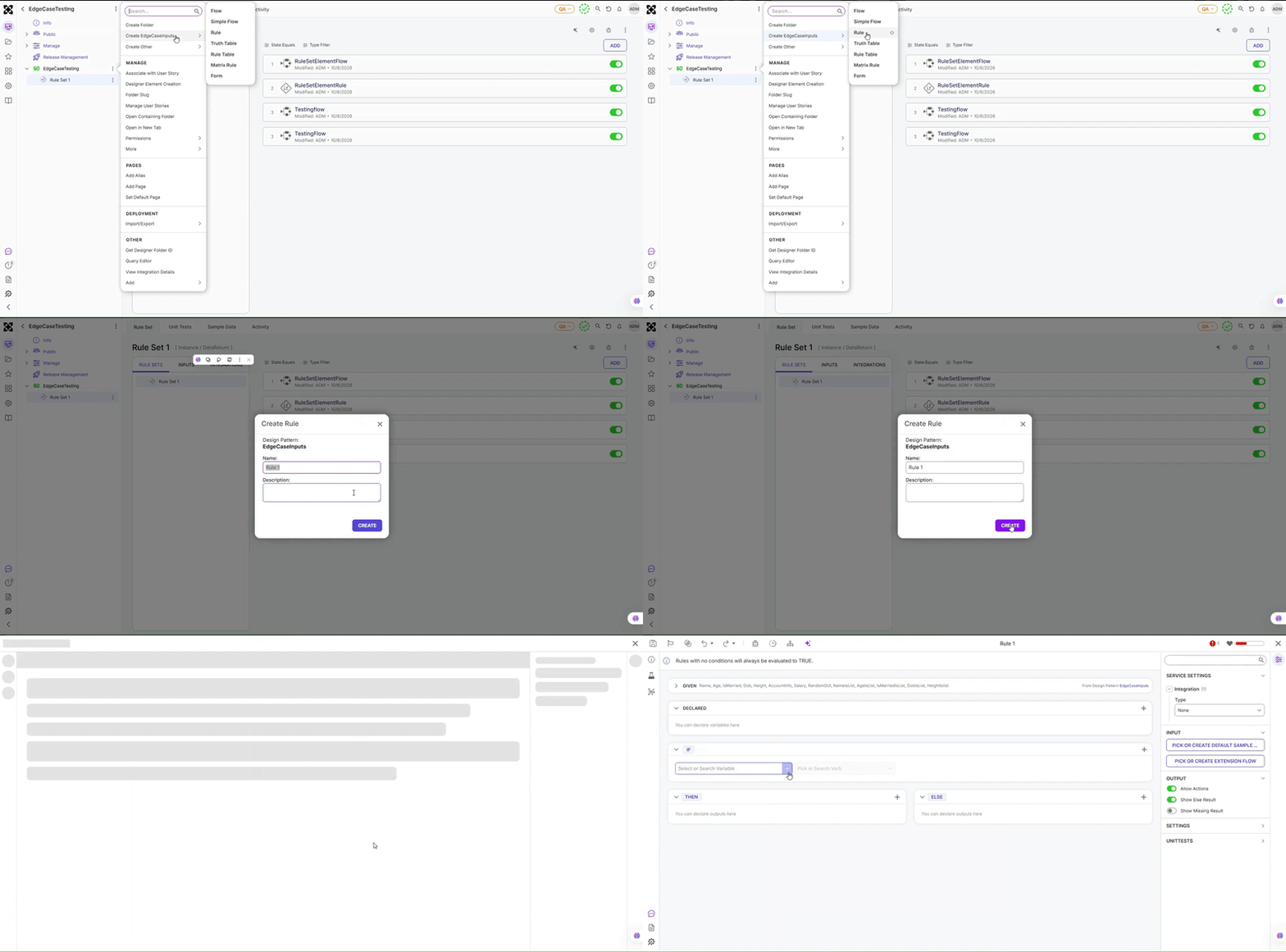 |
| [DT-045266] Header Container as Root Layout for User Controls | User Controls | Added support for selecting a Header Container as the root layout when configuring User Defined Controls. This enables Header Containers to serve as the top-level layout structure within a control. | Forms | 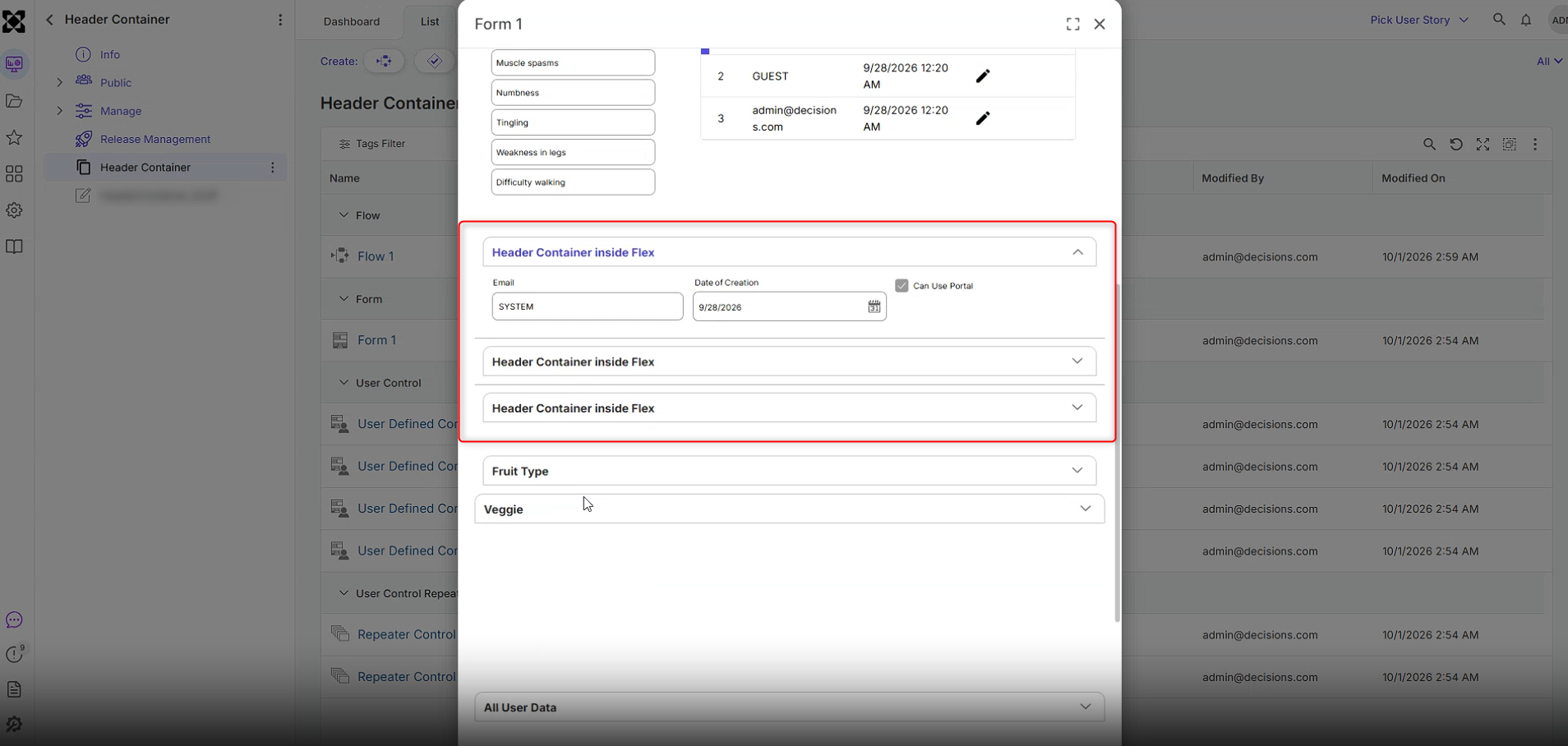 |
| [DT-046917] Make It Possible To Remove unsafe-eval | Securing a Decisions Installation | The Content-Security-Policy (CSP) header no longer includes unsafe-eval in the script-src directive, so the platform no longer depends on it for script execution. Servers without a CSP header are not affected. | Sytem/Portal Administration | |
| [DT-047703] AI.Common: Implement FileSearch built-in tool | Utilizing AI Modules in Decisions | Added file attachment support for Anthropic, OpenAI, and Gemini providers. Files can now be used with Module-specific Prompt AI steps, the AI Common Prompt AI step when one of these providers is selected, and Agents configured to use these LLM providers. | Integrations | 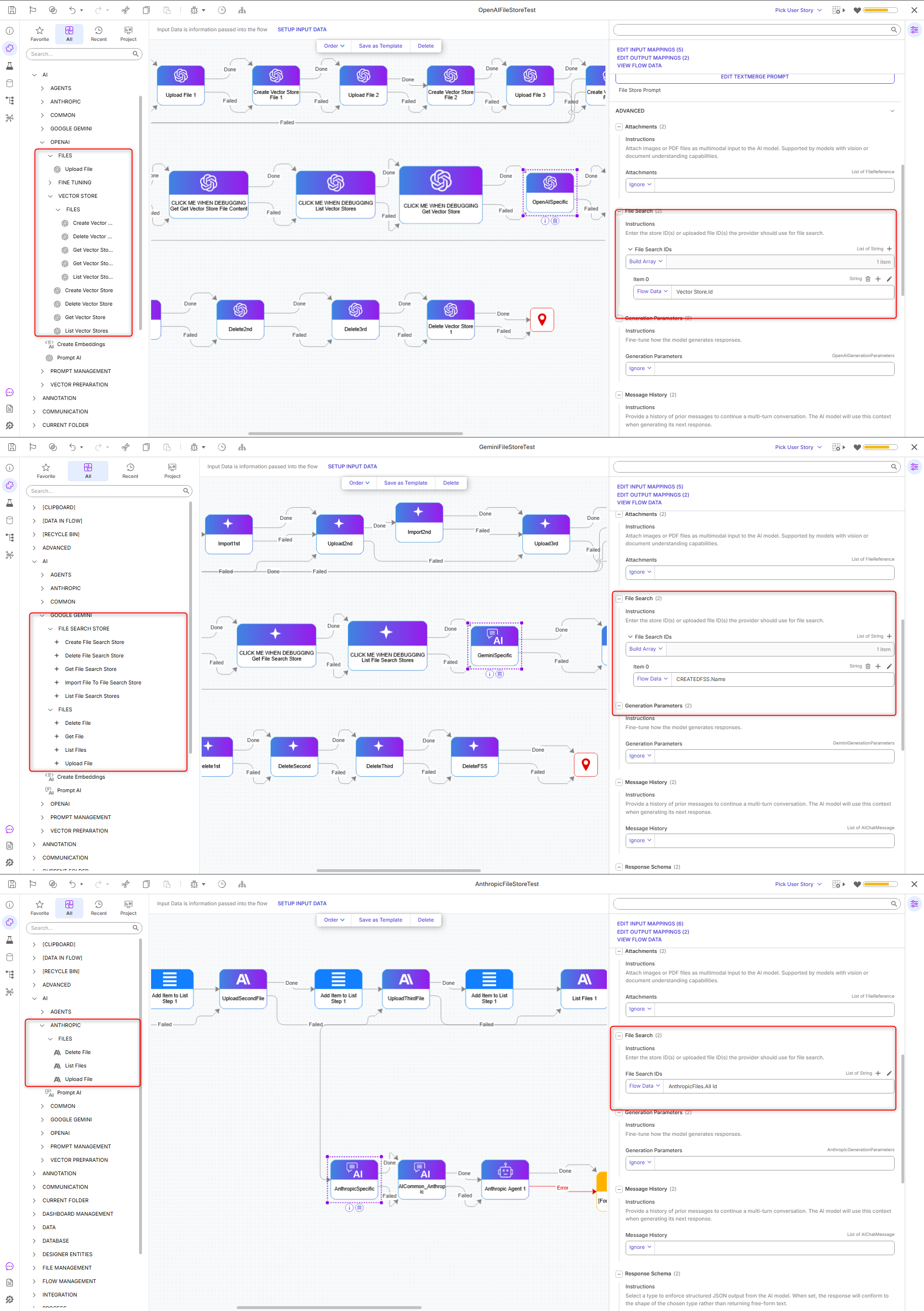 |
| [DT-048326] Need a New Step to Fetch JSON Settings Files Data | Handling Dynamic JSON Structures | Added two new Flow steps in System > Settings:
| Flows | 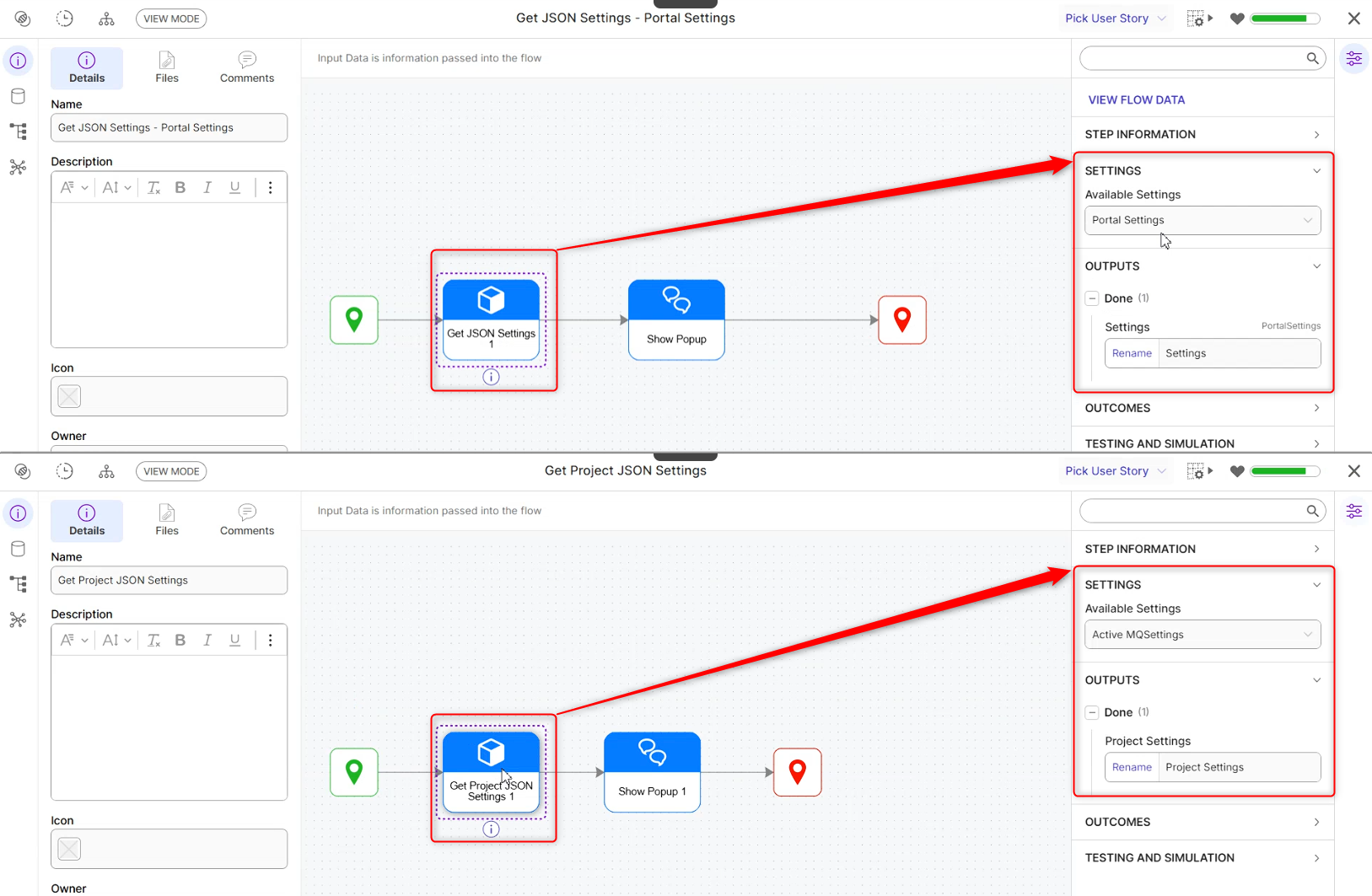 |
| [DT-048419] Support Dropdown Editors for Advanced Data Grid Inline Editing | Advanced Data Grids | Advanced Data Grid inline editing now supports dropdowns for the list/enum column. | Reports | 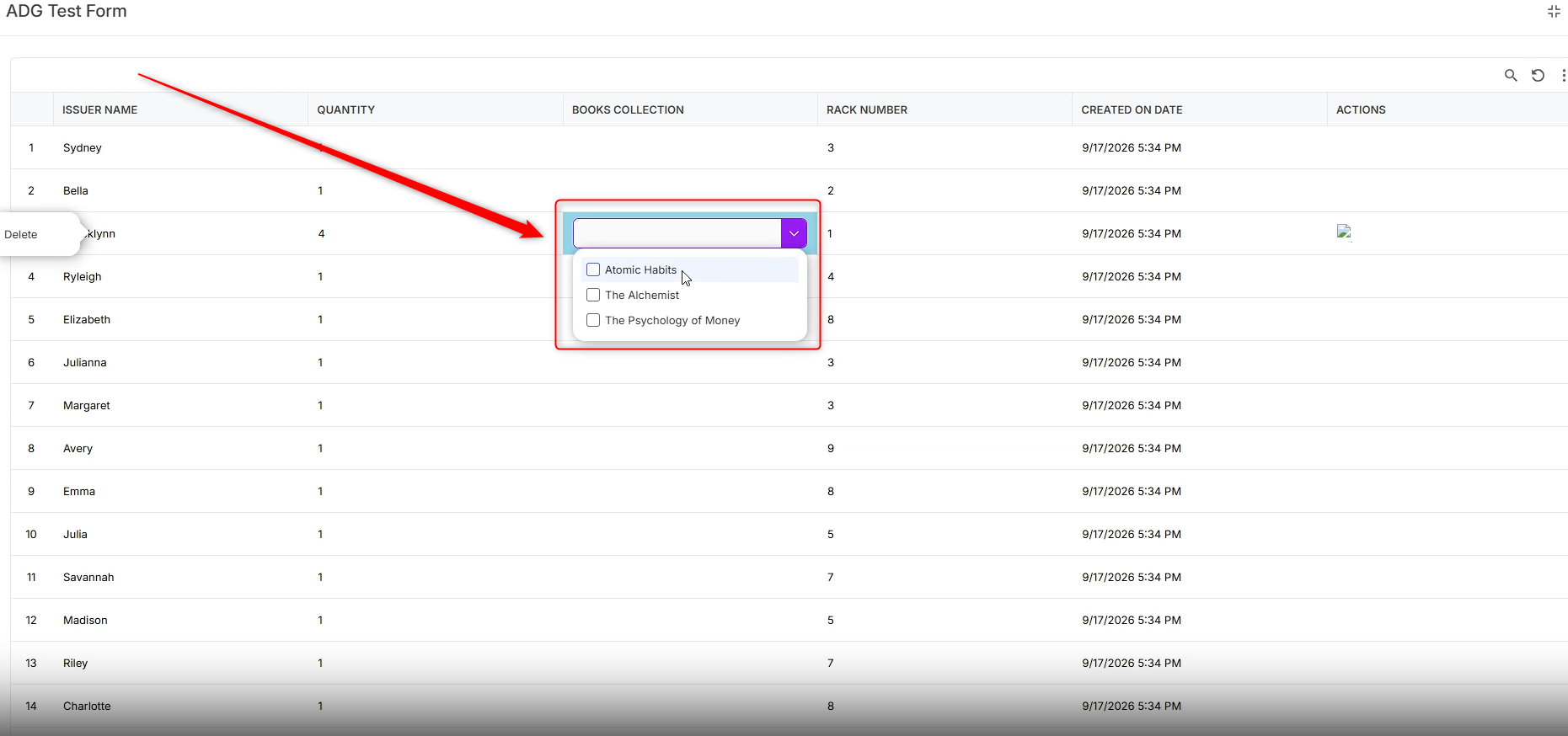 |
| [DT-048421] Report Description Row | Advanced Data Grids | Added support for displaying columns in a collapsible Row Details section beneath each record in both the Data Grid and Advanced Data Grid. Row details can be configured using the Add Row Details option in a column's Description Row properties. Additional settings, including Anchor Under Column, Column Span, and Hide Label, provide control over layout and label visibility. Row details are collapsed by default and include per-record expand/collapse controls, as well as expand-all and collapse-all actions. | Reports | 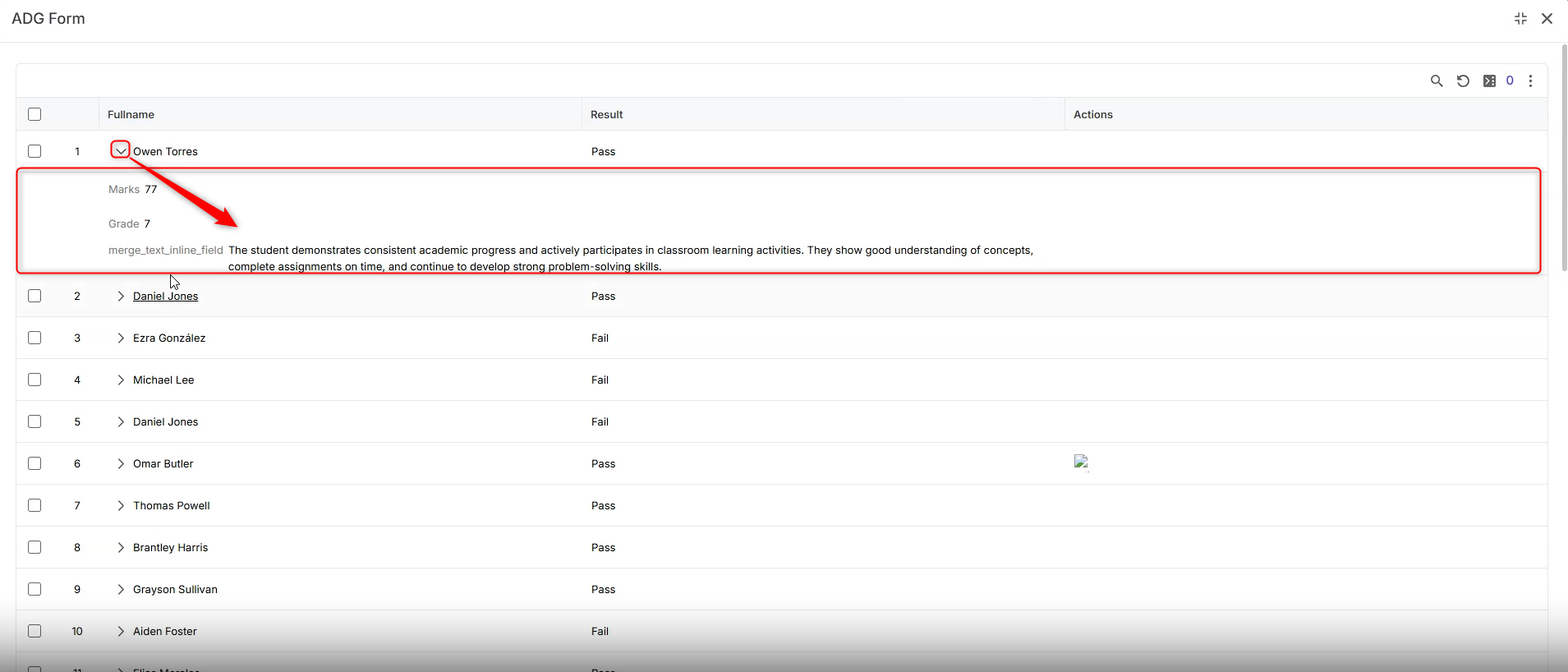 |
| [DT-048805] Unit Test Level Simulation Data | Unit Test Results Page | Added support for simulating individual steps within Flow Unit Tests. Unit tests can now override specific step outcomes and provide custom output data, allowing different execution paths to be tested without running the actual step. Simulations are configured per unit test in the new Step Simulations section and can be enabled or disabled as needed. A single flow can now support multiple saved and re-runnable test scenarios, with visual indicators for simulated steps and unit tests. Unit test simulations take precedence over step-level simulations when both are configured. | Flows | 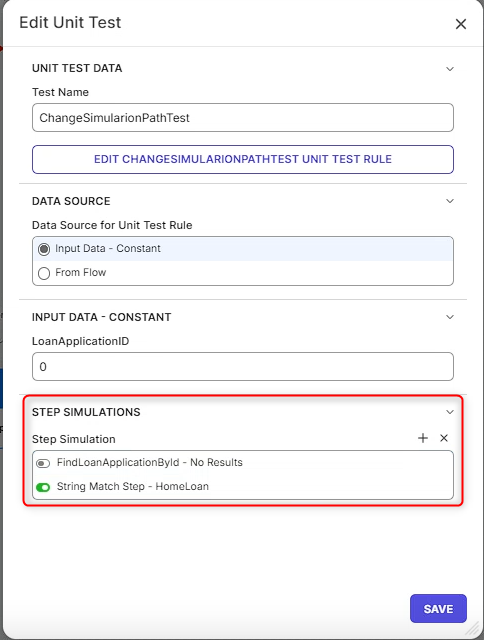 |
| [DT-048823] PDF Viewer | Document Viewer | Added a new Use Browser PDF Viewer property to the Document Viewer control for Pages and Forms. This option allows users to switch from the built-in PDF viewer, which includes tools such as Zoom, Page Navigation, and Print, back to the browser's native PDF viewing experience. | Pages, Forms | 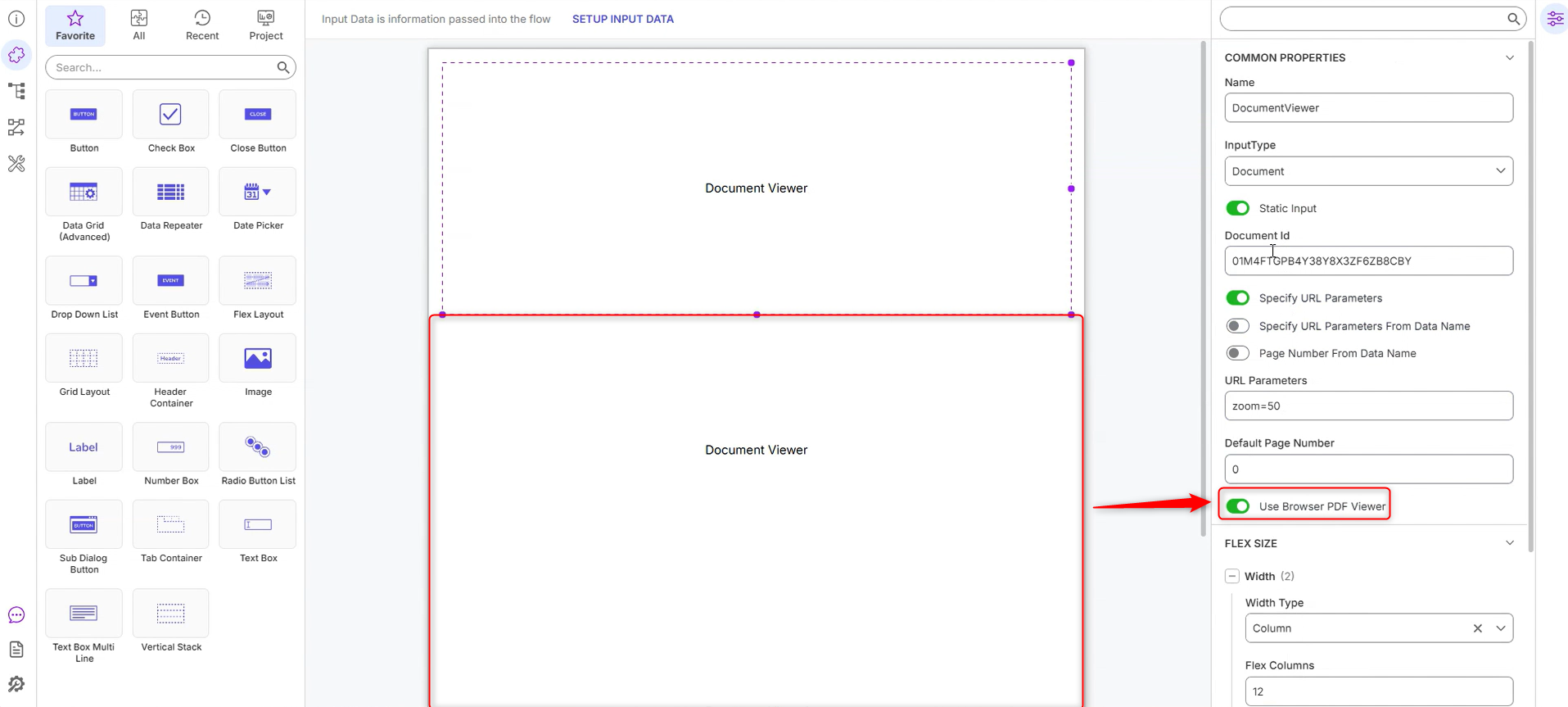 |
| [DT-048863] Add New Steps For Copying Element Registrations | Copy Rule Copy Form Copy Page Copy Designer Element | Added the following new steps for copying element registrations:
| Flows | 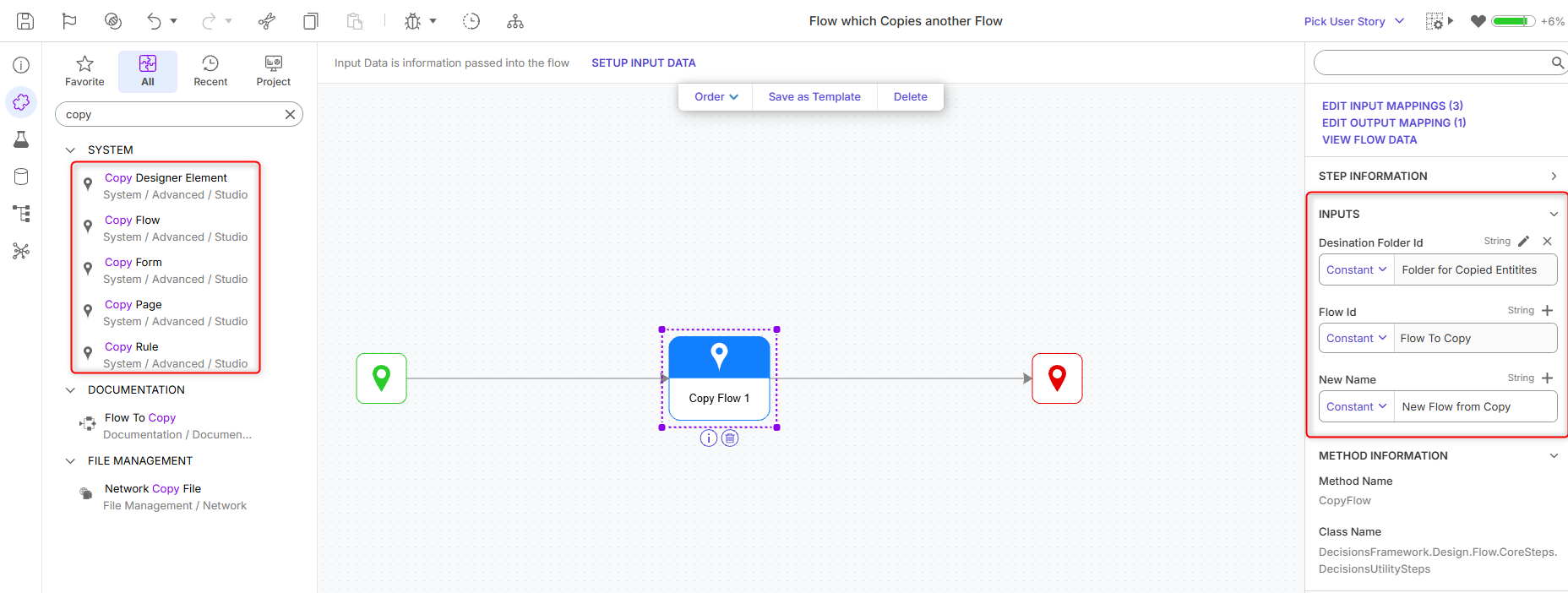 |
| [DT-048880] Expand Drawer Layout Triggers | Drawer Control | Added a new Run Flow on Selection property to the Radio Button List, Dropdown, and List Box controls. When enabled, a Flow can be configured to automatically launch in a Drawer Control whenever a user makes a selection. This allows additional functionality and contextual interactions to be displayed based on the selected value. | Forms | 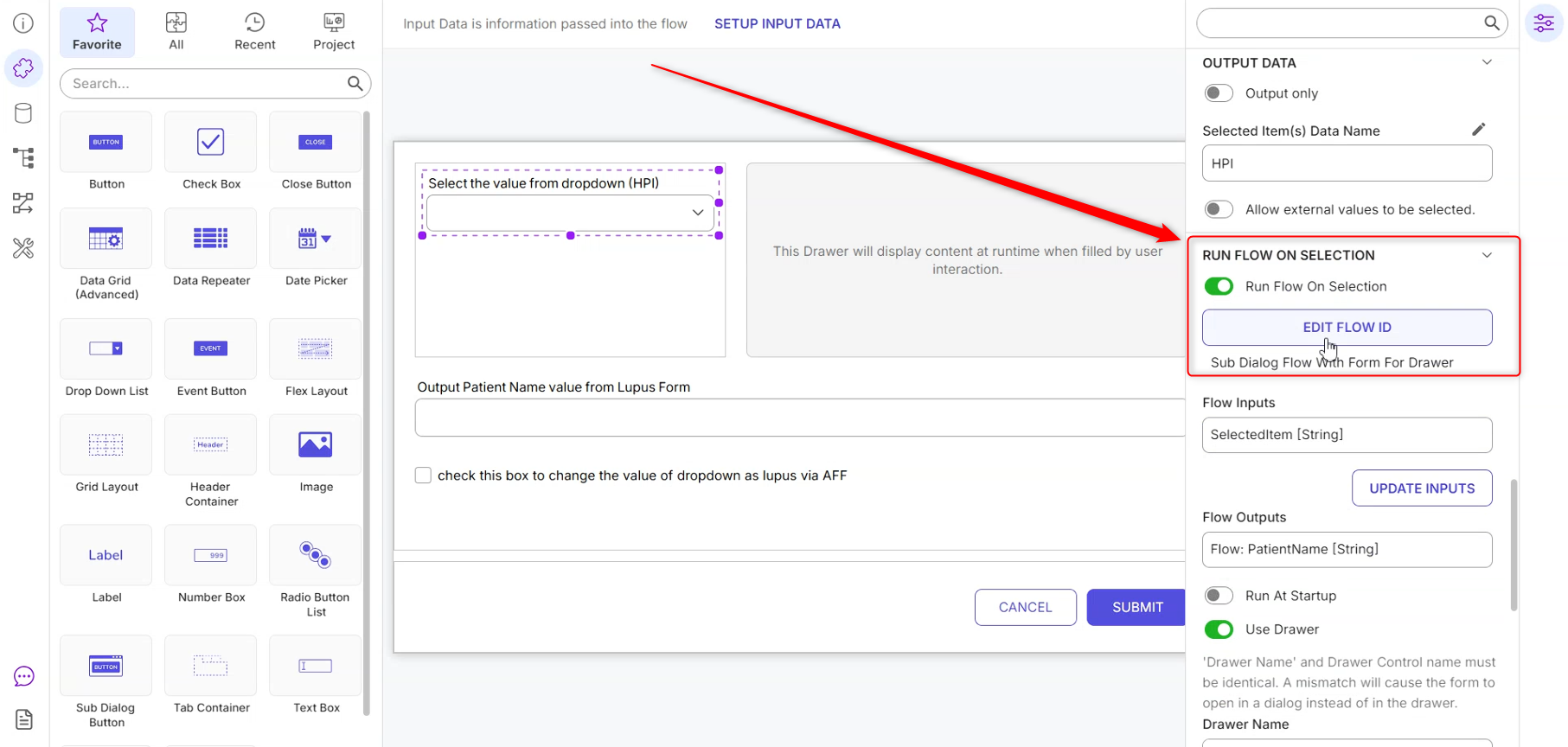 |
| [DT-048881] Allow Custom Layouts in Header Container Titles | Header Container Layout | Added a new Use Custom Title Layout property to the Header Container. When enabled, the header bar becomes a secondary drop zone that supports placing controls and layouts directly within the title area. Interactive controls in the title, such as checkboxes, can be used without triggering expand/collapse behavior, while clicking empty space or a standard label continues to expand or collapse the container. | Forms | 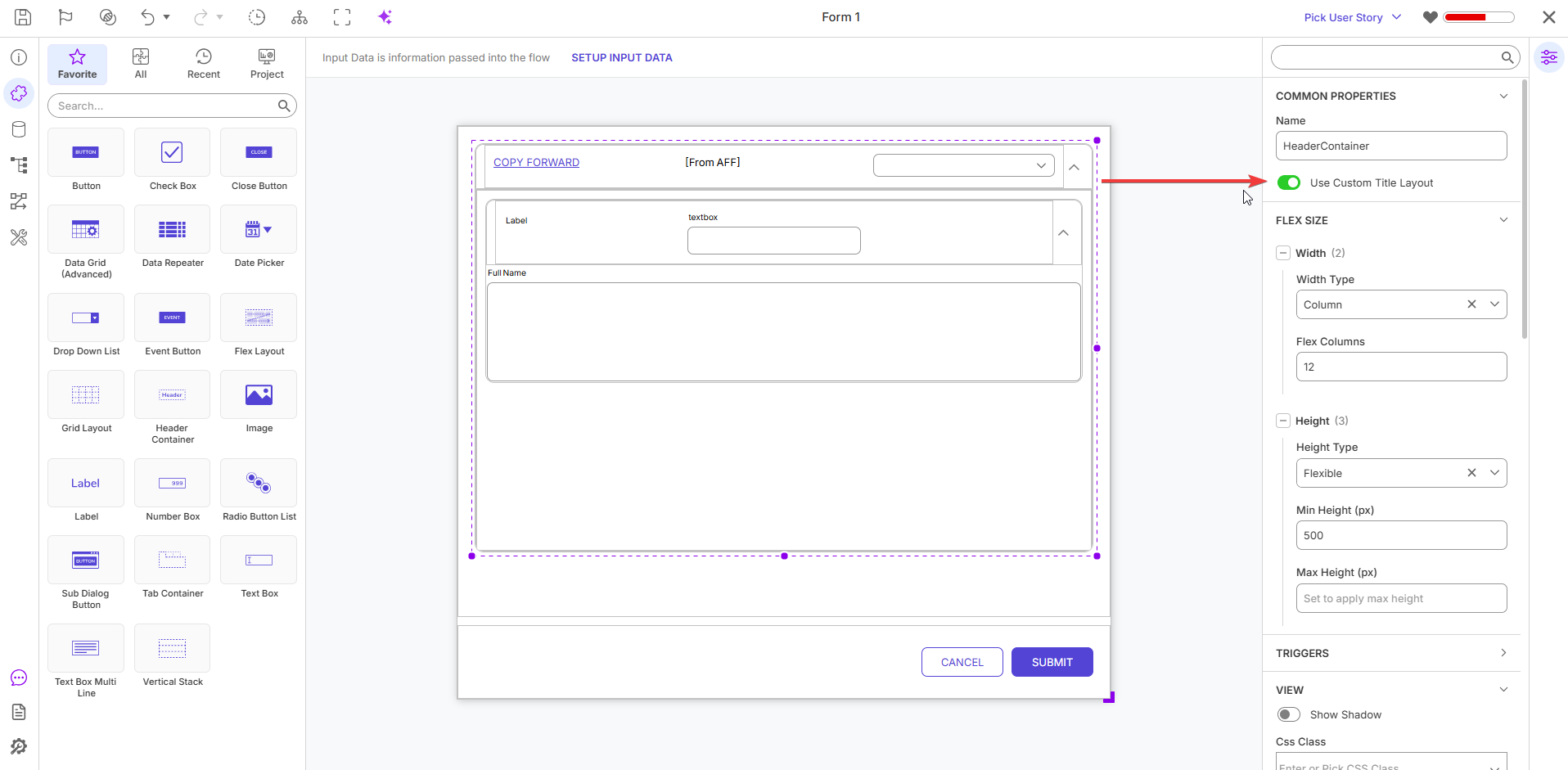 |
| [DT-048970] Data Extension Flows | Configure Flows | Added a new Flow With Data Provider behavior that allows administrators to configure a provider Flow to run before the main Flow. Outputs from the provider Flow are automatically added as inputs to the main Flow. If the provider Flow fails, the main Flow also fails and displays a message identifying the provider Flow. When a Flow is copied, the associated data provider Flow is not duplicated and continues to reference the original provider Flow. | Flows | 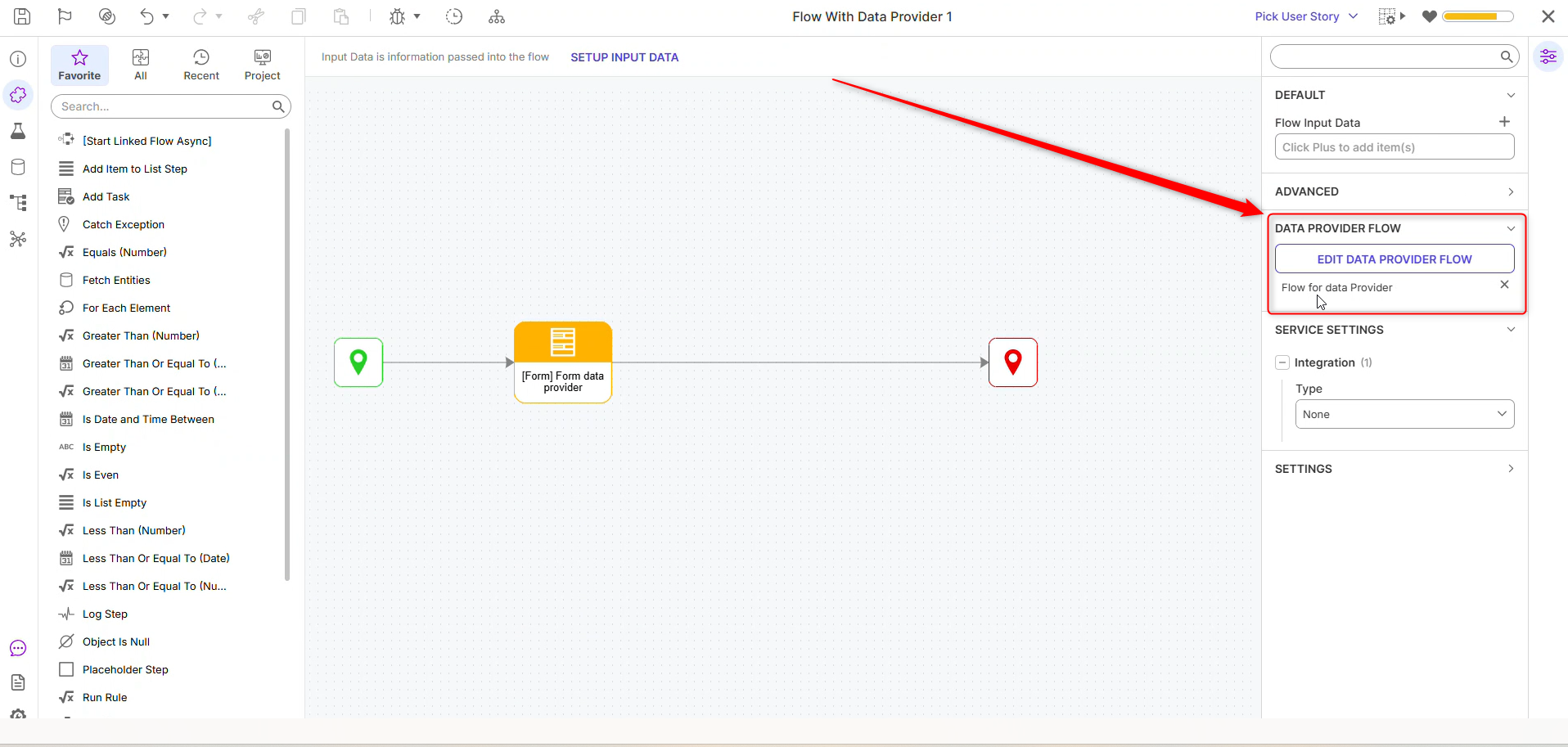 |
Enhancements
| Feature | Link | Description | Product Category | Screenshot |
|---|---|---|---|---|
| [DT-046244] Support Managed Identity Authentication for Azure Service Bus Queue-Level Integration | Azure Services Module | Added Managed Identity Authentication for Azure Service Bus Message Queues. | Modules | 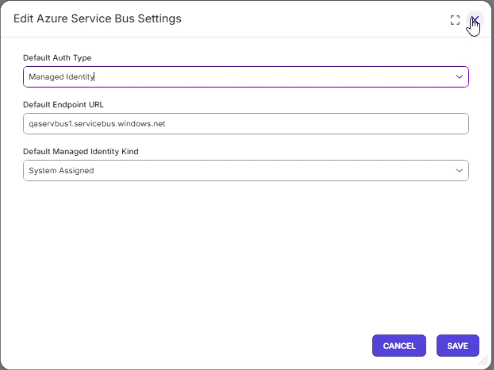 |
| [DT-048327] Deployment Tower - Ability to update the 'Portal Base URL' and the 'Name' of the client in Deployment Server | Environment Types | Added support for renaming environments and updating the Portal Base URL directly from the Environment Configuration page. This enhancement provides a simpler way to maintain environment details following the removal of the Re-register action for environments connected to Deployment Tower. | Deployment Tower | 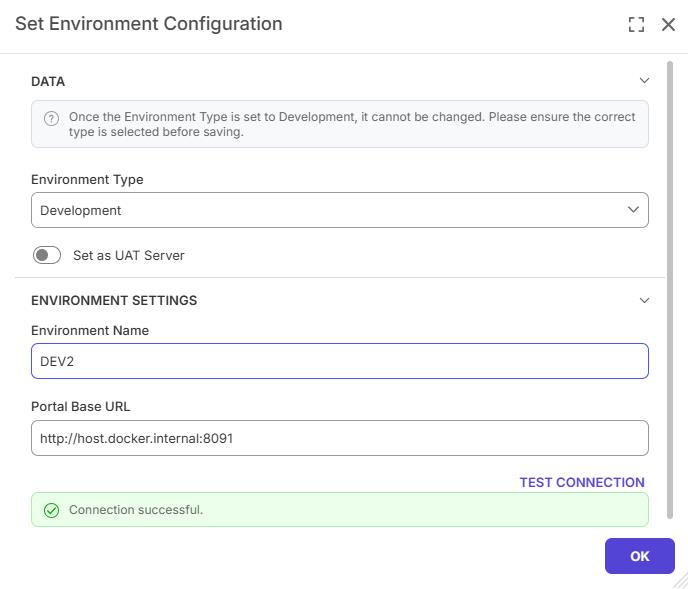 |
| [DT-048632] Watermark from data name on a repeater should have a selector menu | Data Repeaters | A data picker has been added to the Watermark From Data Name property on the Data Repeater control. Previously, users were required to manually type the exact data name including the required "Form Data.X" format. Users can now select the watermark data name directly from a picker menu. | Forms | 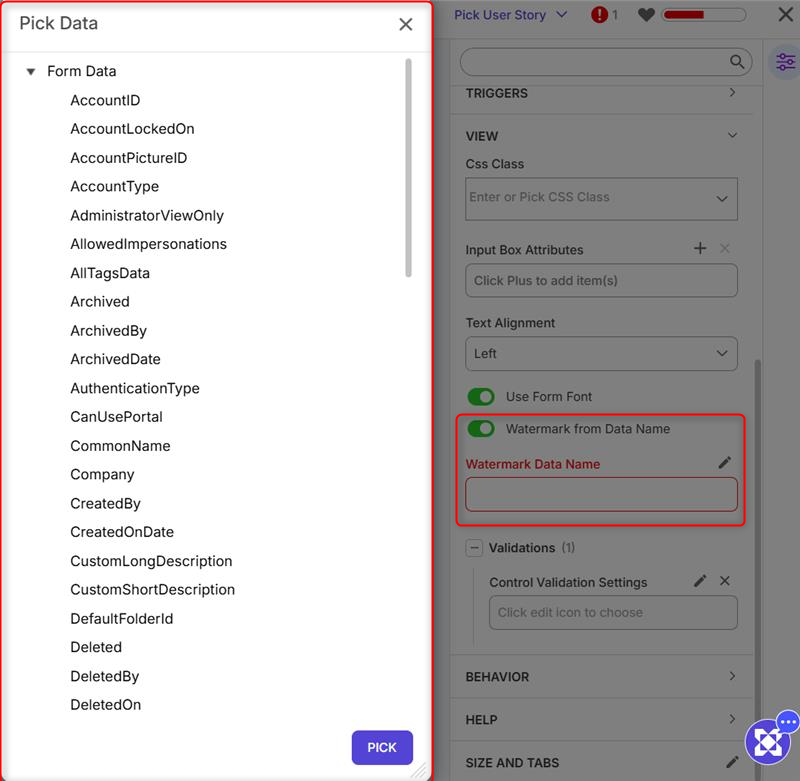 |
| [DT-048641] Improve Default FileStorage Cleanup Configs | File Archiving and Deletion | The Archive File setting in Hard Delete Settings now defaults to True for new configurations. Existing values are preserved during upgrades. | System/Portal Administration | 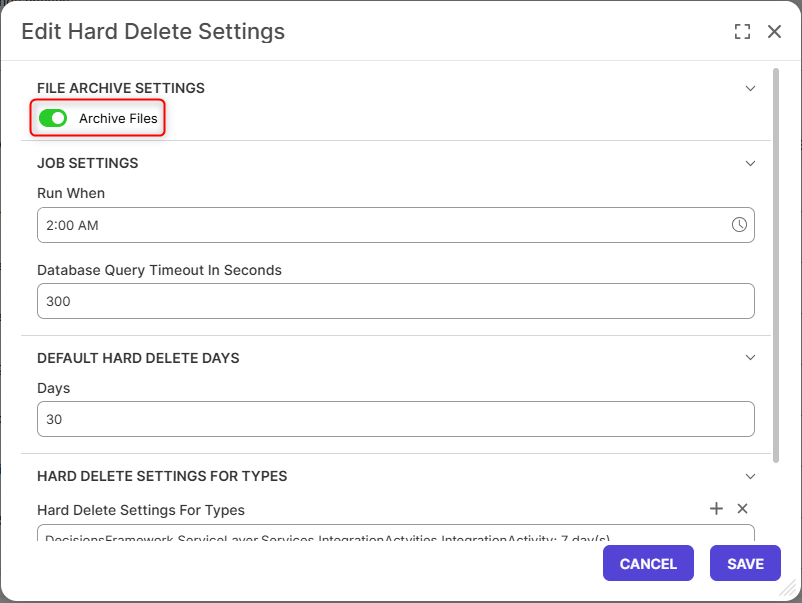 |
| [DT-048817] Chart Data Flows: Add a step that builds chart data from any list | Added a new Create Chart Data step to Chart Data Flow that generates chart data from any list. The step supports three layouts:
| Flows | 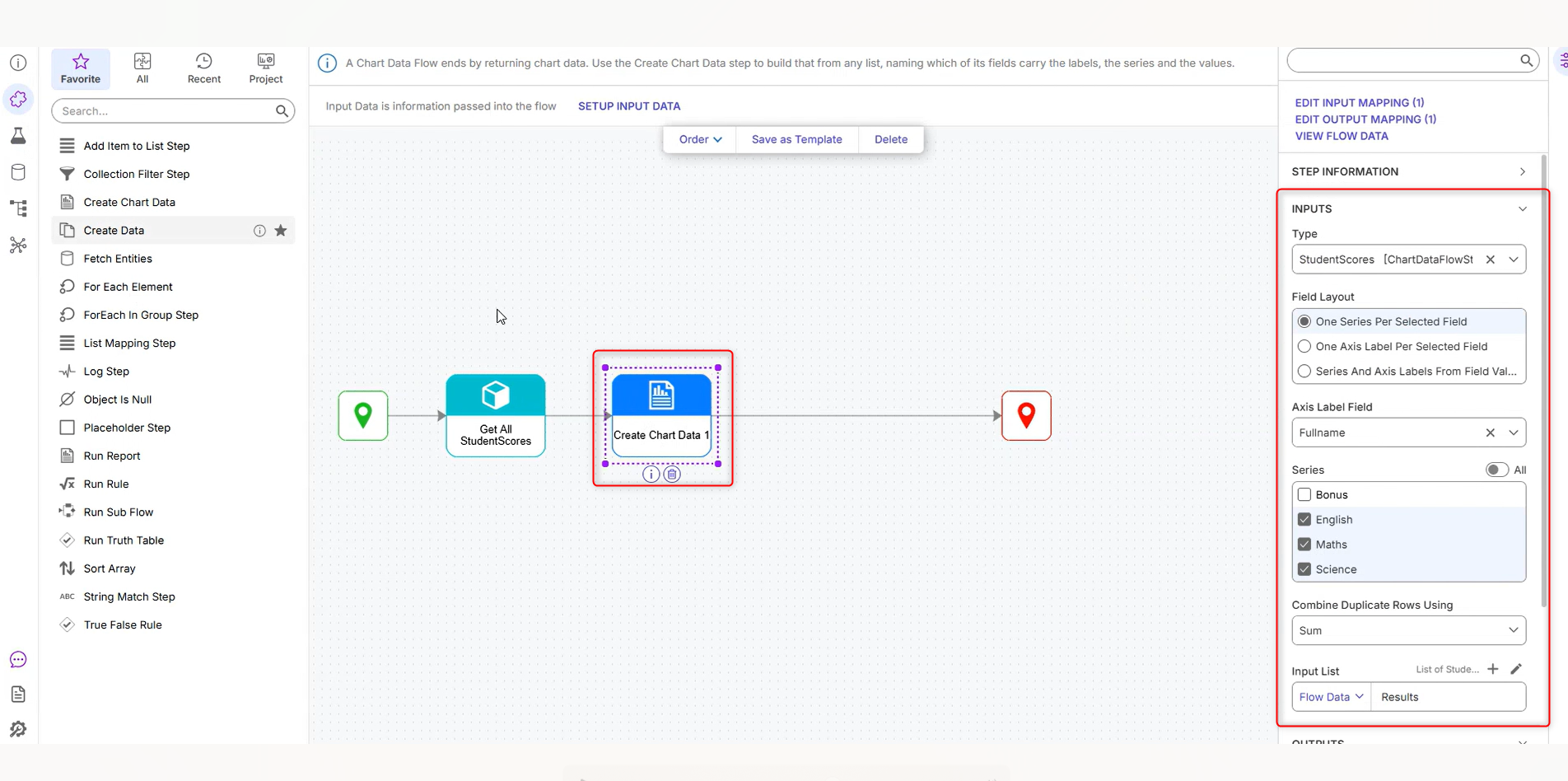 | |
| [DT-048893] Convert CSV to Excel: Format Numbers With Decimals | Convert CSV to Excel | Added a new Format Numbers with Decimals property to the Convert CSV to Excel step. Available as a sub-option of Try to Format Numbers, this setting controls how parsed numeric values are formatted in the generated Excel file. When disabled (default), numbers are stored without decimal formatting. When enabled, numbers are formatted with two decimal places. | Flows |  |
| [DT-048965] LiteLLM: Output Token Count on Prompt AI Step | LiteLLM Module | LiteLLM Prompt AI steps now output the token count (input/output/total). | Flows | 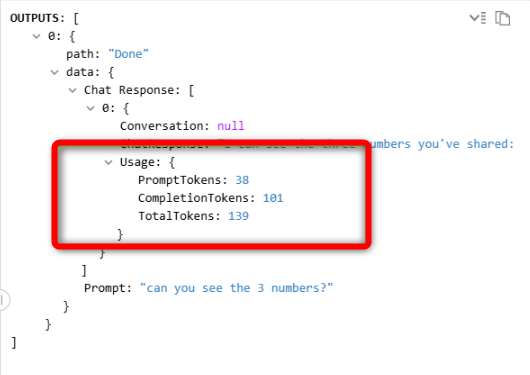 |
Fixes
Infrastructure
| DT Title | Description | Occurs In |
|---|---|---|
| [DT-048811] DECISIONS_CUSTOMHEADERS not applied to static resources | Fixed an issue where custom headers were not being applied to static resources when specified. | 10.x |
| [DT-048867] Offline cluster node keeps stale shared data structure types after restart | Fixed an issue in multi-node clusters where a server that was offline during a project import or deployment on another node would not receive updates for data structures that do not belong to a project. As a result, after restarting, the server could continue using outdated type definitions. The server now correctly synchronizes these changes and remains up to date after rejoining the cluster. | 10.x |
| [DT-048911] Upgrade moment library to 2.31.0 | The Moment Library has been updated. | 10.x |
| [DT-048930] SaveEntities performance optimizations | Fixed an issue where newly created entities of different types could receive colliding identifiers because shared identifier tracking was not being maintained. This fix preserves the performance improvements introduced in the Save Entities step while ensuring unique entity creation. | 10.x |
Modules
| DT Title | Description | Occurs In |
|---|---|---|
| [DT-048054] Setting max iterations greater than what is configured on AI Agent step is not respected | Fixed an issue where AI Agent steps did not honor Max Iteration overrides configured on the Flow step. AI Agent executions now correctly respect the specified iteration limits. | 10.x |
| [DT-048292] SolaceMQ settings are not retained on import | Fixed an issue where SolaceMQ settings were not retained on import. | 10.x |
| [DT-048794] PGP: The Decrypt and verify file and Decrypt File steps output a blank file; the Decrypt and verify file executes when the incorrect keys are supplied | Fixed an issue where the Decrypt and Verify File step in the PGP Module was swallowing errors it hits when running RunGpg, resulting in the step appearing to complete successfully (rather than throwing an exception) and outputting null. | 10.x |
| [DT-048843] SAML Module: Add Authenticated User Check | Fixed an issue where a full SAML authentication request and response cycle was initiated even when the user was already authenticated. Authenticated users now bypass the unnecessary SAML exchange, improving authentication efficiency. | 10.x |
| [DT-048849] Flow Steps - Parquet: An error is thrown when deserializing a Parquet file generated from a Data Structure type by the 'Write Redis List To Parquet File' step | Fixed an issue where deserializing a Parquet file generated from a Data Structure type using the Write Redis List To Parquet File step could result in an error. Parquet files created by the step now deserialize correctly. | 10.x |
| [DT-048967] Generation Parameters are not sent when using LiteLLM as provider | Updated the LiteLLM Prompt AI step to send generation parameters with requests. Added a new Drop Unsupported Parameters setting to LiteLLM Settings, enabled by default. When enabled, any parameters not supported by the selected model are automatically ignored instead of causing the request to fail. | 10.x |
| [DT-049112] Microsoft Teams: Errors creating Tokens in 10x instances | Fixed an issue where users could successfully save Configure Microsoft Services, but the associated token did not appear in the token list. This also caused errors when running Get User Token (Delegated Access). Tokens are now correctly created and displayed, and Get User Token (Delegated Access) executes as expected. | 10.x |
| [DT-048660] AI Modules - Latest AI Provider Models Not Available | Model selector dropdowns now display placeholder text indicating that Users can manually enter model names. |
Forms
| DT Title | Description | Occurs In |
|---|---|---|
| [DT-048343] Data Repeater Extra Row Issue | Tabbing after removing a row from the Data Repeater will now add only one row. | 10.x |
| [DT-048434] Form > Single File Upload Control Does Not Display Uploaded Document in the Completed Form View for Assignments | Fixed an issue with the Single File Upload Control in assigned forms where uploaded documents were not displayed when viewing a completed form after the assignment was finished. This issue did not affect the Multiple File Upload Area. Files uploaded through the Single File Upload Control are now correctly displayed in the completed form view after assignment completion. | 10.x |
| [DT-048631] Null value passed to watermark from data name in a repeater throws error | Fixed an issue with the Data Repeater control where passing a null value to the data type specified in Watermark From Data Name could cause a NullReferenceException and prevent the form from loading. The control now handles null watermark values correctly by displaying an empty watermark instead of throwing an error. | 10.x |
| [DT-048966] Self-Referencing Form/Page Controls Cause Crashes During Project Health Scans | Fixed an issue with the project health scan. | 10.x |
| [DT-047198] MultiFileDownload File List Value Throws Error in AFFs | Fixed an issue where the MultiFileDownload Control and FileDownload Control could throw errors when their data was mapped to another control using AFF. Both controls now support data mapping through AFF and can be successfully mapped to any compatible control without errors. | 10.x |
Flows
| DT Title | Description | Occurs In |
|---|---|---|
| [DT-045520] OSRF exposes an option to add inputs, and it shouldn't | Updated Private Handler Flows to prevent adding inputs on newly created flows. Existing flows and imported projects that already contain inputs will continue to display them; however, once all existing inputs are removed, additional inputs cannot be added back to the Private Handler Flow. | 10.x |
| [DT-046904] Running Any User Action for a Case Entity Creates Two Duplicate Data Being Passed to Flow Start Logs | A fix has been applied to User Actions. Previously, executing a User Action on a Case Entity generated a duplicate warning log entry "duplicate data being passed to flow start: FolderId" twice in the system logs. This flooded logs for customers heavily using Case Entities. Executing a User Action on a Case Entity no longer generates duplicate warning log entries. | 10.x |
| [DT-047324] When typing a description for AI Tool flow input data, text becomes "jumpy and erratic" | Fixed an issue in AI Tool flows where entering descriptions for flow input data could cause the text field to behave erratically while typing. Description editing is now smooth and stable, providing a more consistent authoring experience. | 10.x |
| [DT-047646] View Integration Details - First 'view' of configured flow has long load time on Info tab | Fixed a performance issue where the Integration Details Info tab could take more than 20 seconds to load. The page now loads significantly faster, improving responsiveness when viewing integration details. | 10.x |
| [DT-048659] Debugger Inspection Dialog: Update Search Highlight Color | A new highlight color will be displayed for searched values in the Inspection dialog. | 10.x |
| [DT-048741] Add Item Cache Step does not work with Redis Cache | "[List] Add Items" cache step with Redis was not working, which is now fixed | 10.x |
| [DT-048824] The "Create Tile Data" step in the "Token Help Tile" system-level flow errors with "File Not Found" when trying to edit it | Fixed an issue where editing the Create Tile Data step in the Token Help Tile system-level flow could result in an error. The step can now be opened and edited successfully without encountering errors. | 10.x |
| [DT-048879] Flow Designer: Dropping the first step while right-clicking creates two connections from the Start step | Fixed an issue where the [List] Add Items cache step was not functioning correctly when using Redis. The step now properly adds items to Redis-backed lists as expected. | 10.x |
| [DT-048883] Flow UI UX | Straight Lines | Enhanced the Flow Designer connection layout by changing connector lines to straight-line paths and adding spacing between multiple connections. This prevents overlapping connector lines, making flows easier to read and navigate when multiple steps are connected. | 10.x |
| [DT-048884] Flow UI UX | Next Step Auto Align | Fixed several UI issues related to Flow Designer step connectors to improve flow readability and layout behavior. The first step dropped near the Start step is now automatically positioned with appropriate spacing instead of overlapping. Steps added to True or False branches of diamond-shaped paths no longer overlap existing connections. Connector lines now remain straight when created near the center connection point, reducing unintended curved paths. Additionally, multiple connectors attached vertically to the same anchor point are now spaced correctly to prevent overlapping. | 10.x |
| [DT-048885] Flow UI UX | Step Icon Alignment | Fixed a UI issue where badges on Diamond and Rule Set step shapes were offset from their expected position. Badges now align correctly with the top edge of the shape, providing a cleaner and more consistent appearance in the Flow Designer. | 10.x |
| [DT-048969] Browse Dependencies removed sub flow is still shown as a dependency after saving the Flow | Fixed an issue where removed subflows continued to appear as dependencies after being removed from the main flow and saved. | 10.x |
| [DT-048999] FlowDebugger: Running a machine-generated unit test reports the flow run as Failed even though the flow executes end-to-end | Fixed an issue where debugging machine-generated and manually created unit tests could display an incorrect status in the debugger tree. The debugger now correctly reflects the execution status of both unit test types during debugging. | 10.x |
| [DT-048812] Run Flows for List Expose All Flow Data Should Be Unchecked by Default | Changed the default value of Expose All Flow Data in the Run Flow For List step from enabled to disabled. By default, only list items are now passed to the associated subflow. | 10.x |
Projects
| DT Title | Description | Occurs In |
|---|---|---|
| [DT-046864] Non-Admin Users Unable to Delete Case Entity Documents Despite enabling CanDelete Permission. | Fixed an issue where the Delete option was not displayed for non-admin users on documents, even when the CanDelete permission was enabled. Documents now correctly display the Delete option for any user whose folder permissions include CanDelete. | 10.x |
| [DT-048691] Updated layout of Create Project Dialog | Fixed inconsistent spacing between fields in the New Project dialog. | 10.x |
System / Portal Administration
| DT Title | Description | Occurs In |
|---|---|---|
| [DT-048392] Logging: 'ObjectsImporter' warnings and 'IDFilter' errors are displayed | A technical fix in the Logs has been made. | 10.x |
| [DT-048437] Update icon for OAuth Applications System folder | Updated the system folder icons for OAuth Applications and JWT Access. | 10.x |
| [DT-048677] Dart: First digit of two-digit numbered list items is truncated in chat responses | Fixed an issue where the first digit of double-digit numbered list items (10 and above) was truncated in chat responses. | 10.x |
| [DT-048754] Error after checkout | Fixed an error after checkout. | |
| [DT-048974] Server crashes on startup when a database table check fails | Fixed an issue where a failed database table check during startup could cause a stack overflow, resulting in a server crash. The server now either continues startup or stops with a readable error message. | 10.x |
| [DT-049002] API URL resolution should not depend on Redis in a cluster | Fixed an issue where each node in a cluster was required to reference the Redis shared cache when processing REST API calls if the information was not already present on the node. This behavior slowed API traffic and contributed to Redis timeouts under load. | 10.x |
| [DT-049051] Resource Center: Videos - Deployment Server is incorrectly named | The Resource Center Video tab has been renamed to Deployment Tower. | 10.x |
| [DT-048603] Portal: Various areas still use old fonts instead of Inter | Additional areas of the Product have received font changes. | 10.x |
Rules
| DT Title | Description | Occurs In |
|---|---|---|
| [DT-048925] External Rule Execution History Settings Validation and Logging Issues | Added validations and enhanced logging. The feature no longer falls back to the internal database when the connection to the external database is interrupted. | 10.x |
Reports
| DT Title | Description | Occurs In |
|---|---|---|
| [DT-045315] Reports: PreserveAllSpacesWithWrap does not apply the wrap when downloaded as Excel or PDF | Preserve all spaces with wrap is now respected in downloaded Reports. | 10.x |
| [DT-048931] Report/Rule Designers: Icons are not displayed in the downloaded 'Preview Image' file after saving an entity. | Fixed an issue where icons in downloaded Preview Image files did not match their appearance in the Report and Rule Designers. | 10.x |
| [DT-048997] Report Action Bar: Action bar not rendered on Linux and Container instances | Fixed an issue where the Report Actions Bar could fail to render on Container and Linux deployments. The Report Actions Bar now renders correctly without errors in these environments. | 10.x |
Dashboards
| DT Title | Description | Occurs In |
|---|---|---|
| [DT-048704] Deployment Tower - Organization: The 'Branches' count is incorrectly shown as '2' instead of '1' on the Projects report | Removed the Branches column from Deployment Tower, as it displayed an incorrect branch count and was not relevant to the view. | 10.x |
| [DT-048816] Chart data from a flow plots values against the wrong labels | Improved chart label alignment by addressing several rendering issues. | 10.x |
Integrations
| DT Title | Description | Occurs In |
|---|---|---|
| [DT-047074] Swagger Collection Download document behavior | Added validation and disabled View Integrations link when element slug is empty. Updated swagger collection downloads to display when Input data fields are nullable. | 10.x |
| [DT-048543] When the element slug is updated, then show a warning to the user. | Added a warning to the save dialog when changing an existing Element Slug, informing users that the Service URL will change and the previous address will no longer work. | 10.x |
| [DT-048604] Stored Procedure Integration - Timestamp Input: Border disappears after entering a dateTime value | Fixed an issue where the border around a manually entered date field in a stored procedure disappeared after focus was moved away from the field. | 10.x |
| [DT-048680] Integrations Page: JSON in the 'PARAMETERS' and 'OUTPUT' panels is not syntax-highlighted like the 'TEST' tab output | Added syntax highlighting for JSON and output content on the REST page. | 10.x |
| [DT-048735] Integrations | Database Queries | Query Editor Returns a Syntax Error When WITHIN GROUP (ORDER BY ...) Clause is Used with STRING_AGG() Function | Fixed an issue where queries using STRING_AGG ... WITHIN GROUP (ORDER BY ...) syntax were incorrectly rejected during validation. The built-in SQL syntax checker has been updated to recognize this syntax, allowing supported queries to execute successfully against the database. | 10.x |
Deployment Tower
| DT Title | Description | Occurs In |
|---|---|---|
| [DT-047105] PMIS integration: Newly added connection is not set as active by default when multiple connections exist. | Fixed an issue where a newly added PMIS connection (Jira or Azure DevOps) was not set as the active connection when other connections already existed. New connections now include a "Make this your Active PMIS Connection" option, checked by default. When it's selected, the new connection becomes the active connection and the previously active one is turned off. | 10.x |
| [DT-048153] User Stories: 'Added In Package' status does not update after re-adding a removed User Story to a Deployment Package | Fixed an issue where user stories did not accurately reflect whether they had been added to a deployment package. User stories now correctly display their deployment package status. | 10.x |
| [DT-048169] Release Management - Sprints Folder View: 'Created On' date is different from the date shown on the Sprint Dashboard on the QA environment | Fixed an issue where the Sprint Folder View displayed an invalid Created On date and blank user fields after deployment to QA. The Folder View now correctly aligns with the dashboard data. | 10.x |
| [DT-048415] Deployment Tower: Prevent registering or changing an environment to Development when a Development environment is already registered. | Added validation to prevent users from changing an existing QA or Production environment to a Development environment when a Development environment already exists. This change is only permitted through the Deployment Tower > Environments > Configure action. | 10.x |
| [DT-048465] Projects: 'Release Management' folder is hidden from Designer users for projects upgraded from v9.x to v10.x after Deployment Tower registration. | Fixed an issue where the Release folder was not visible to Designer users after upgrading from version 9.x to the latest version. | 10.x |
| [DT-048466] Add User Stories To Package: Each new build lists a shifting pair of User Stories instead of the specific User Story added. | Fixed an issue where project details were displayed on user stories that were not associated with those projects. User stories now only display details for their associated projects. | 10.x |
| [DT-048679] Deployment: Deployed Rule Set is incorrectly marked as 'Modified', causing a false conflict on the next deployment. | Fixed an issue where Rule Sets were incorrectly marked as Modified after deployment, causing them to appear as conflicts in subsequent deployments. Rule Set state is now updated correctly following deployment. | 10.x |
| [DT-048720] Deployment Tower - Build Resources: 'User Story' column repeats the same Legacy User Story multiple times for a resource after migration | Fixed an issue where user stories were duplicated for each project included in a migration. User stories now appear only once regardless of the number of projects migrated. | 10.x |
| [DT-048737] Ability to Navigate to Release Management Folder or Create User Story from the User Story Drop-down | Added a Release Management link to the Pick User Story drop-down in the portal header when no User Stories are available, allowing users to navigate directly to the Release Management folder to create or import a User Story. | 10.x |
| [DT-048756] Client Environment: Import Sprint with bulk User Stories displays 'Sprint imported successfully' message while User Stories are still being imported in the background. | Updated the Import Sprint confirmation message in Development environments to indicate that the sprint import has started successfully. The dialog now includes a Close button, as User Stories continue importing in the background. | 10.x |
| [DT-048848] Deployment Package Builds: A User Story from another project with no check-in is added to the build and shown as "unknown project" | Fixed an issue where "Unknown Project" was displayed instead of the associated project name. The correct project name is now shown. | 10.x |
| [DT-048886] Admins not in the Designer Group cannot be assigned User Stories | Updated User Story assignment permissions to allow both Administrators and Designers to be assigned to User Stories. Previously, User Stories could only be assigned to Designers. | 10.x |
| [DT-048887] Deployment Tower - Check-In: 'Commit ... was not found in this repository context' error on every check-in after the project's first check-in fails | Fixed an issue where check-ins could fail with a "Commit ... was not found in this repository context" error after a project's initial check-in failure. A new synchronization mechanism now queues sync requests to ensure they are processed without being dropped. | 10.x |
| [DT-048913] Deployment: Sync is triggered on the environment even when a deployment is in progress. | Updated synchronization behavior to allow active sync and deployment operations to complete before starting a new synchronization request. | 10.x |
| [DT-048918] Deployment Tower - Environment Registration: 'Sync' icon is not displayed in the header after registering an environment until the browser is refreshed | Updated environment registration behavior in Deployment Tower so that the Environment Type badge is displayed immediately after registering a client environment, without requiring a browser refresh. | 10.x |
| [DT-048920] Deployment Tower - Builds: 'Items To Deploy' screen intermittently does not appear and deployment starts directly when clicking 'Deploy' on a build. | Fixed an issue where the Items to Deploy screen could intermittently fail to appear. The screen now displays reliably during deployment workflows. | 10.x |
| [DT-048921] Deployment Tower - Environments: Deployed version is updated on the environment tile even when the build deployment fails. | Updated environment tiles to display the last successfully deployed build. Failed and in-progress deployments no longer update the deployed version. | 10.x |
| [DT-048933] Remove the 'Re-register' action from client server once the Client is connected to Deployment Tower | Replaced the Re-register action with the ability to update a client's Portal Base URL and Name directly within Deployment Tower. | 10.x |
| [DT-048936] Release Management - Local Changes: Unit test flow and Unit Test Rule created for a Case Entity Structure activity are listed as 'Moved' on QA after deployment | Fixed an issue where Unit Test rules and flows created within a Case Entity were incorrectly displayed as Moved after deployment. These items now retain their correct status following deployment. | 10.x |
| [DT-048993] Deployment Package: Build does not include the changes of a User Story added to the package right after check-in | Fixed an issue where changes associated with a User Story could be omitted from a deployment package build when the User Story was added immediately after check-in. | 10.x |
| [DT-048821] User Story Sync Is Skipped When Another Project Sync Is Already Running | Improved Deployment Tower synchronization by queuing project sync requests instead of skipping them when another project's sync is already in progress. User-created changes, such as new User Stories, are now synchronized once the active sync completes. Check-ins, deployments, and background synchronizations no longer wait for unrelated project sync operations, and Deployment Tower now reuses connections to improve performance. | 10.x |