Breaking Changes
[DT-046731] v10 Adopt New Platform-Wide Font Family:
In Version 10, Decisions standardized the platform font to Inter. As part of this update, several areas that previously used hardcoded font settings have been updated to inherit the platform's Default Font setting instead.
This change affects Pages, Forms, Reports, Portal styles, Charts, Tiles, Exports, and other related components. Font sizes in these areas have also been aligned with the platform baseline. Additional updates were made to areas such as the Debugger, Property Grid, Help Center, mobile rendering, and Form/control defaults to ensure a more consistent experience across the platform.
Users who relied on previous font-specific styling may notice visual changes after upgrading.
Deployment Tower now enforces version consistency across all connected environments. The platform validates the Major, Minor, Patch, and Build Number of each environment to ensure all connected systems are running the same Decisions version.
If a version mismatch is detected:
- New environments cannot be registered with Deployment Tower.
- Synchronization operations will fail for existing registered environments.
- Check-In, Check-Out, and Deployment operations will be blocked.
- Users should ensure all environments connected to Deployment Tower are upgraded to the same version before performing synchronization or deployment activities.
10.3 New Features (10/12/2026)
| Feature | Link | Description | Product Category | Screenshot |
|---|---|---|---|---|
| [DT-047897] Resource Center | Resource Center |
| System/Portal Administration | 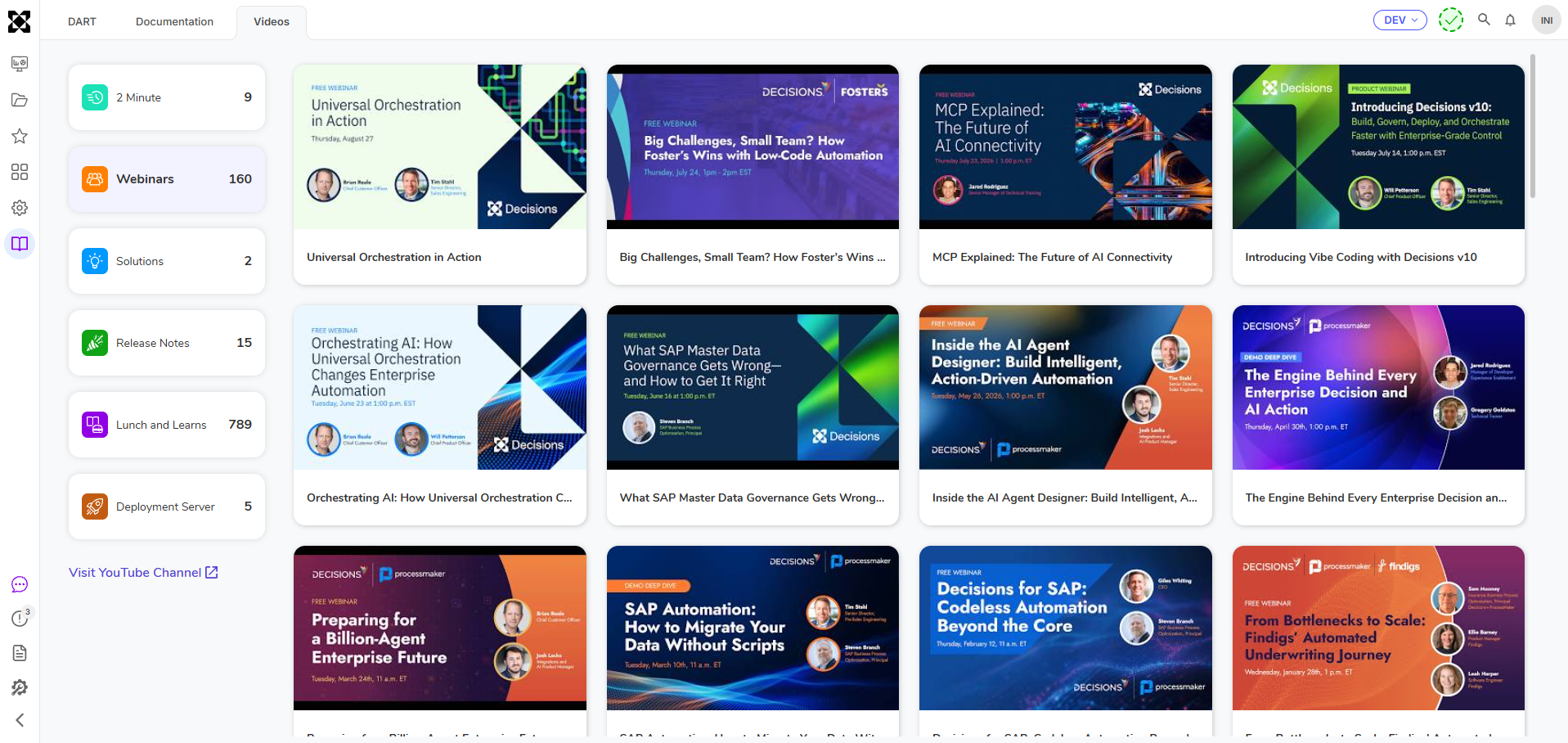 |
| [DT-048807] Studio MCP | Studio MCP |
Deletion operations are not supported. *This is a beta feature and may not function as expected in all scenarios. | Integrations | 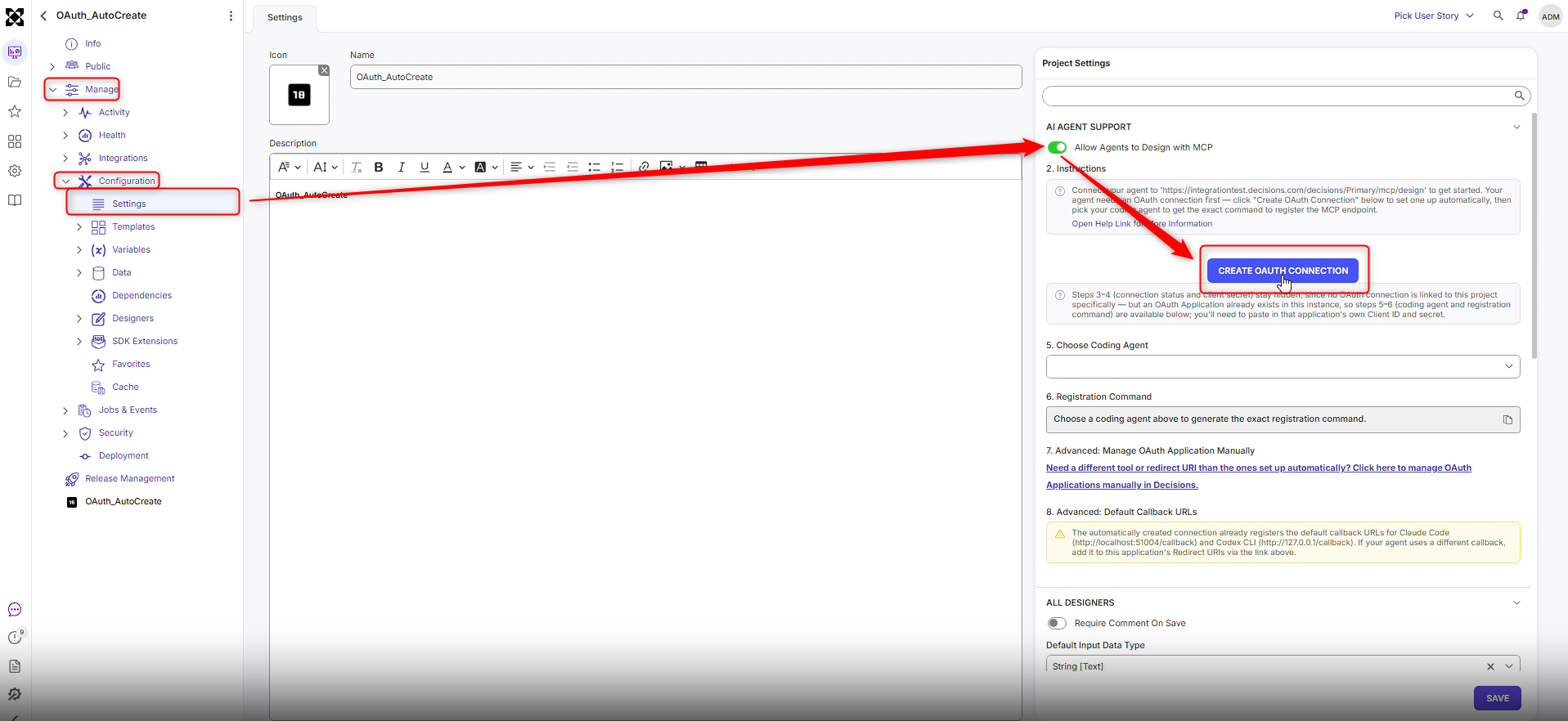 |
| [DT-044467] Set Background Color Excel step isn't working | Set Column Background Color Set Row Background Color | Added 2 new steps in Data > Excel & CSV
| Flows | 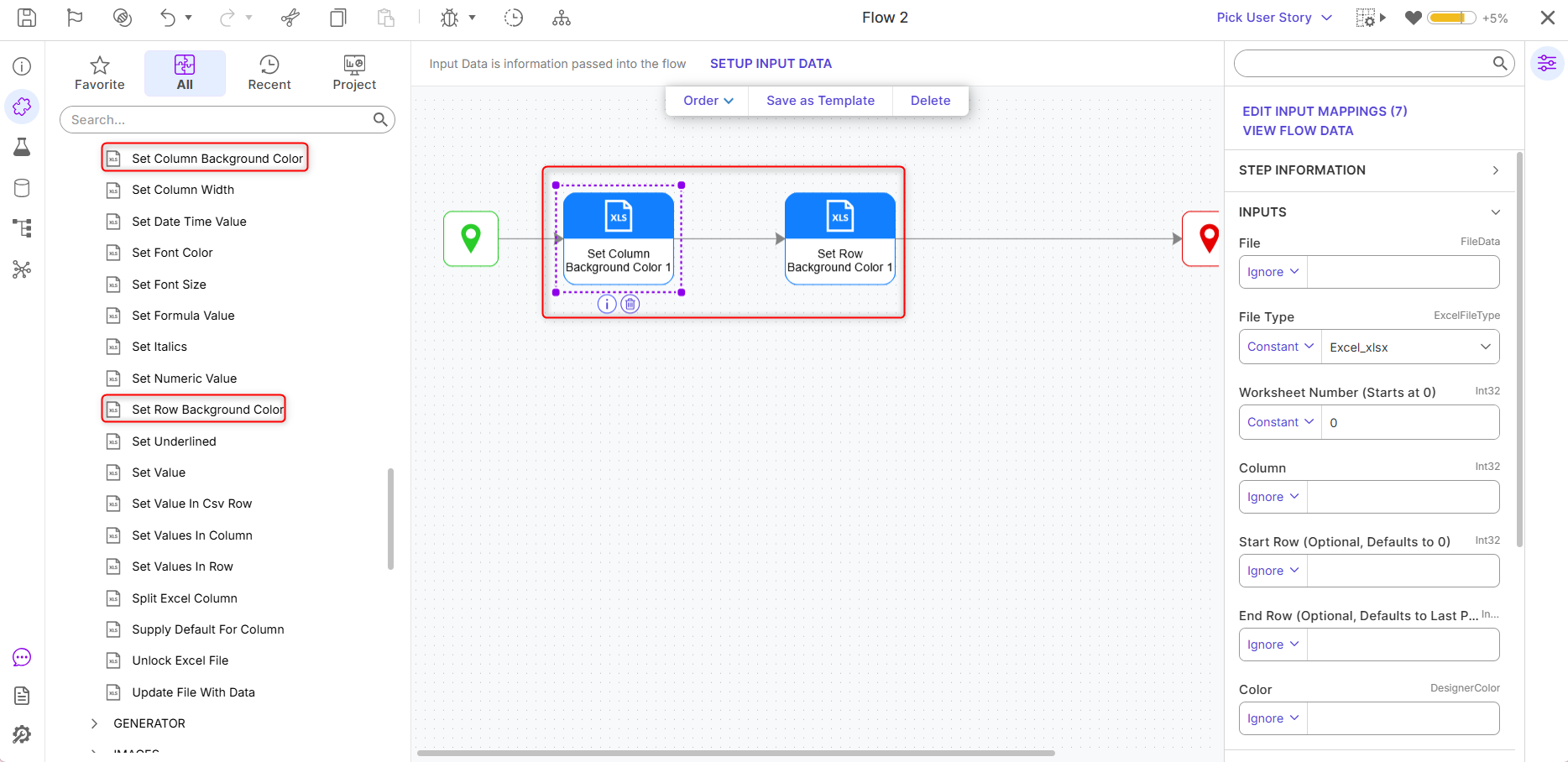 |
| [DT-044948] Generate Rule Set | Modify Rule Set with AI | Users can now use Generative AI to modify Rule Sets. Users can iterate on rules, but the LLM doesn't have context of the rule, so Users will need to tell the LLM what the original structure was and what needs to be changed. | Rules | 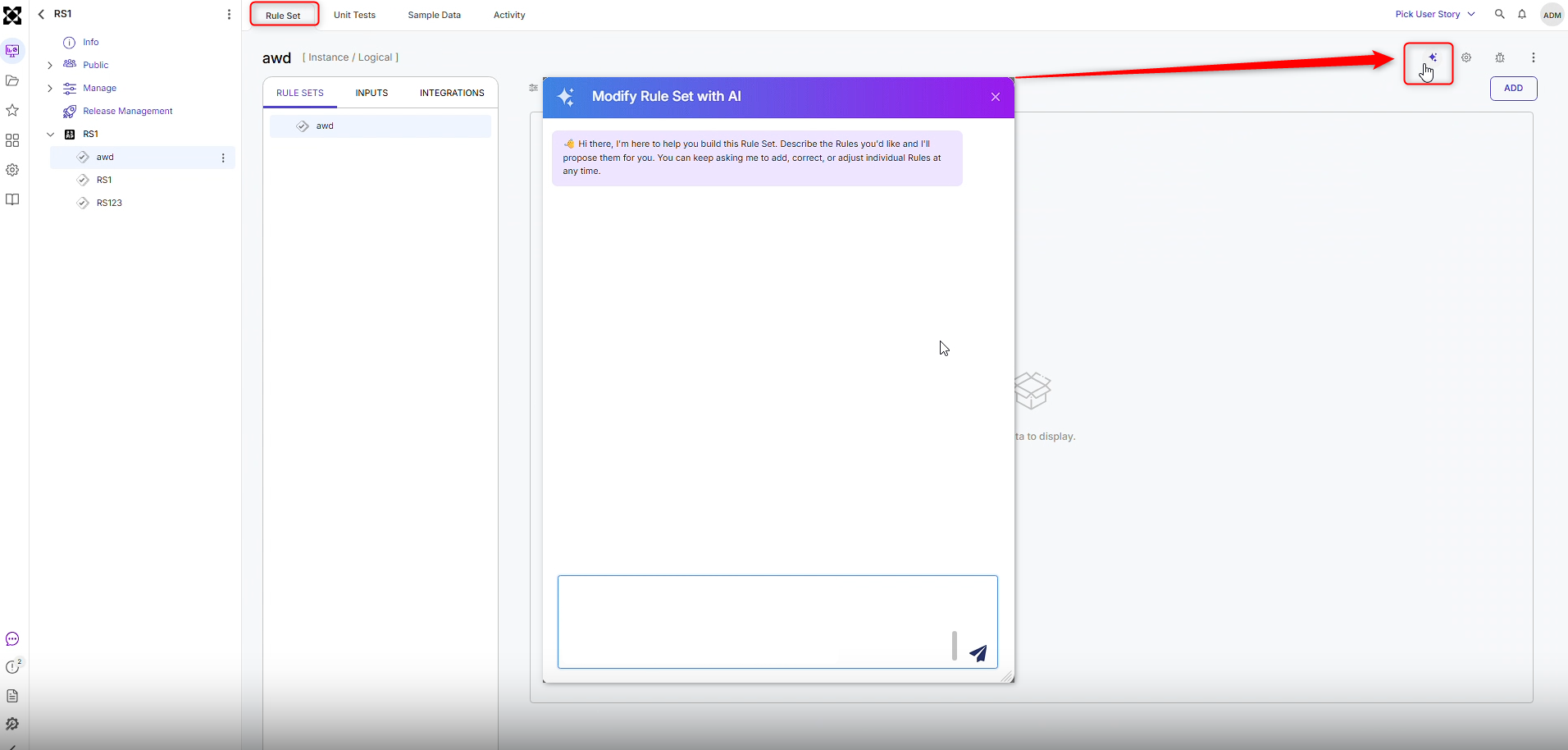 |
| [DT-045268] Dynamic Header Container Title | Header Container Layout | A new property, Title from Data Name, has been added to the Header Container. By default, this property is disabled. When enabled, Users can set a dynamic title by passing the title value from a Flow or an Active Form Flow. | Forms | 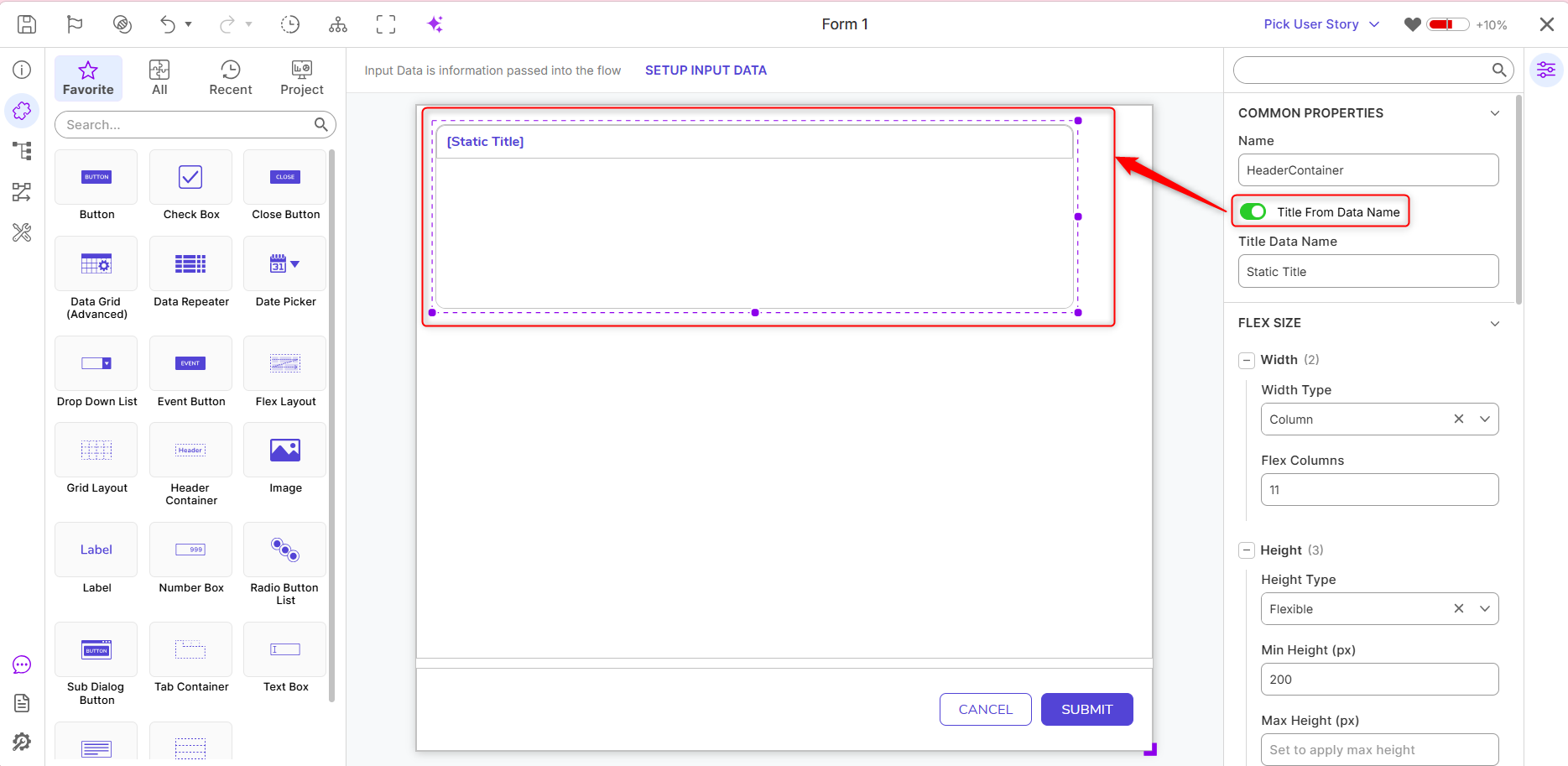 |
| [DT-046276] AI Summary Implementation | User Stories | User Stories can now generate AI-powered summaries based on commit notes, save comments, and entity descriptions. Summaries focus on the purpose of the work, display commit and contributor counts, sync across environments through the Deployment Server, and are marked Outdated when new commits are added. AI configuration is required. | Deployment | 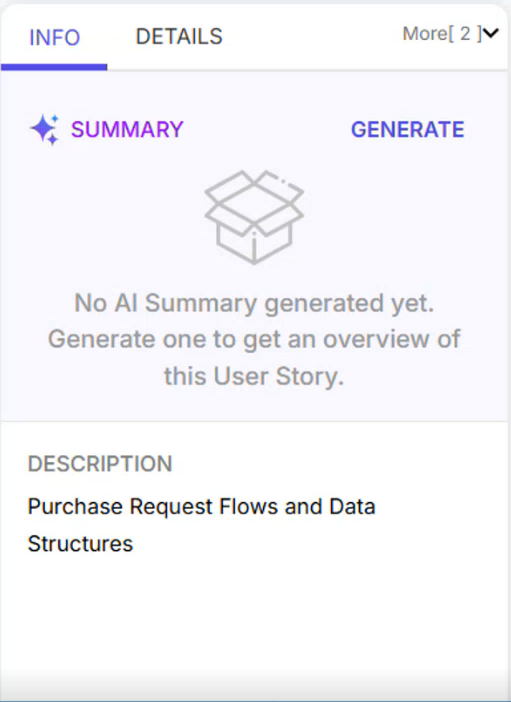 |
| [DT-046527] Add Graphical View to User Story Review Screen | User Stories | Added 'Graphical View' to see the comparison of entity changes associated with the User Stories. | Deployment | 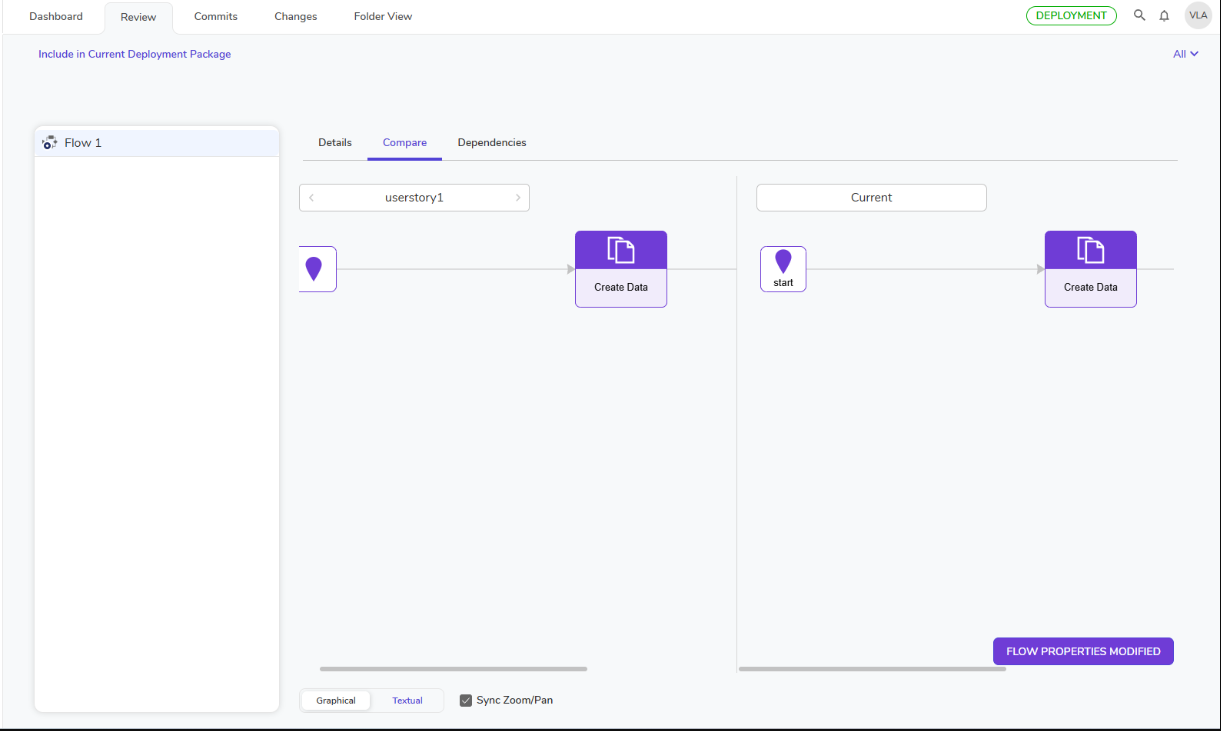 |
| [DT-047379] Allow a rule writer to define the substitute value if NULL | Creating Statement Rules | New functionality has been added to Statement Rules that handle null values:
| Rules | 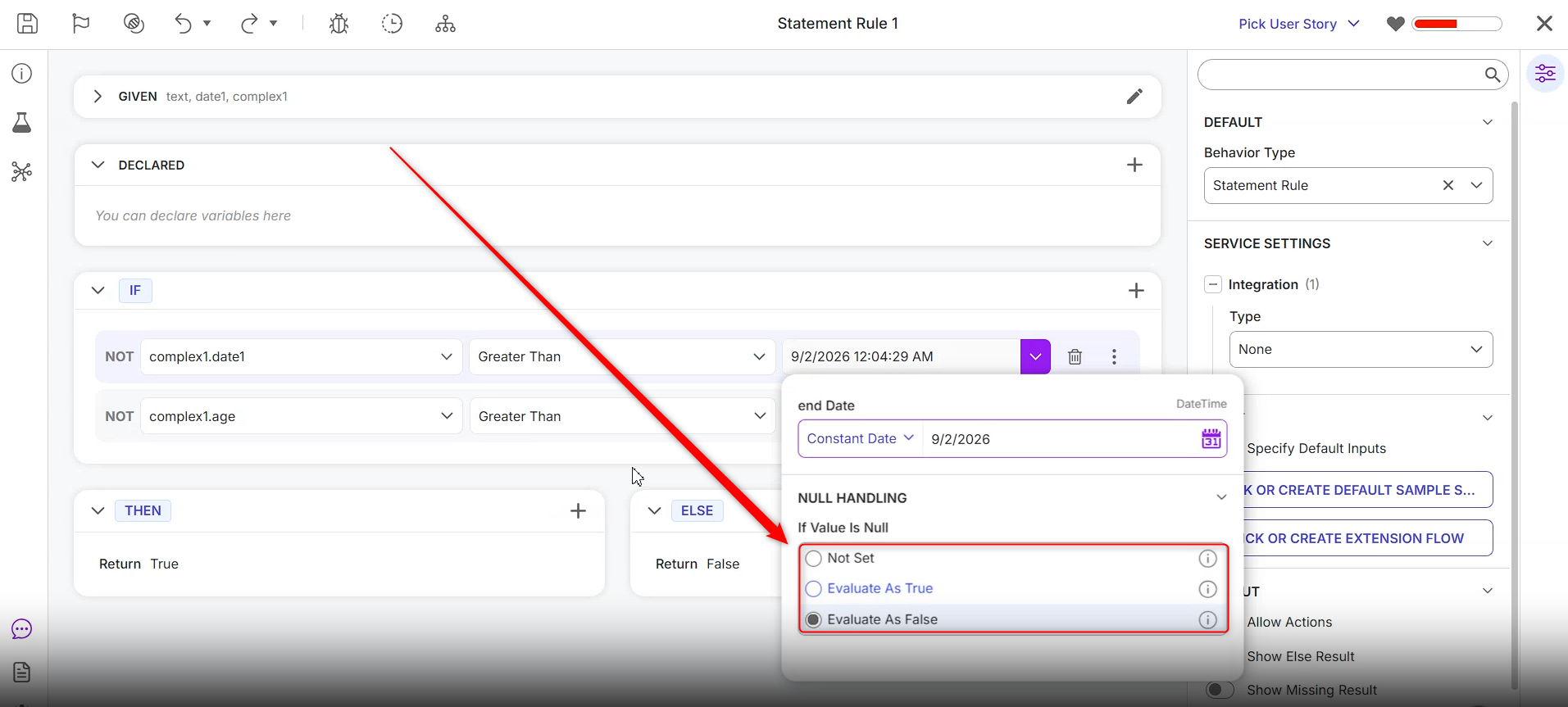 |
| [DT-048370] AI.Common - LiteLLM Support | LiteLLM Module | Added support for the LiteLLM module, allowing Users to connect to a self-hosted LiteLLM proxy and access models from 100+ providers through a single configuration. Chat Completion, Embeddings, and Get Model List steps are available. | Modules | 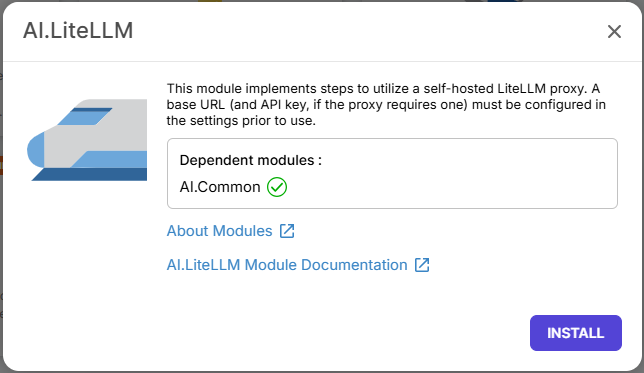 |
| [DT-048423] Row-Level Inline Editing in Advanced Data Grids |
| Reports | 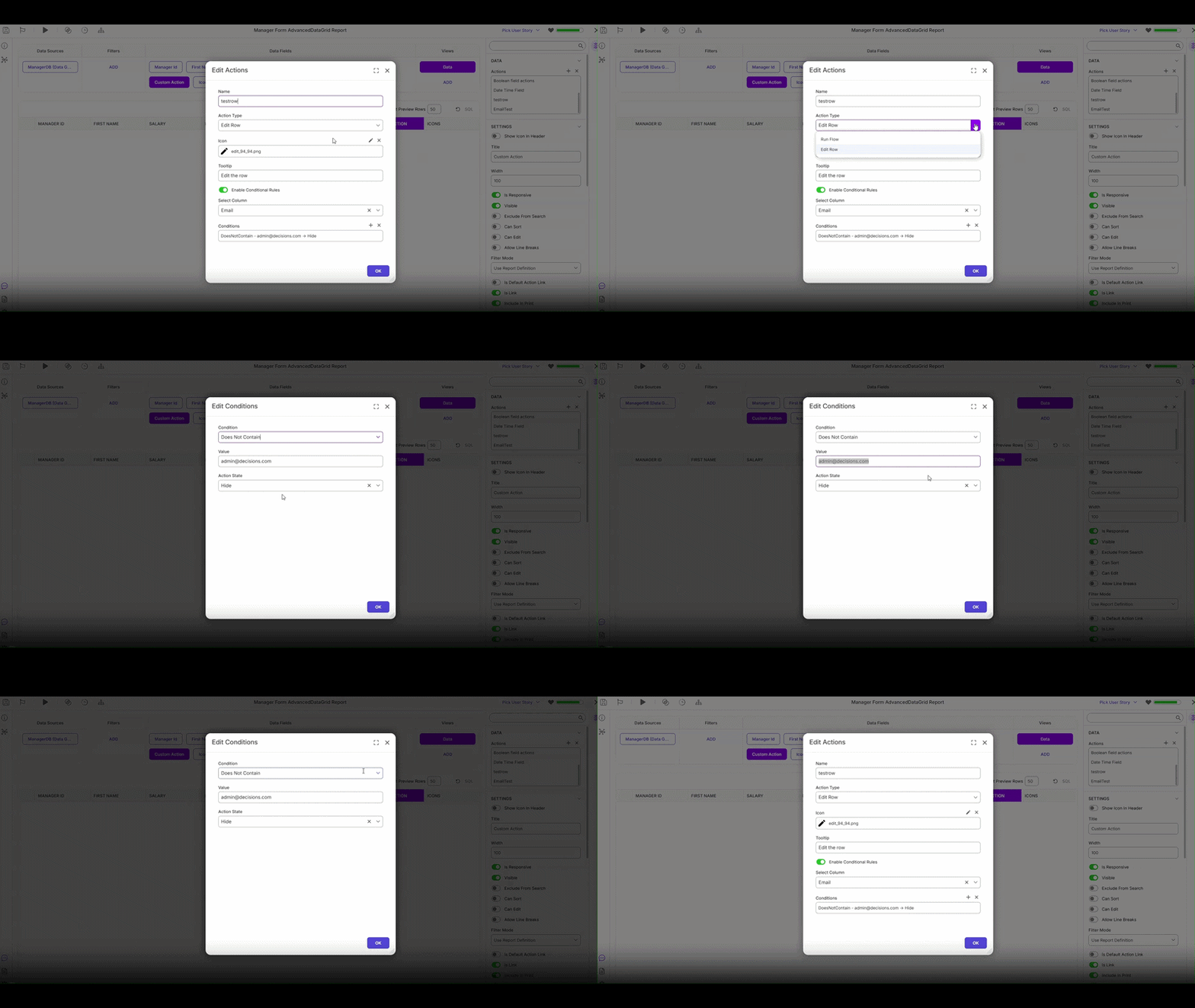 | |
| [DT-048449] Load Parquet To Redis and Cache Steps |
| Flows | 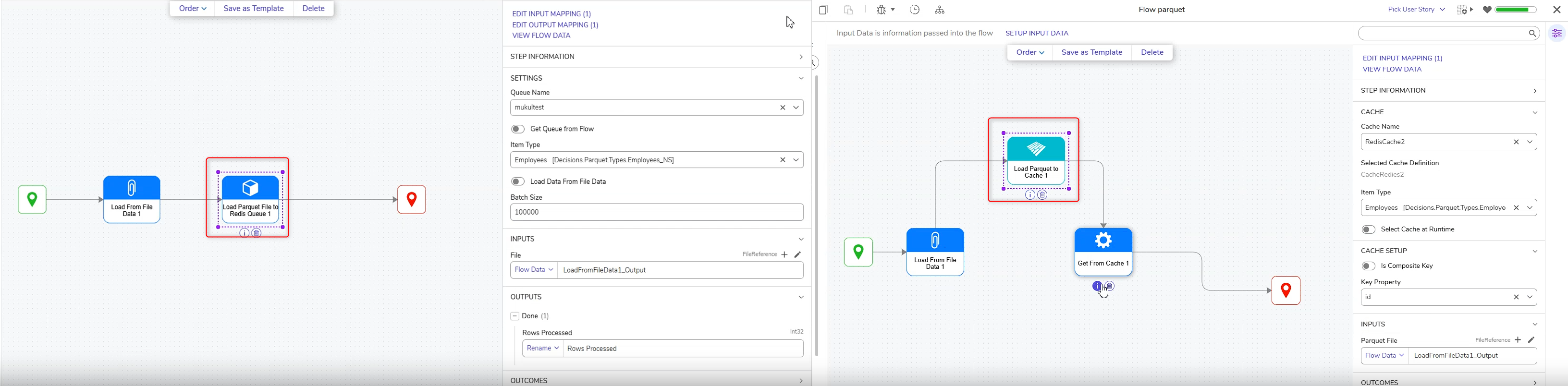 | |
| [DT-048525] Modules > Enhance MongoDB Module to Support Index Management | MongoDB Module Overview | Added three new steps to the MongoDB module under MongoDB > Advanced: Create Index, Drop Index, List Indexes | Flows | 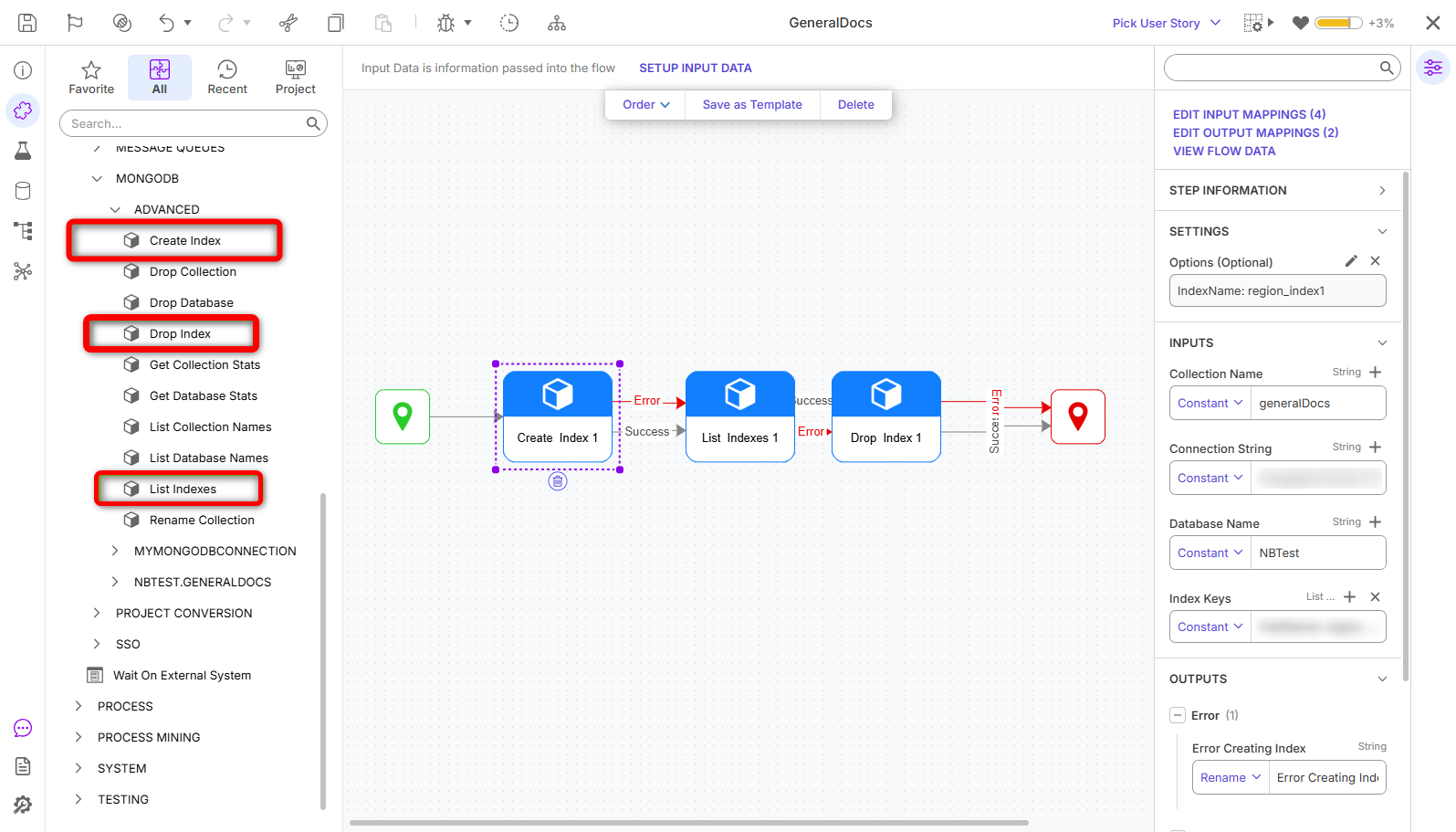 |
| [DT-048664] Redis Queue To Parquet File Step |
| Flows | 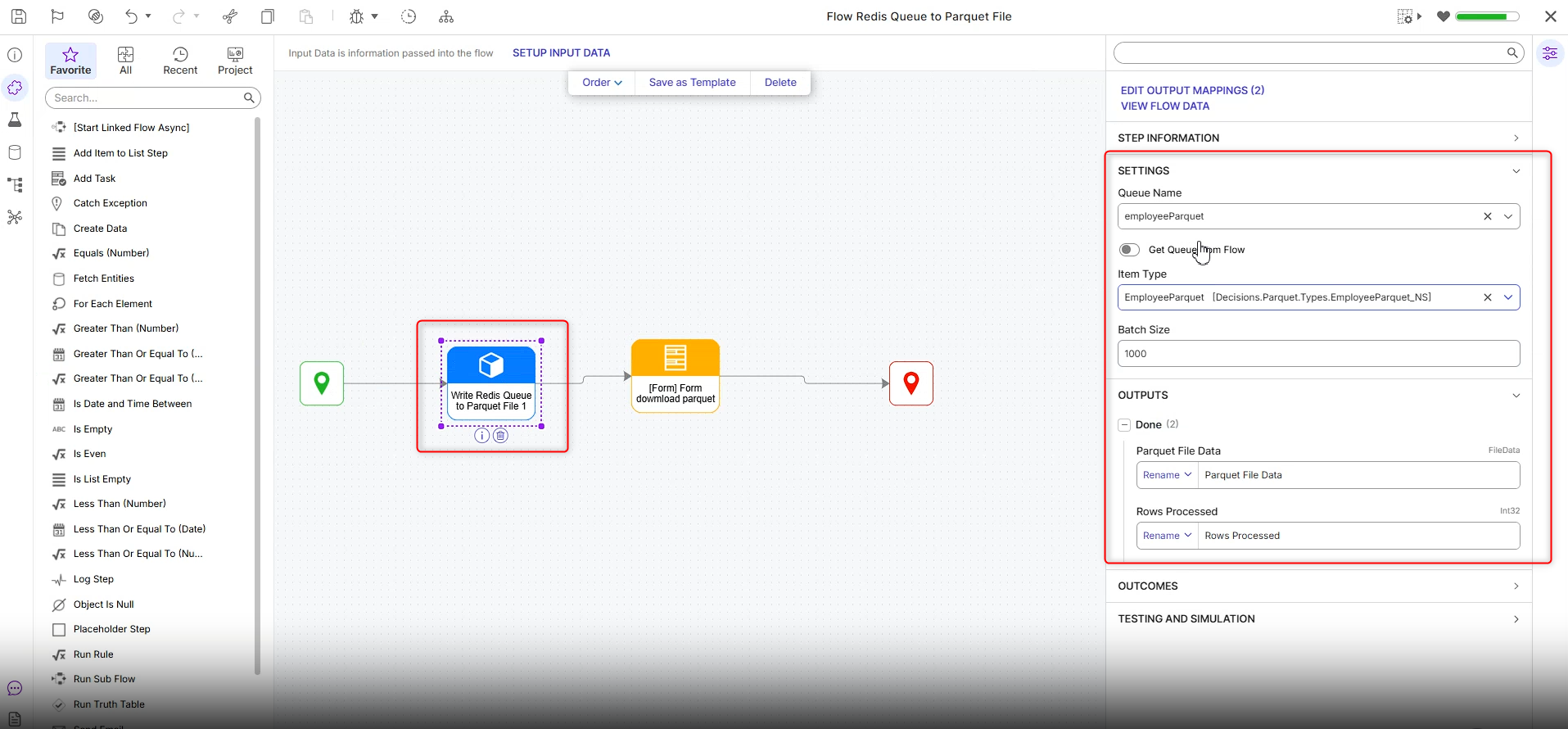 | |
| [DT-048733] Add step to sanitize HTML | Sanitize Html | Added the Sanitize HTML step, which removes HTML tags from the provided HTML input and returns plain text. | Flows | 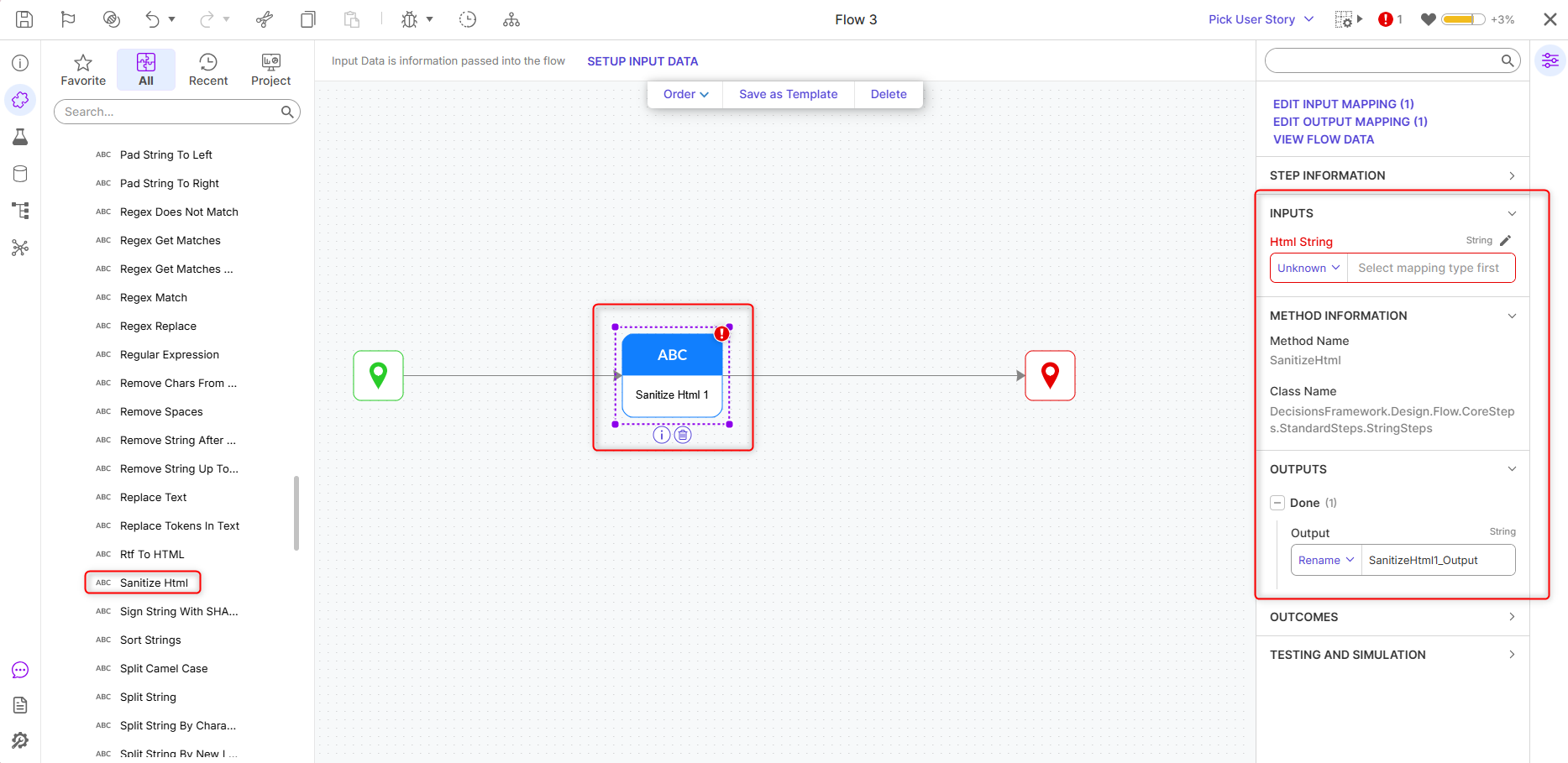 |
Enhancements
| Feature | Link | Description | Product Category | Screenshot |
|---|---|---|---|---|
| [DT-043927] Raw SQL Step Output XLSX Excel Type | Raw SQL Step - Renamed the current Excel Option as XLS and added a new option called XLSX. | Flows | 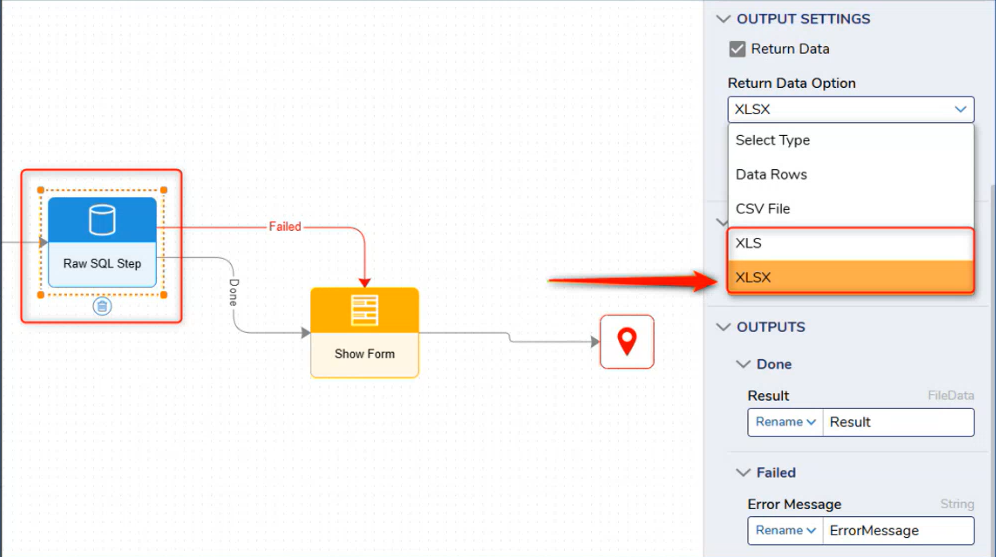 | |
| [DT-043995] Query Editor - Column Auto-Suggestions Showing Incorrect Table Columns | In the earlier version, the column auto-suggestions did not display the correct columns based on the entered keyword. Instead, users could see columns belonging to a different table. After the fix, the autocomplete suggestions are now limited to columns from the table(s) referenced in the query. As users type a keyword, the suggestions are filtered accordingly and display only the relevant columns that match the entered text. | 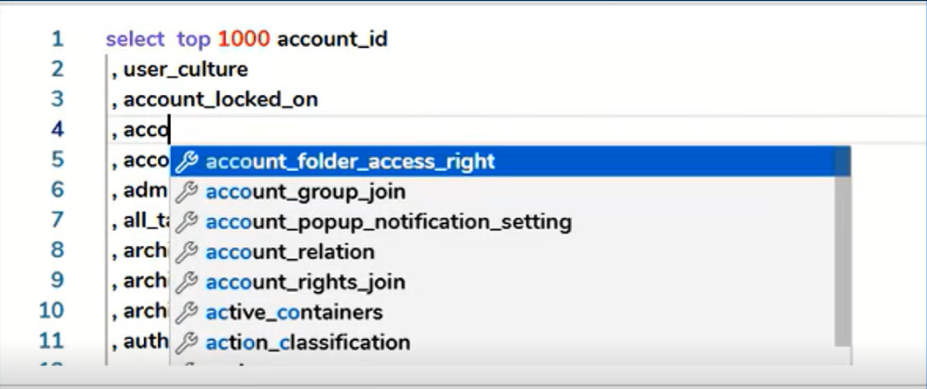 | ||
| [DT-044659] AI Common: Add TopP and Temperature To Chat Completion Step | Added Generation Parameters for Prompt AI steps. Temperature, Top P (nucleus sampling), Max Tokens, Stop Sequence, Top K, Candidate Count, Seed. NOTE: Each LLM has different supported Generation Parameters. | Flows | ||
| [DT-044805] Add drill-down behavior for rule extensions | User can now edit the rule extension used in statement rule verb layer using the edit/pencil icon. The same can be done from the rule debugger as well. If Users do not have permission, they will not see the edit icon. This is only applicable for statement rule only. The truth table/rule table does not have this ability now. | Rules | ||
| [DT-046655] Enhance Audit Notes During Entity Creation | Previously, when a new record was created in a Data Structure, the audit report displayed only a generic entry such as "[Entity] Saved". While this confirmed that a record had been created, it did not provide any details about the data that was actually stored. As a result, users found it difficult to understand what had been created without relying on custom reports or other workarounds. To address this, we enhanced the audit notes generated during entity creation. Audit entries now include the field names and values that were stored when the record was created. This gives users immediate visibility into what data was added and brings creation audit entries in line with the detailed information. We also extended this functionality to entities that are audited through audit settings. Previously, these entities recorded only the action performed, but they now display the same descriptive creation notes as well. | Data Structures | 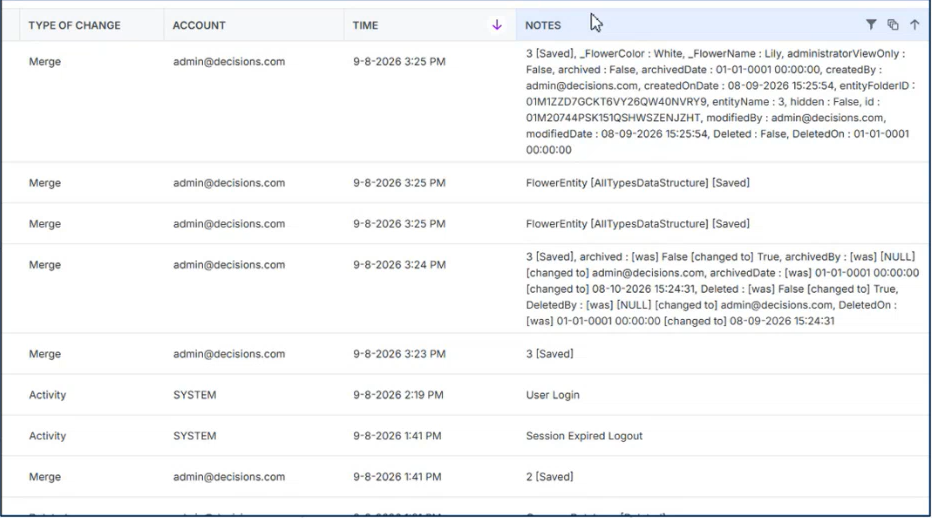 | |
| [DT-046731] Adopt New Platform-Wide Font Family | In Version 10, the platform-wide font was changed to Inter, but several pages, forms, reports, portal styles, charts, tiles, and exports continued using hardcoded font settings and preventing new controls from inheriting the platform font. The fix updates these areas to use the Default font setting, which inherits the portal font, and aligns font sizes with the platform baseline. Related areas such as the debugger, property grid, Help Center, mobile rendering, and form/control defaults were also updated. | |||
| [DT-047313] Add Dynamic Default Option for Tab Container on Page | Tabs Container Layout | A new "Sync Selected Tab To URL" option has been added to the Behavior section of the Page Tab Container properties. When enabled, the browser address bar stays in sync with the currently selected tab, allowing users to bookmark, share, or return to a specific tab directly. | Pages | |
| [DT-047702] AI. Common: Implement WebSearch built-in tool | Added ability to use the Web Search with the Prompt AI and Agent steps. Supported providers: OpenAI, Gemini, Anthropic, Foundry, LiteLLM(Anthropic, Gemini, OpenAI tested). Bedrock and Ollama are not supported. | Flows | ||
| [DT-048089] SAP Connector Enhancement | Switched to the official SAP .NET Connector. A SAP Module Setting has been added where the user will provide their Nco directory location. | Modules | ||
| [DT-048384] Enhance OAuth token functionality | Added option to allow OAuth tokens to auto-refresh after their expiry. Dependent on proper OAuth setup and OAuth App capabilities (did not work with MS365 OAuth, but not because of Decisions). | System/Portal Administration | ||
| [DT-048450] OpenAI File Upload Step | Updated the OpenAI Upload File step to allow for dynamic file input from flow. | Flows | 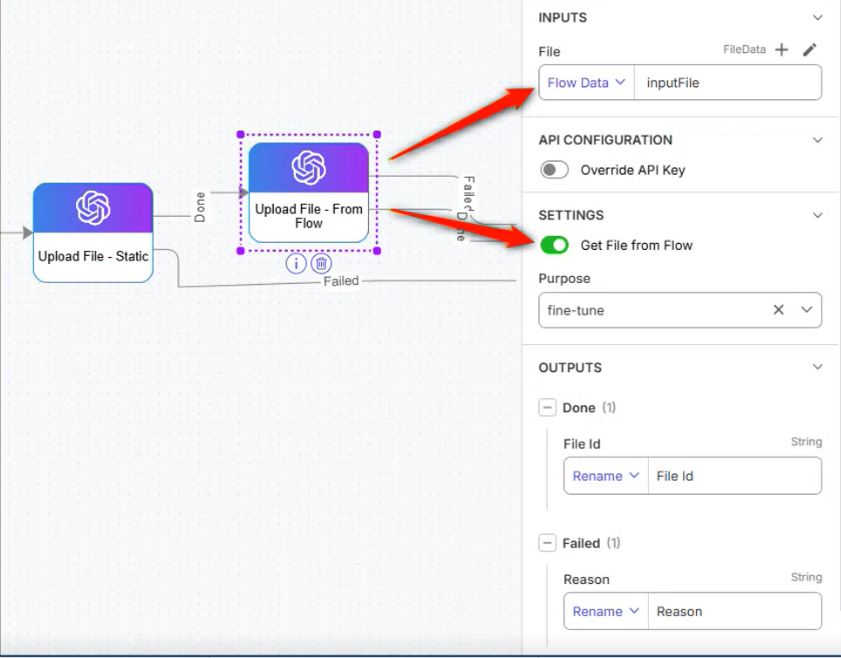 | |
| [DT-048515] Project/System-Level Default Timeout Configuration for REST API Steps | REST API steps can now inherit a default request timeout from Project or System settings instead of requiring a value on every step. Steps use their own timeout if explicitly overridden; otherwise, they fall back to the Project-level default, then the System-level default, in that order. | Flows | ||
| [DT-048601] FR: Add Use of Avro Logical Types To Kafka Module | Added support for Logical Avro types for the Kafka module | Modules | ||
| [DT-048606] Platform AI - Remove AI.Common Dependency | Generative AI features now call OpenAI directly using keys from tirade. The AI Common module is no longer required and will only be used if the "Override Provider Settings" option is used. | Integrations | ||
| [DT-048649] Ability to Create Groups Folder in Deployment Tower | Added the ability to create 'Group Sub Folders' in the Deployment Tower. | |||
| [DT-048739] Add support for Clear-Site-Data header on logout response | Added support to configure the Clear-Site-Data response header specifically for the logout response/page | |||
| [DT-048777] Convert CSV to Excel 'Try To Format Numbers' property sets cell to number not general | Added a new property name, Template, on the ConvertCSVtoExcel step, which can take a .xls or .xlsx template and format the numeric columns of the resulting Excel file positionally (template column ? output column). The template file will need to have the desired decimal places on a per-column basis, with each column's format defined in the template's first row | 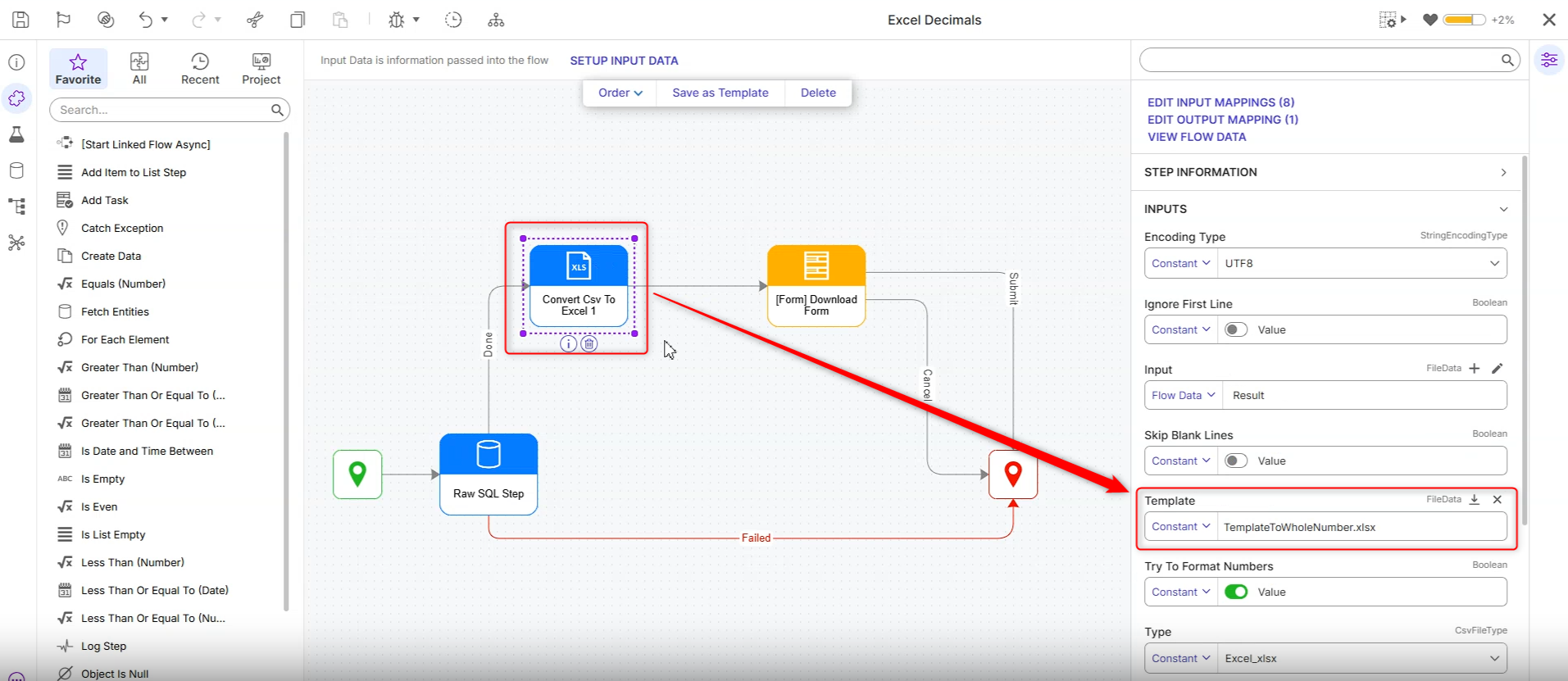 | ||
| [DT-048814] MCP OAuth hardening: refresh tokens, PKCE public clients, resource-matching fixes | Added refresh-token support to the OAuth server so a connected tool can silently renew its access token, and added a "public client" (PKCE-only, no secret) option for tools that can't hold a secret. | |||
| [DT-048820] Update AI Flow Step Icons | Created icons for AI steps that didn't have icons and added icons to AI steps that were missing icons. | |||
| [DT-048846] Deployment Package: Other cluster nodes keep running the old Code Bucket assembly after a Build containing a Code Bucket is deployed |
Fixes
Infrastructure
| DT Title | Description | Occurs In |
|---|---|---|
| [DT-046782] Type Mismatch Between Columns on Entity_Folder and Entity_Header_Data tables causing scheduled jobs report to load slowly | Fixed an issue where mismatched column types between Entity_Folder (Folder_id) and Entity_Header_Data (project_id) could increase load time for scheduled jobs. The project_id column has been changed to varchar(254) to match the folder_id column's type in entity_folder. | 10.x |
| [DT-048734] Update reference_id from nvarchar to varchar on entity_assignment Table | Fixed an issue where the reference_id column on the entity_assignment table was set to nvarchar(254). This results in considerable slowness for any affected queries. | 10.x |
| [DT-048750] Add KeyFieldConverter to usages of FolderParentXref fields | Fixed an issue where the queries we run for FolderParentXref have nvarchar parameters instead of varchar, forcing SQL to convert the fields from varchar to nvarchar to perform the comparison. | 10.x |
Modules
| DT Title | Description | Occurs In |
|---|---|---|
| [DT-047747] Flow Debugger: SubAgent nodes create a new parent node each time a Tool Flow is called | Updated the debugger to show a single debug node per agent execution instead of a new parent node being created every time the agent invokes a Tool Flow. | 10.x |
| [DT-047789] The Microsoft 365 Exchange module fails to install on containers via environment variables when the DB type is MSSQL | Fixed an issue that caused the M365 Exchange module to fail to install on MSSQL containers when installed via environment variable DECISIONS_MODULES_TO_INSTALL_ON_STARTUP. | 10.x |
| [DT-048622] [Modules] -> [PGP] PGP Steps succeed with mismatched keys and incorrect passwords | Fixed an issue where the PGP steps would execute when mismatched keys or passwords were supplied. | 10.x |
| [DT-048662] Optimize Load Parquet To Redis Queue Step | Optimized the "Load Parquet to Redis Queue" step. | 10.x |
| [DT-048690] Existing AI modules do not get Chat Completion toolbox step renamed Prompt AI | Existing installed AI modules Chat Completion will now get properly renamed to Prompt AI. | 10.x |
| [DT-048828] Message Queue - Check-in: Fails with a NullReferenceException when checking in a User Story containing a 'Message Queue' entity | Checking in a User Story that contains Message Queue settings (such as Solace MQ) now completes successfully instead of failing with an object reference error. If a project can't be determined for an item being checked in, the check-in now fails with a clear error naming that item. | 10.x |
| [DT-048636] Kafka Module: Improve Avro Schema Field Handling | Fixed an issue where Avro schema Fields where not applying declared default values when the field is omitted, and values such as dates were being altered, losing the milliseconds, timezone, and original format. | 10.x |
Forms
| DT Title | Description | Occurs In |
|---|---|---|
| [DT-046995] Checkbox List not displaying on form in Mobile View | A fix has been applied to the CheckBox List form control in the Mobile Portal. Previously, CheckBox List items were not displaying correctly when a form was viewed on a mobile device, and items appeared blank despite being loaded. CheckBox List items and their labels now render correctly in the Mobile Portal. | 10.x |
| [DT-048459] Form maximize/minimize function in title bar breaks in a form loop | Fixed an issue where the maximize and restore functionality was not working correctly when forms were rendered inside a loop. The functionality now works properly for each form, allowing users to maximize and restore Forms independently even when multiple forms are generated in a loop. | 10.x |
| [DT-048507] Form->Auto Focus: Auto Focus Applied to Data Repeater in Other Tabs as well When First Form Control Is a User Defined Control or Data Repeater | A fix has been applied to Form Tab focus behavior. Previously, when Auto Focus First Control was enabled on a Form, only the first tab correctly focused its first control based on the tab order. Navigating to subsequent tabs did not apply auto focus correctly when a User Defined Control or Data Repeater was configured as the first control in the Tab Editor. Each tab now correctly focuses its first control in tab order when navigated to, consistent with the behavior of the first tab. | 10.x |
| [DT-048531] Custom Display Mask Fails When Mixing Numeric and Alphabetic Placeholders | A fix has been applied to the Masked Text Box form control. Previously, combining numeric and alphabetic placeholders in a Custom Display Mask caused a validation error on form submission even though only supported placeholders were used. Numeric and alphabetic placeholders can now be freely combined in a Custom Display Mask without validation errors. | 10.x |
| [DT-048657] Form Designer - AI Generated Forms: Field's font attribute keeps the form's custom font instead of resetting to 'Default' when 'Use Form Font' is turned off | Fixed an issue where disabling Use Form Font or Use Form Font For Label on fields in AI-generated forms did not reset the field font to Default, causing the previously inherited custom form font to persist. | 10.x |
Flows
| DT Title | Description | Occurs In |
|---|---|---|
| [DT-046645] Flow Steps: An "Object reference not set to an instance of an object" error is displayed when opening the 'Compare' dialog from sub-entities of several steps | Fixed an issue where the Compare Utility did not correctly detect changes in sub-entities for certain steps, including Run Flow for CSV, Rule Collection Filter, and Rule Collection Sort. | 10.x |
| [DT-048080] Flow Designer: An error is displayed when inputs contain '.', '[', or '' characters and the Mapping Editor is opened | Fixed an issue where Flow input and output names containing ., [ or ] could cause Mapping Editor errors. These characters are now automatically replaced with underscores (_) when the Flow is saved, and validation messages have been updated to indicate the sanitization behavior. | 10.x |
| [DT-048235] Cannot debug subflow that's called asynch from mainflow in global debugger |
| 10.x |
| [DT-048628] Wait On External System: Completed assignments remain in the escalation queue for one extra cycle before being removed | Fixed an issue where the Wait On External System step queued multiple jobs for a single step execution. The step now creates only the intended job instance. | 10.x |
| [DT-048651] Input List not being condensed in Flow Designer | Fixed an issue where the Input Data section expanded excessively when a step contained a large number of configured inputs, preventing access to the Properties panel. The layout now displays correctly, keeping the Properties panel accessible. | 10.x |
| [DT-041967] Icon on Steps with Caching | To improve visibility, cached steps now display a cache badge with the tooltip "Step Outcomes Are Cached", making them immediately identifiable on both the Debugger and the Flow Designer. |
Projects
| DT Title | Description | Occurs In |
|---|---|---|
| [DT-048359] Can't Download Project Documentation Due to SQL Limit | Fixed an error when downloading project documentation for a project containing 10000 entities. | 10.x |
| [DT-048730] Named Sessions: Designer users can edit named sessions, and 'Move to Project' exposes inaccessible projects |
| 10.x |
| [DT-042959] Show Dependency for Constants | Fixed an issue where Browse Dependencies for Constants did not display dependent designer entities. The dependency browser now correctly shows entities that reference the constant, including flows and rules. Added dependency warnings when renaming or deleting a constant to help identify the potential impact on dependent entities. | 10.x |
System / Portal Administration
| DT Title | Description | Occurs In |
|---|---|---|
| [DT-048338] Authentication - Login Redirect: An 'Invalid URI: The hostname could not be parsed' error is logged when a request is received without a Host header. | Fixed an issue where a request that arrives without a Host header and hits a login-protected page caused an unhandled exception and an HTTP 500 instead of the normal login redirect. | 10.x |
| [DT-048464] Edit Accounts - Other Contact: Fatal validation error on 'Other Contact Type' persists even after selecting a value. | Fixed an issue where adding an Other Contact to an account could fail with an "Entity is not part of the project" validation error after selecting an Other Contact Type. Other Contacts can now be added and saved successfully. | 10.x |
| [DT-048795] Account Impersonations Broken When Created On Tower |
| 10.x |
| [DT-048850] Developers Cannot View the REST Integrations in the Public Folder | Fixed an issue where the REST page under Project > Public > Integration was only accessible to Admin users. Designer users with Can Edit permission can now view and access the REST page. | 10.x |
| [DT-048877] Upgrade fails when existing tags are deleted directly from the database | Fixed an issue that could cause upgrades to fail when a referenced tag had been deleted from the database. | 10.x |
Rules
| DT Title | Description | Occurs In |
|---|---|---|
| [DT-047021] Errors in Logs when creating Truth Table via Generate | Fixed an issue where errors could be logged after configuring rule-based entities, such as Truth Tables and Rule Tables, even when the configuration completed successfully. | 10.x |
| [DT-048409] Rule Designer: An 'Object Reference not set to an instance of an object' error is displayed if inputs containing '.', '[', ']' are mapped to outputs | Fixed an issue where Flow input and output names containing unsupported characters (., [ or ]) could cause Mapping Editor errors. Input and output names are now automatically sanitized on save by replacing these characters with underscores (_), and validation messages have been updated to indicate this behavior. | 10.x |
| [DT-048426] Rule Designer - Output Section: Validation is not removed when the output mapping is changed from Constant to Ignore | Fixed an issue where a validation message was incorrectly displayed when changing an output mapping from Constant to Ignore within the Statement Rule designer. Validation is no longer triggered for this action. | 10.x |
Reports
| DT Title | Description | Occurs In |
|---|---|---|
| [DT-038444] Report Blurb View | Report Blurb View (Rich Text View) has been deprecated. Existing reports configured with this view will display the message: "Rich Text View is deprecated, please switch to another view." | 10.x |
| [DT-047828] Report: An error is displayed when selecting the 'AI Execution History' data source | Fixed issue where an error would display when adding the AI Execution History data source to a report. | 10.x |
| [DT-048361] [Reports] -> [Filters] "Show all data when filter value is null" Option Missing for Child Data Structure Fields via Relationship Integration | A fix has been applied to Report filter settings. Previously, the "Show all data when filter value is null" property option was missing from the filter properties panel for fields belonging to a Child data structure when Parent and Child structures were linked using Relationship Integration. | 10.x |
| [DT-048781] Report Designer: Administrator user unable to pick database tables, views and saved queries as a data source without being in the Designers group | Fixed an issue where Administrator users who were not members of the Designer group could not use database integrations as report data sources. Administrator users can now access Tables, Queries, and Views as report data sources. | 10.x |
Dashboards
| DT Title | Description | Occurs In |
|---|---|---|
| [DT-048489] Remove Folder Actions Bar On Process and Case Pages | Actions have been moved to the "All" section on the right side of the Case Page and Process Page to avoid duplication and can be handled when Chrome=off. | 10.x |
Data Structures
| DT Title | Description | Occurs In |
|---|---|---|
| [DT-048549] Error using setup process folder from case action flow. | We have added a property named "Ignore If Already Set Up" on the Setup Process Folder step. | 10.x |
Integrations
| DT Title | Description | Occurs In |
|---|---|---|
| [DT-045909] Generative AI: Flow Inputs - Add Input Description to data generation | Added description generation for AI Tool Flow Input Data when using the generative AI feature. | 10.x |
| [DT-048667] Maximum Size property not respected when input data is null | A fix has been applied to Query Integration parameter handling. Previously, when a null value was passed to a Query Integration parameter at runtime, the configured Maximum Size was ignored, and the parameter size defaulted to 4000. The Maximum Size configured on a parameter is now correctly honored even when the input value is null, ensuring the declared parameter size matches the database column definition as expected. | 10.x |
| [DT-048684] AI.Common: Remove Use Agent option from Prompt AI step | The Use Agent option on the Prompt AI step is now hidden by default for new steps, since Agent functionality has moved to dedicated Agent steps. Existing flows that already had Use Agent enabled are unaffected and continue to show and use the setting as before. | 10.x |
| [DT-048696] Queues in projects declared as a dependency are not visible in main project | A fix has been applied to Message Queue steps in Flows. Previously, queues defined in a dependency project were not visible in the queue name dropdown when configuring Message Queue steps in the main project. Only queues defined within the same project as the flow step were selectable. Queues from dependency projects are now visible in the queue name dropdown. | 10.x |
| [DT-048834] Decisions as an OAuth application for MCP Server does not work when the instance is on IIS (virtual directory) | Allows Decisions instances hosted on IIS to correctly act as an OAuth provider and allow external AI tools to use Public MCP Servers in projects (if the MCP Server is configured for OAuth authentication). | 10.x |
Deployment Tower
| DT Title | Description | Occurs In |
|---|---|---|
| [DT-048312] Hide 'Create Project' and 'Import Project' actions from the QA and Prod environments. | The "Create Project" and "Import Project" actions are now hidden on environments registered as QA or Production. They stay available on Development and multi-tenant environments. | 10.x |
| [DT-048332] Deployment Tower - Projects: 'Create Folder' action is exposed on the Project right-click menu, allowing plain folders to be created inside a Project. | On the Deployment Tower, the Project right-click menu no longer offers "Create Folder", so plain folders can't be created inside a Project. The menu now shows only "Import Sprint" and "Get Project ID". | 10.x |
| [DT-048431] "Connect to Deployment Tower" action is displayed to the designer user. | The "Connect to Deployment Tower" action is now shown only to administrators and is no longer visible to Designer users. | 10.x |
| [DT-048467] System - Accounts: Built-in accounts lose management actions on the client after environment registration, even though they are not migrated to the Deployment Tower. | On an environment registered to a Deployment Tower, built-in accounts (GUEST, SYSTEM, and the default administrator) now keep the full MANAGE menu, including Reset Password, Activate, Deactivate, and Edit. Accounts migrated to the Tower still show the reduced menu. The default administrator's Description can no longer be changed. The save applies the other edits and keeps the original Description. | 10.x |
| [DT-048541] User Stories Compare Utility: Editing Flow from Review Tab Reverts Local Changes | Fixed an issue where flows could not be edited correctly from the Review screen. Flows can now be opened and edited as expected from the review experience. | 10.x |
| [DT-048572] Check-In: An error is displayed when retrieving check-in info after a successful check-in if the repository sync did not complete | Added logging for check-in info retrieval after a successful check-in, to help diagnose cases where the repository sync has not completed and the Check-In dialog shows | 10.x |
| [DT-048656] Security - Groups: Group settings are not retained during registration or synchronization, except for 'Default URL Parameters'. | Group settings were not transferred from the connected environment to Tower and vice versa; now we are syncing them. | 10.x |
| [DT-048674] Group Sub Folder: Accounts within the Groups that are inside a Sub Group folder are missing upon upgrading and connecting to Deployment Tower | Added support for creating Group Sub Folders within Deployment Tower, enabling better organization and management of deployment groups. | 10.x |
| [DT-048831] The Deployment Package 'Changes Report' does not load and an error 'The incoming request has too many parameters' is displayed in case of a large number of entities | Fixed an issue where the Deployment Package Changes Report could fail to load and display an error when processing a large number of entities. The report now loads correctly for large deployment packages. | 10.x |
| [DT-048855] Deployment Tower: Do not allow a new Deployment if one is already in progress |
| 10.x |
| [DT-048866] Deployment - Check-In: Decisions service crashes, and changes are committed to another project when checking in a new project whose name matches an existing Deployment Tower project |
| 10.x |
| [DT-048912] Deployment Wizard | Updated the deployment dialog displayed during an active deployment to include both View Progress and Close actions, allowing users to either monitor the current deployment or dismiss the dialog. | 10.x |
| [DT-048625] Client Server - Start Sync - Enforce a Full sync for Client | Added a Start Sync action for connected environments that initiates a Full Sync between the Deployment Tower and the client environment. | 10.x |
| [DT-048862] Stop Sync if found application version difference with the Deployment Tower | Deployment Tower now enforces version consistency across all connected environments. The platform validates the Major, Minor, Patch, and Build Number of each environment to ensure all connected systems are running the same Decisions version. | 10.x |
| [DT-048858] Deployment Wizard: Progress stops updating during a long multi-project deployment even though the target environment completes the import. |