9.18 New Features (12/10/2025)
| Feature | Link | Description | Impact Category | Screenshot |
|---|---|---|---|---|
| [DT-044727] Add Theme Manager to the Project Folder Tree | Theme Manager | The Theme Builder/Manager is now available for all projects under Manage > Configuration > Templates > CSS > Theme Manager. Users can create, edit, and manage multiple themes for a project, and apply them to both Forms and Pages. Please see the attached link for information about known issues. | Projects | .png) |
| [DT-044818] Flow Designer: Adding UI element to Auto-Align Steps | Flow Designer Enhancements | Guidelines will now be visible when dragging and dropping steps on the canvas from the toolbox. If a User changes a Flow, it will be retained across all Flows of the browser session. | Flows | 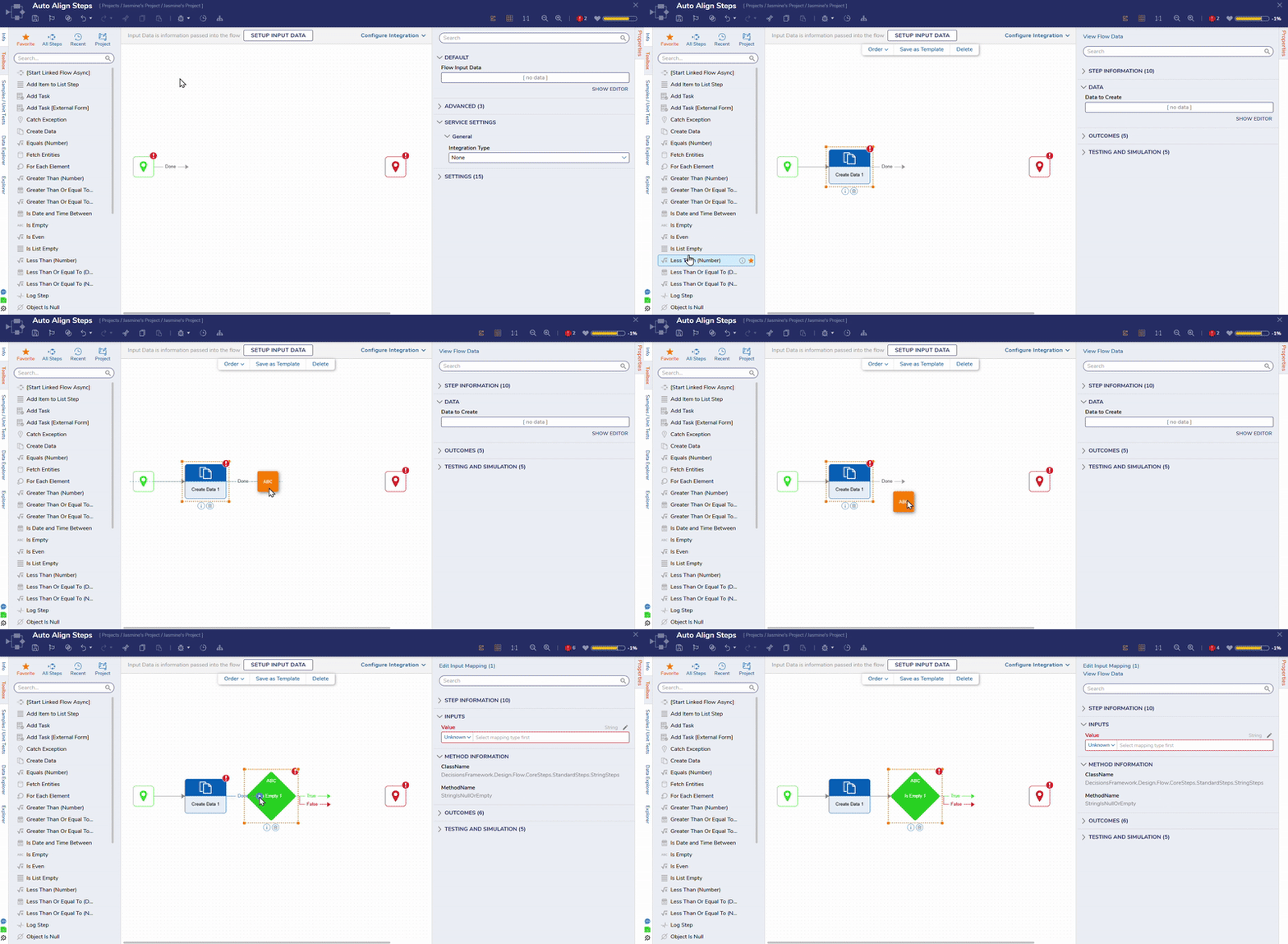 |
| [DT-045576] Flow Designer Connector Step Placement Enhancements | Flows | When dragging steps to the toolbox, the first step will automatically connect to the start step. | Flows | 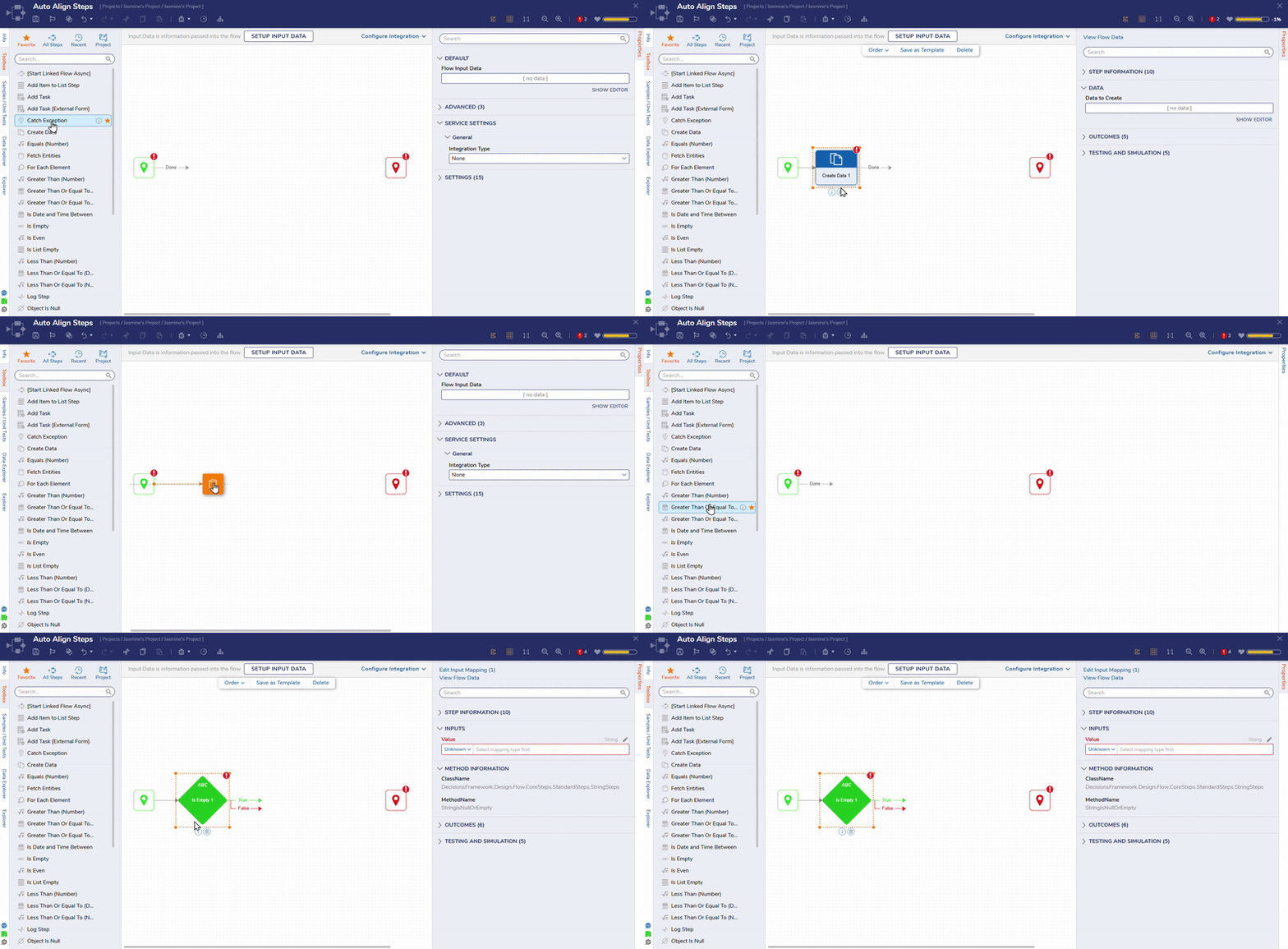 |
| [DT-045686] Ability to nest rules | Rule Verb Extension | Users can now utilize outputs of rule extensions in a statement rule as an anchor point and as output data. | Rules | 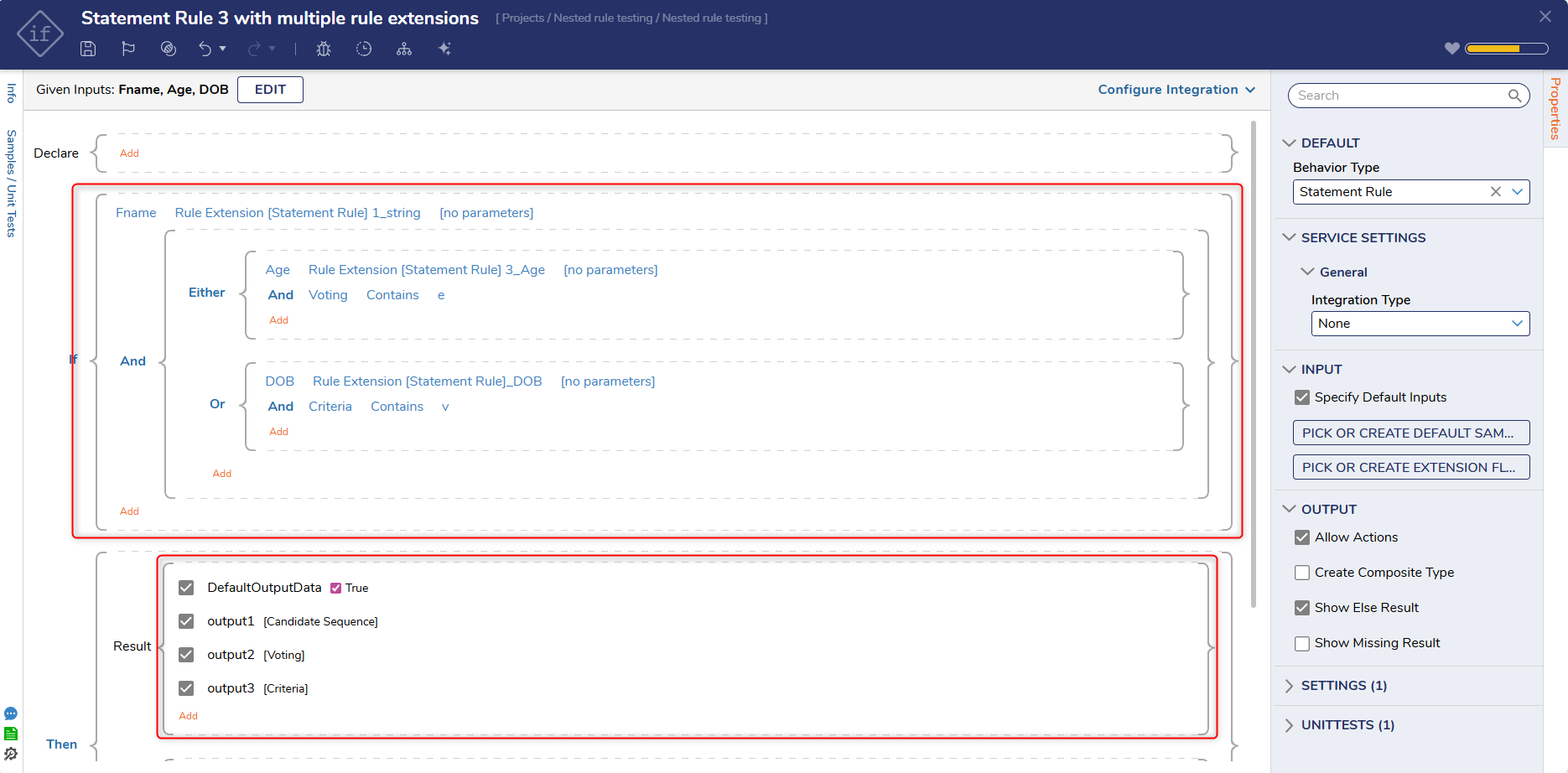 |
| [DT-045812] Implement designer view mode for Matrix rule. | Creating a Matrix Rule | View mode has been implemented for the Matrix Rule Designer. | Rules | 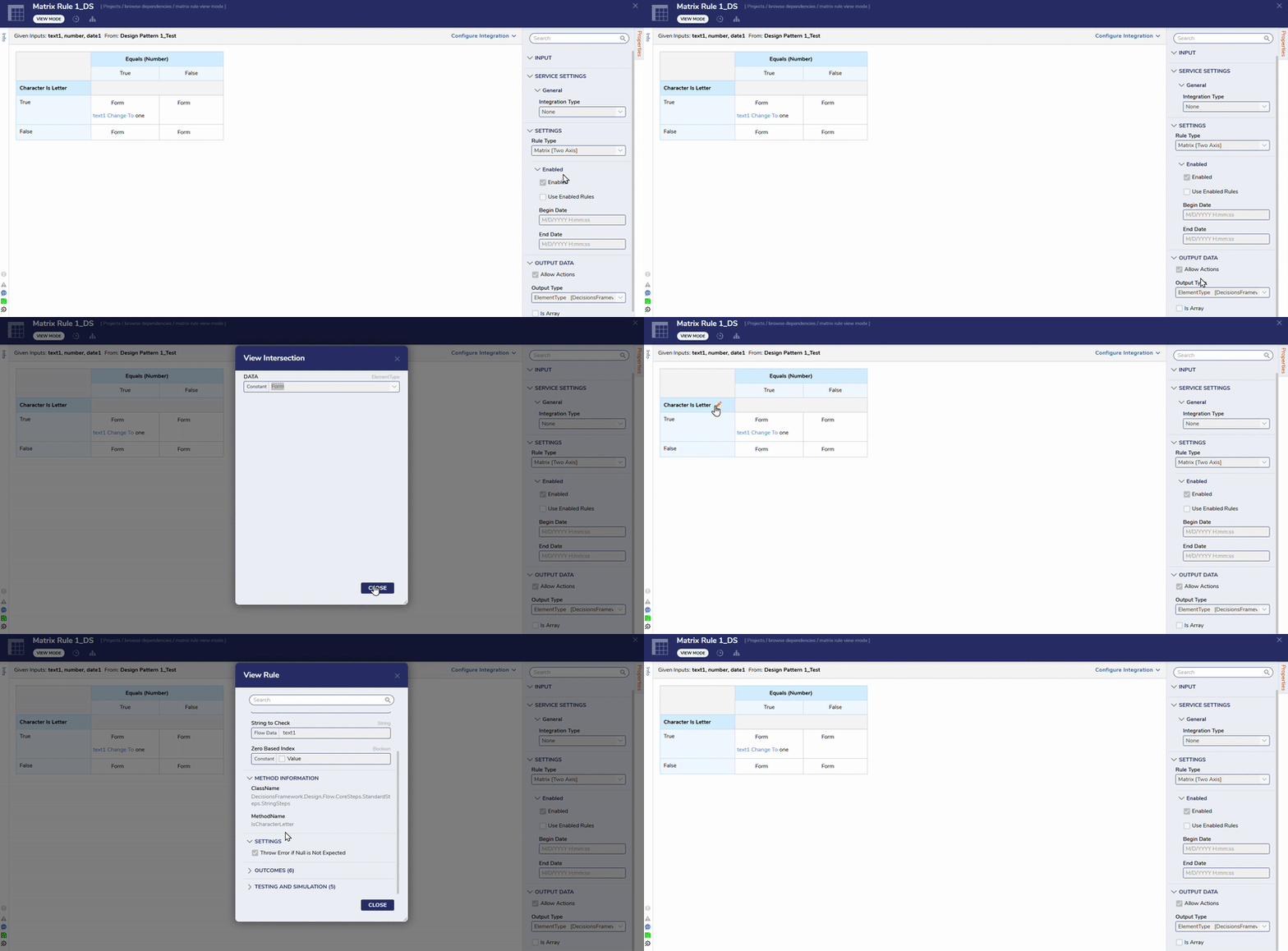 |
| [DT-045948] On Click Button Behavior | Form Control Glossary | A new property has been added to the platform called 'Show Interaction Effect' for button controls in the Form and Page Designer. When this property is enabled, Users can configure several related settings, including Colors, Play Count, Interval, Fade Speed, and Particles. At runtime, clicking the button will display a confetti animation in vibrant colors. | Forms | 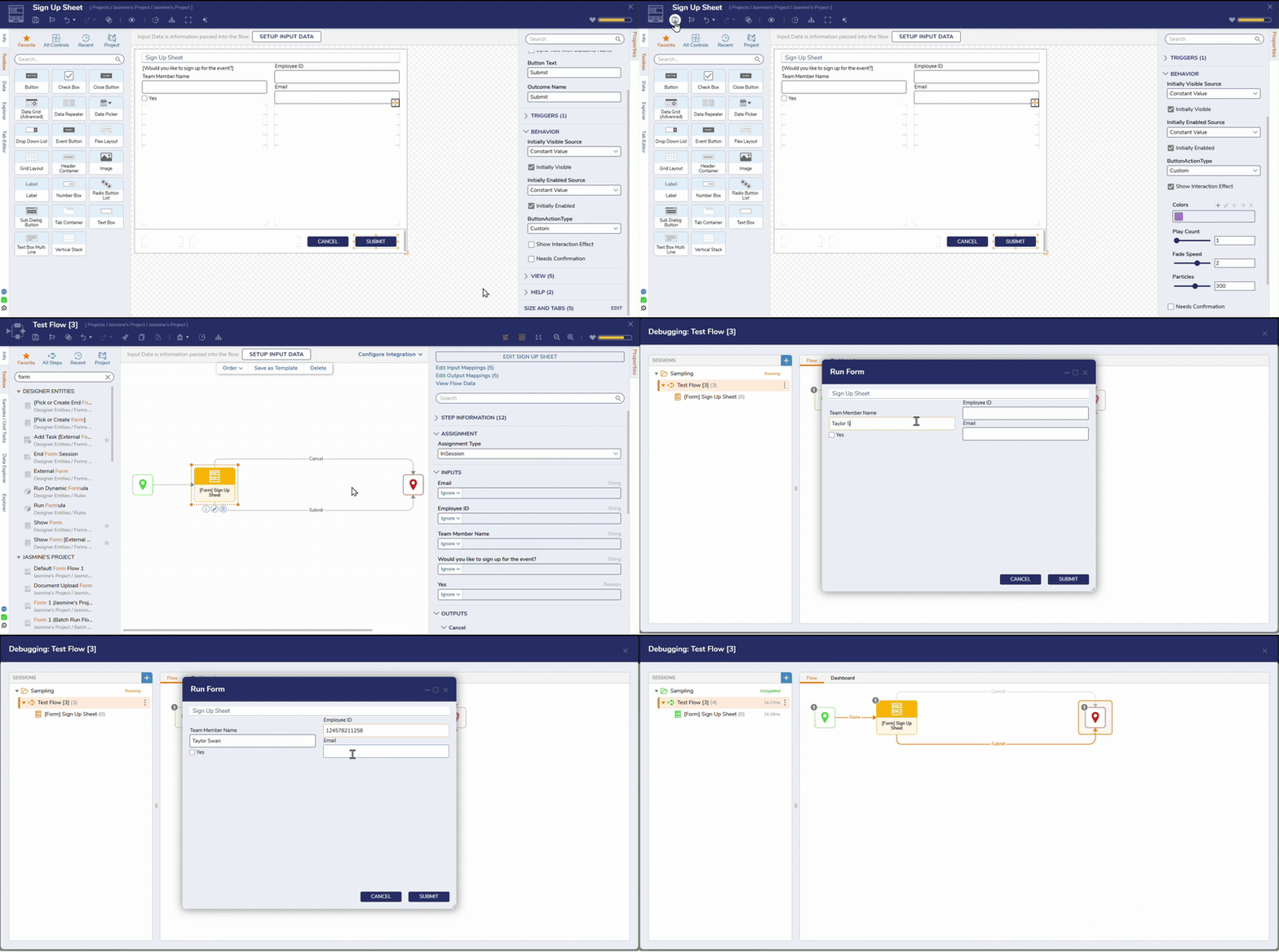 |
| [DT-046168] Add New Step to Update and Overwrite File for FileReferenceEntity | Update File Reference Entity | A new step, 'Update File ReferenceEntity', has been added to the platform. This new step enables Users to update (overwrite) files when a new version is uploaded, ensuring that the latest file is always linked to the corresponding FileReferenceEntity and preventing unused files from cluttering storage. | Flows | .png) |
| [DT-046212] Get Structure and Member Description - Add FullAnchorName Support for Member | Get Structure and Member Description | A full anchor name will now be displayed for each member for the 'Get Structure and Member Description' step. | Flows | 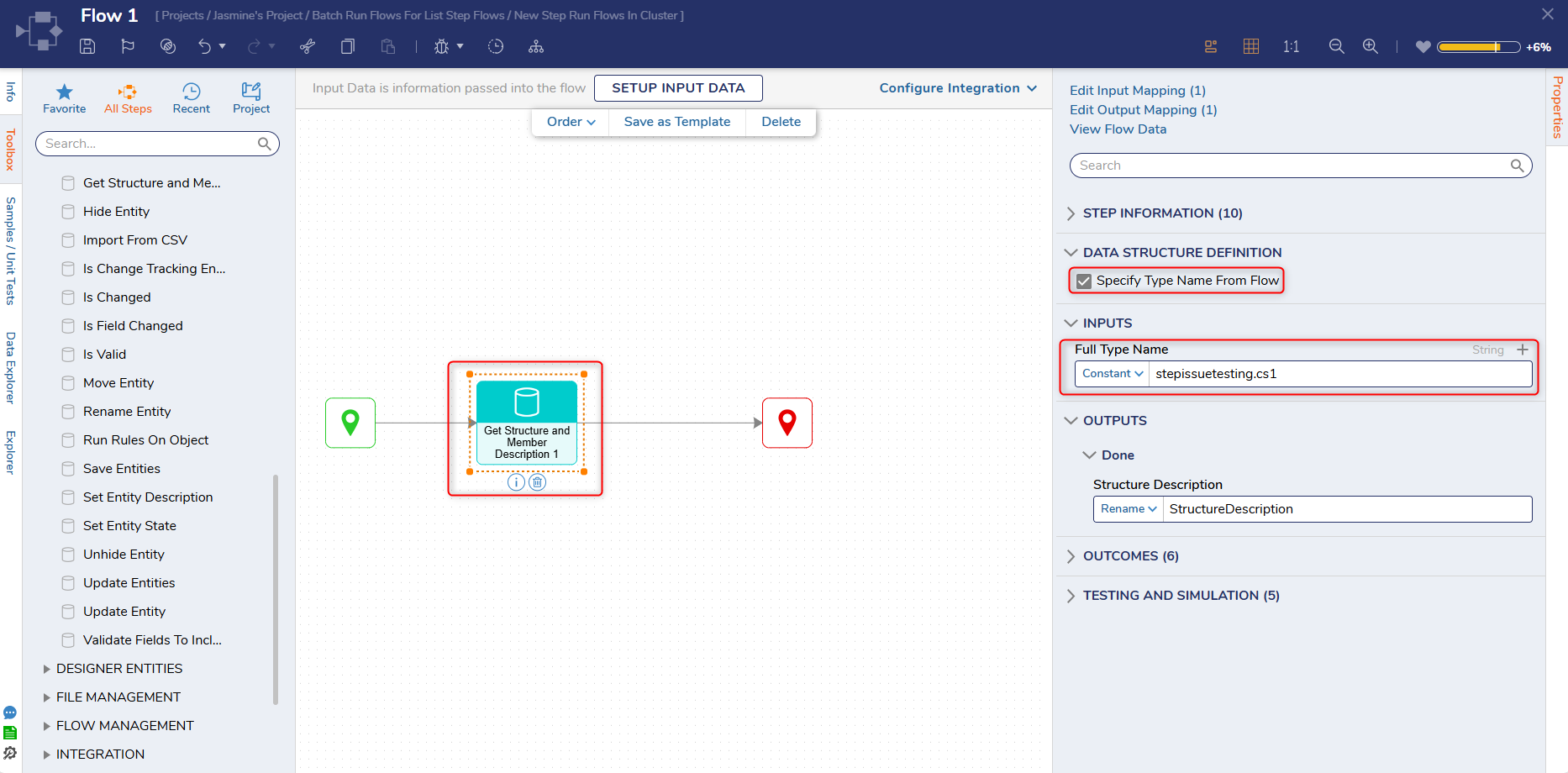 |
Enhancements
| Feature | Link | Description | Impact Category | Screenshot |
|---|---|---|---|---|
| [DT-045803] Compare Utility - Ability to see Sub-Entities Comparison from Parent Entity. | Using The Comparison Utility | Users can now open designer entities from their parent step via the compare utility. This functionality ensures easy accessibility to open designer entities, rather than closing the compare utility, then clicking on the step to edit it. | Forms | .png) |
| [DT-045804] Compare Utility - UI Updates | Using The Comparison Utility | The Compare Utility has received several UI updates:
| Flows | 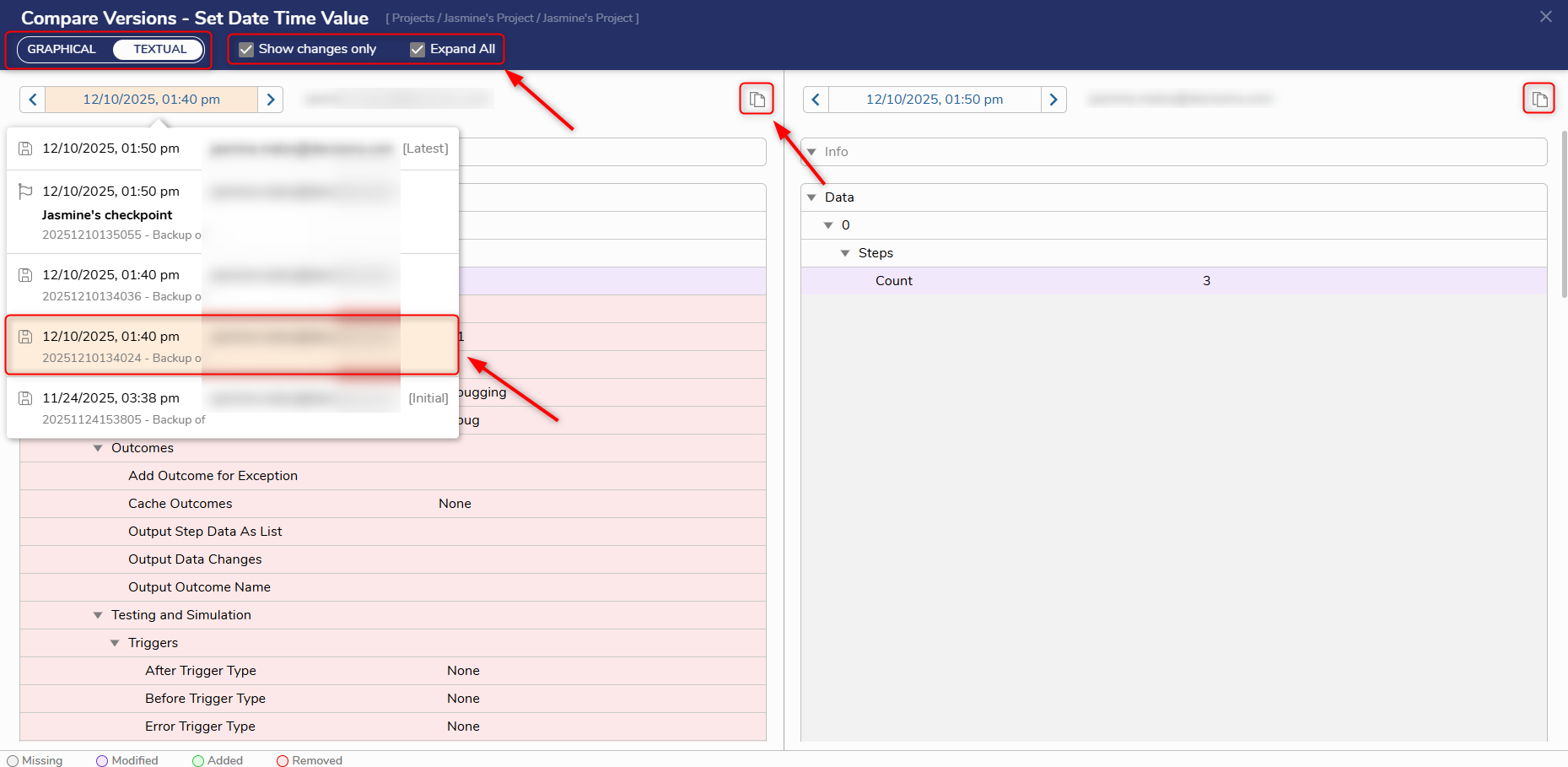 |
| [DT-045806] Compare Utility - Adding Info section to Compare Screen | Using The Comparison Utility | The Info section on the textual compare screen will now display changes made in the respective designers' info panels. This includes updates such as name changes, description edits, icon updates, owner modifications, and similar metadata. | Flows | 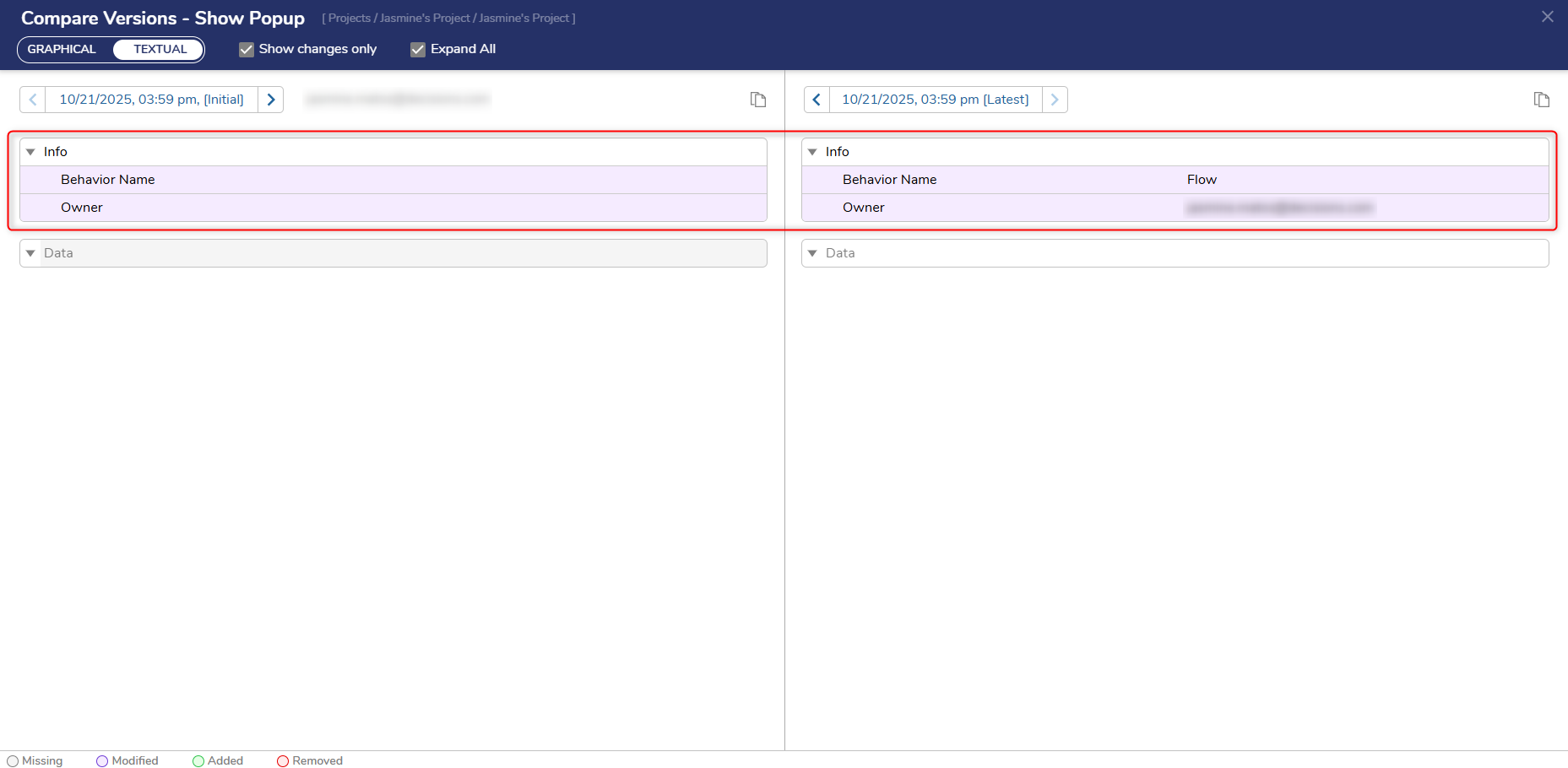 |
| [DT-045813] Compare Utility - Adding Default Compare Version | Using The Comparison Utility | The default behavior on the Compare Versions dialog has been updated to compare the latest version with a previous version, so Users will no longer need to adjust the selection manually. | Flows | .png) |
| [DT-045852] Compare Utility - Formula Designer | Using The Comparison Utility | A compare dialog has been implemented for the Formula Designer. This feature will enable Users to compare formula versions with color-coded changes, and includes expand/collapse support for opening and hiding JSON nodes. | Formulas | 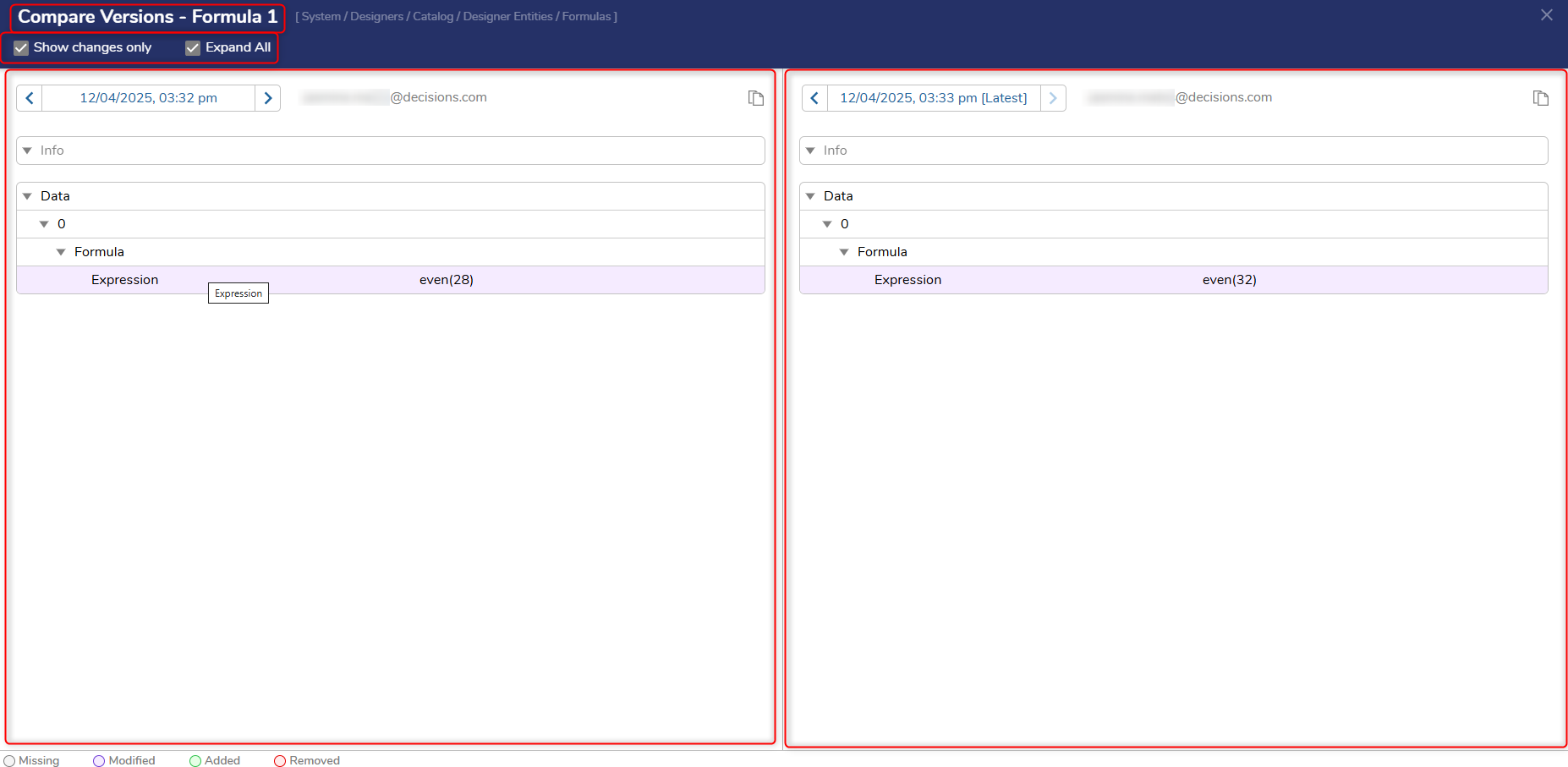 |
| [DT-045859] Dynamic Timer Value from Flow for Time Form Exit Control | Form Control Glossary | A new property, 'Specify Exit After From DataName', has been added to the platform to allow dynamic timer values from Flow/DataFlow. This feature is only supported on normal forms; Simple Forms will keep the original static behavior. | Forms | 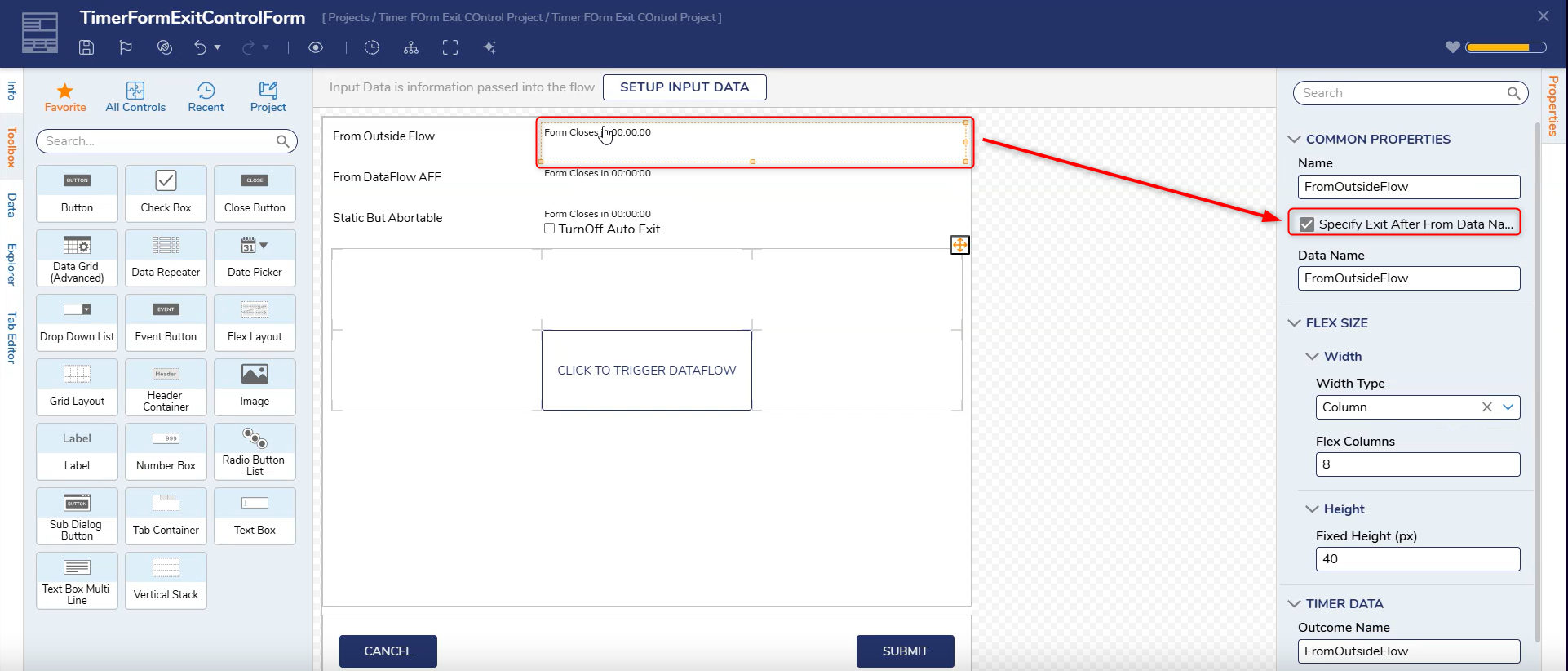 |
| [DT-045969] Update Dependency Browser | Dependencies Overview | The 'Dependency Browser' dialog has been enhanced. The dialog can be opened by right-clicking on the designer entity (Browse Dependencies) from the 'List' page and from the designer itself (Dependencies). | Flows | 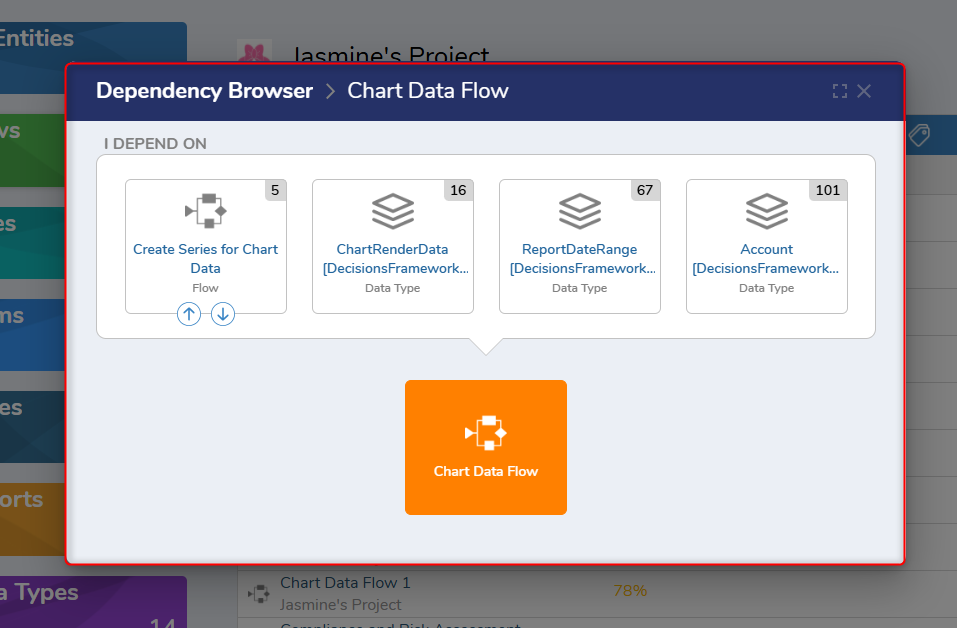 |
| [DT-046024] Flow Designer: Add the ability to open sub-flows and similar sub-designers directly from the canvas | Flow Designer Enhancements | The 'Edit' icon will now be displayed on hover when a sub-entity is selected in element registration Flow steps, such as Run Flow, Run Rule, etc. This enhancement reduces the number of clicks required and allows Users to open the associated entities directly from the step. | Flows | 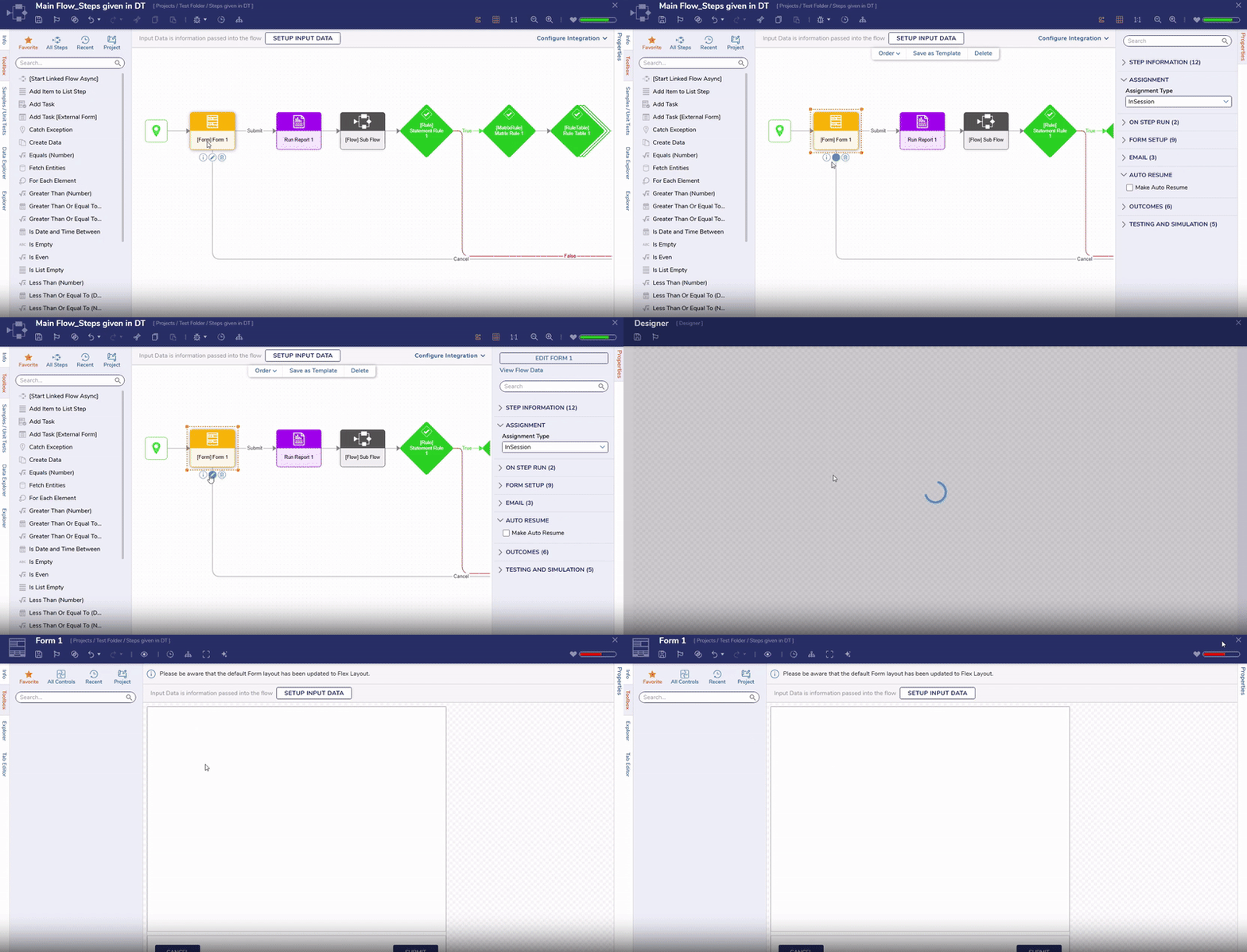 |
| [DT-046080] Add Premier Profiles to Experian Module | Experian Module | A new step has been added to the Experian Module, 'Experian Premier Profiles'. 'Premier Profiles Client ID' and 'Premier Profiles Client Secret' have also been added to Experian Settings. | Modules | 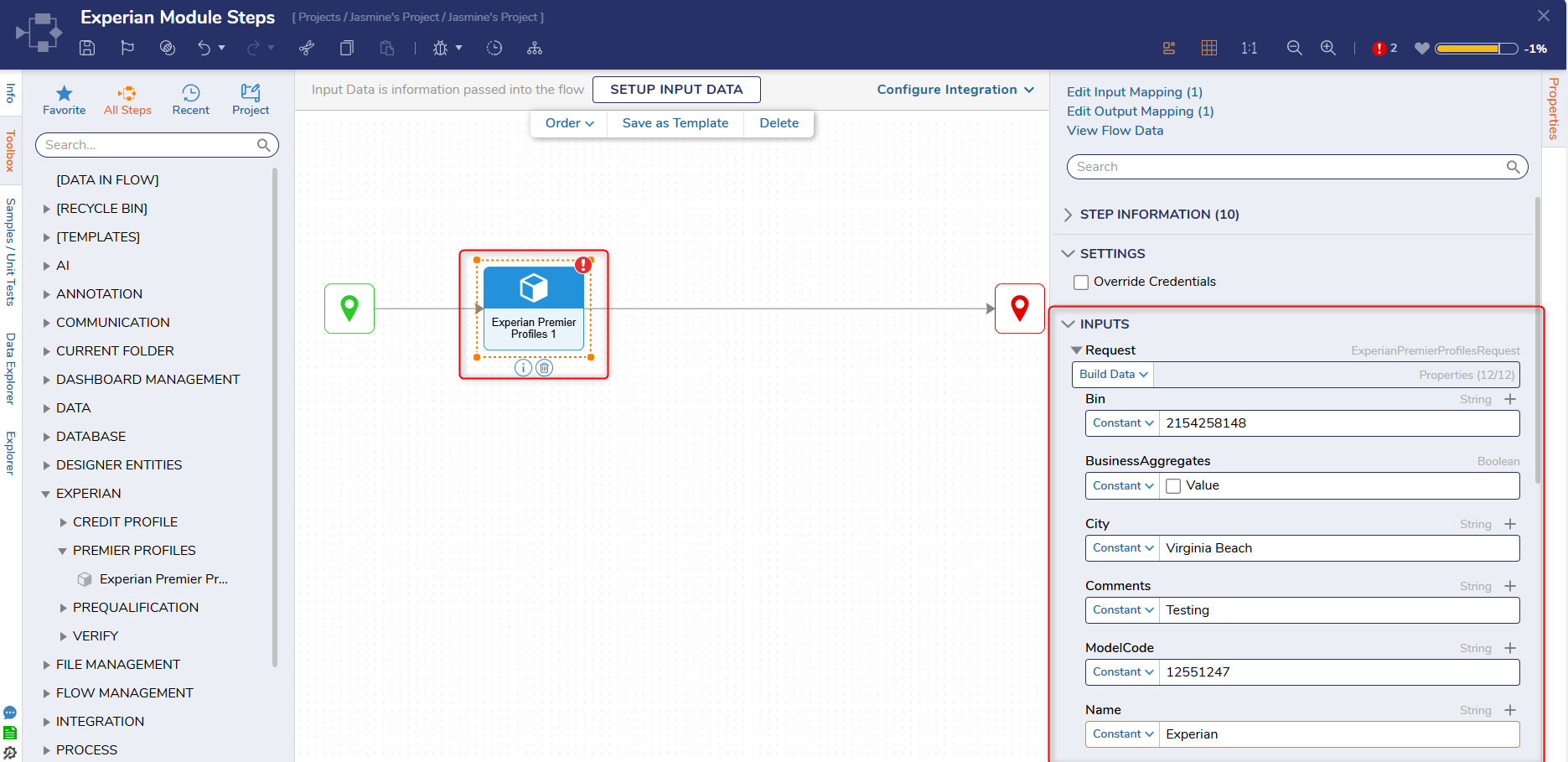 |
| [DT-046181] Add Formatting options to SetDateTimeValue excel step | Set Date Time Value | Formatting options have been added to the 'Set Date Time Value' Excel step, enabling Users to format the values in the sheet as desired. | Flows | 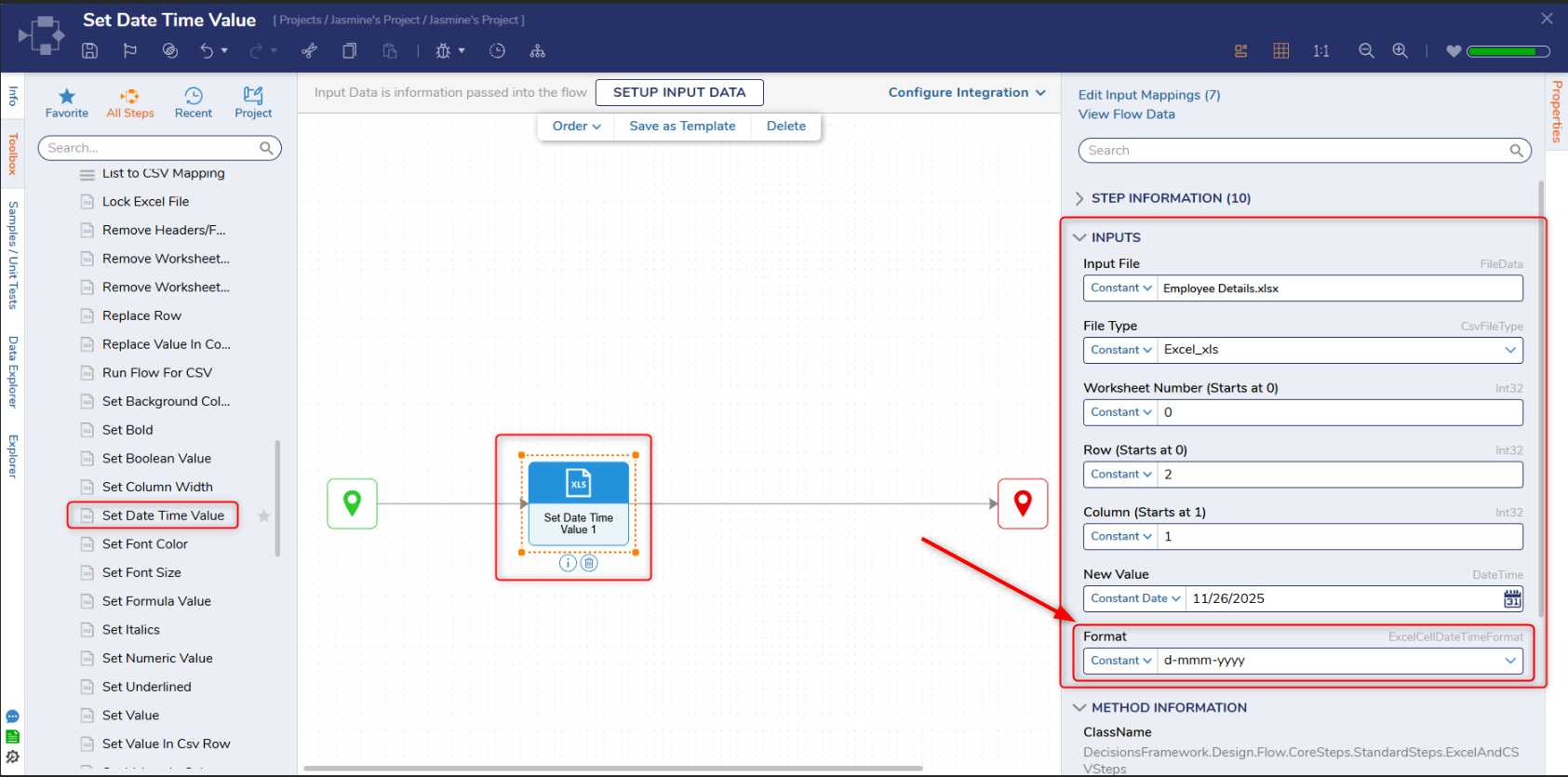 |
| [DT-046225] Implement 'Maximize' icon on the 'Dependency Browser' dialog | Dependencies Overview | The maximum icon was implemented for the dependencies browser dialog, allowing users to view it in a larger dialog rather than scrolling. | Flows | 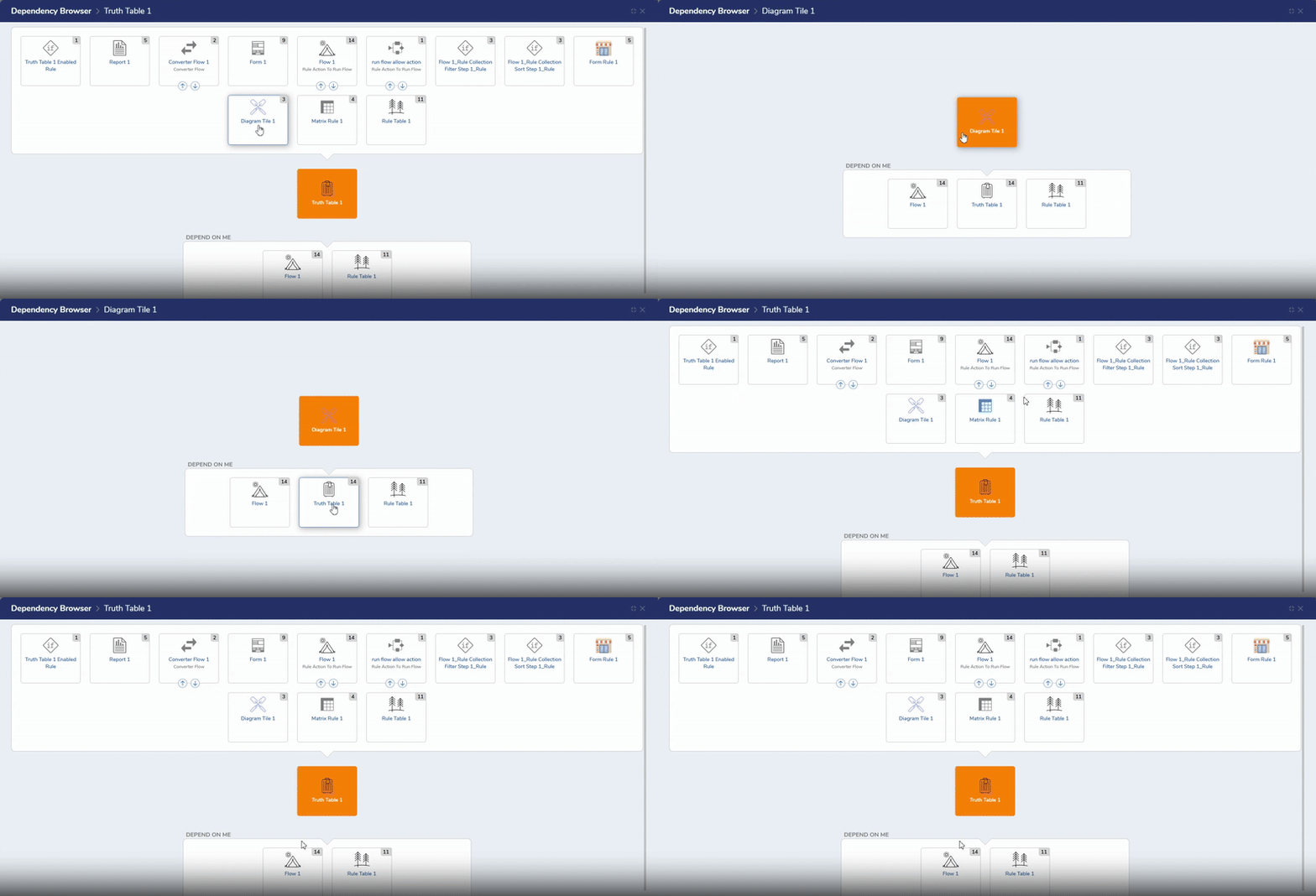 |
| [DT-046246] Dynamic Thread Count Configuration for 'Run Flows for List' | Run Flows For List Step | A new property, 'Dynamically Set Thread Count' for Run Flows for List and Run Flows for List (Batch Processing), using which the User can now set Thread Count dynamically. This setting enables Users to set the thread count dynamically. Users should note that each thread on the Run Flows for List step is a separate Flow process; running a high number may impact system performance. Users are advised to use a lower thread count (such as four) to test the impact of the step on the system. | Flows | .png) |
| [DT-046254] Add Support for AEAD/OCB Mode in PGP Module Steps | Clear Sign File | New steps have been added to the PGP Module. Existing steps have been added to the PGP Legacy category in the step toolbox. | Flows | 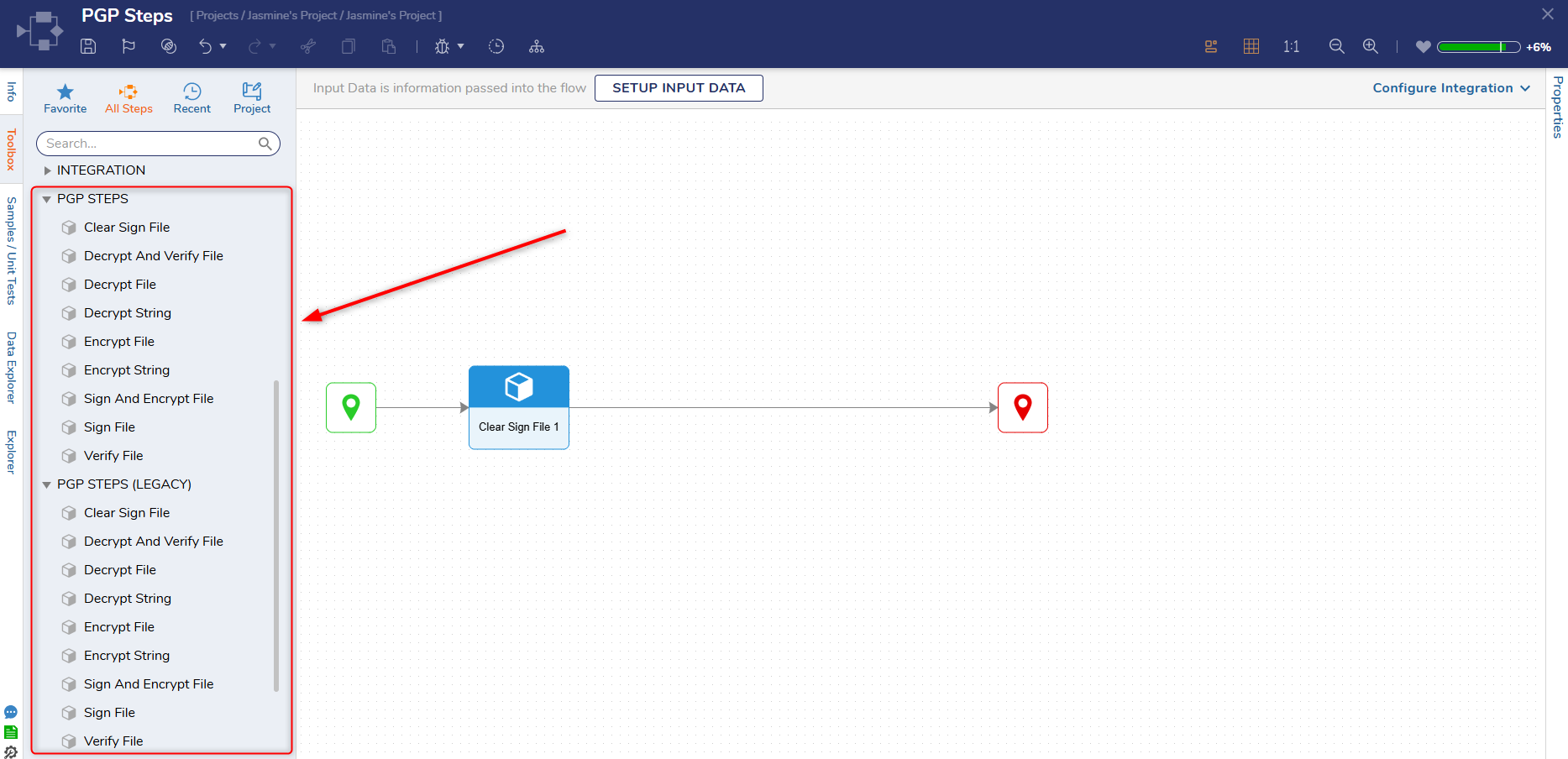 |
| [DT-046257] Performance Optimization for 'Respect Permissions' Property in Fetch Entities Step | Designer Settings | There is a new setting called 'Respect Permissions In Fetch Entities' in System > Designer Settings, under 'Flow Designer'. This setting affects the default True/False value for steps that have the 'Respect Permissions' property. If set to True (at the system level), all steps that have the 'Respect Permissions' property when dragged out to the Flow designer will have the 'Respect Permissions' property set to true by default. If set to false, the 'Respect Permissions' property is set to False by default. | Flows | 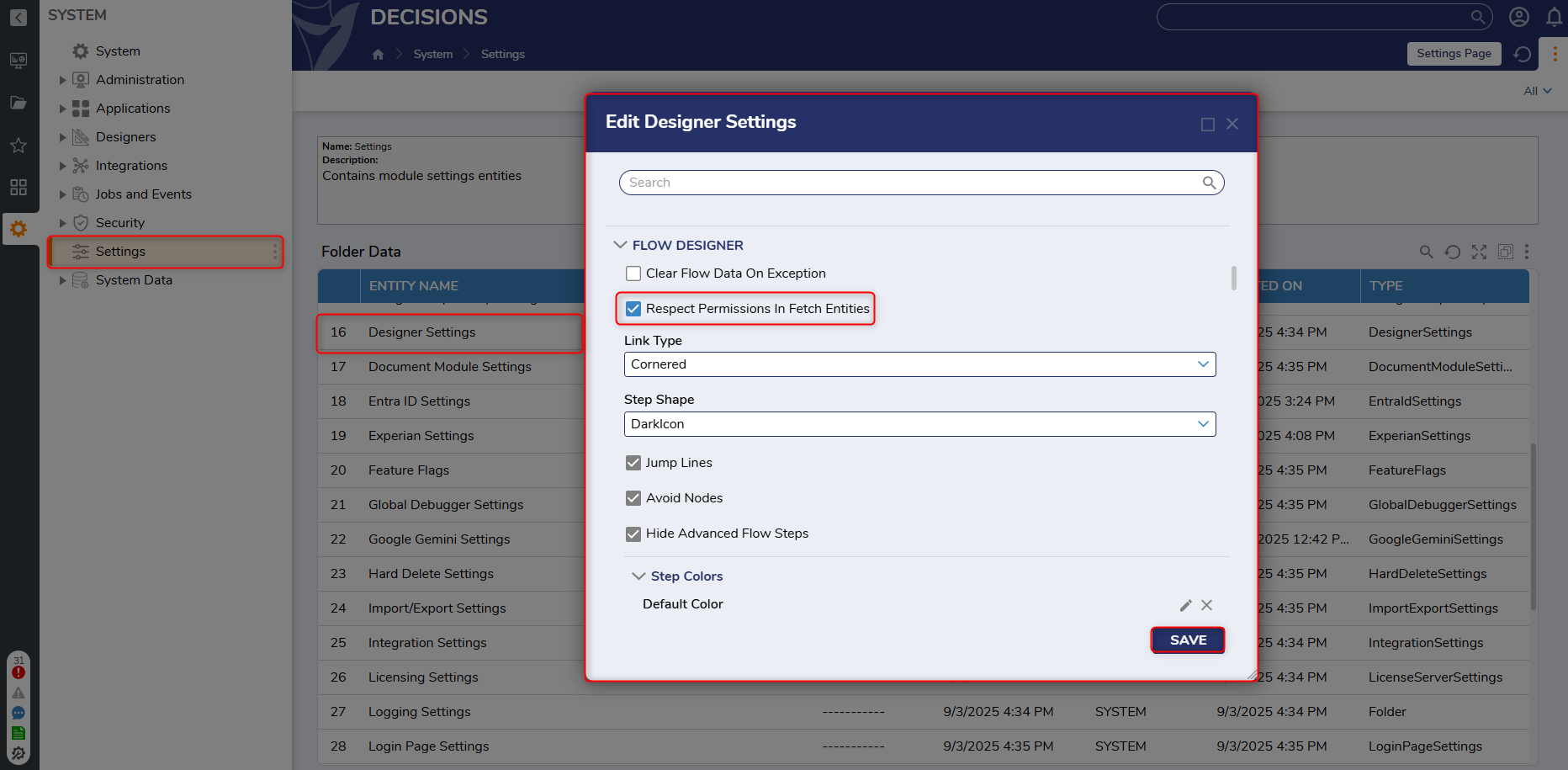 |
Fixes
Various security and performance fixes have been added.
Infrastructure
| DT Title | Description | Occurs In |
|---|---|---|
| [DT-045637] Decisions Dynamic Certificate Reloading | Users will no longer experience a service restart when renewing and updating a Decisions certificate. | 9.x |
Modules
| DT Title | Description | Occurs In |
|---|---|---|
| [DT-044988] SSO module steps are not available system-wide | Users will no longer see a validation error "Entity is not part of the Project" when steps or datatypes of Okta SAML or OpenID are used in a Project. | 9.11-9.17 |
| [DT-046311] All "Access" type to be configurable on the Box Create Shareable Link step | A new property, 'Access Type', has been added to the Create Shared Link step. This setting is a dropdown field in which Users can select Open, Company, and Collaborators as types. | 9.x |
| [DT-046406] PowerShell Module Steps Throw 'Could Not Load File or Assembly' Error | The PowerShell Module steps will now execute as expected, without errors. | 9.x |
Forms
| DT Title | Description | Occurs In |
|---|---|---|
| [DT-045754] Active Form Flow Designer: An 'Object Reference set to an instance of an object' error is displayed after clicking on the 'Compare' action. | The Compare Utility for Active Form Flows will now be displayed when the compare action is clicked. | 9.x |
| [DT-046040] Compare Versions Dialog: Inputs configured in the Form and Rule designers are not displayed. | Inputs configured for Forms and Rules will now be displayed when Users add, remove, or update the Input type. | 9.x |
| [DT-046218] Active Form Flow Designer: Names of the steps inside 'Form Rules' category get changed when dragged onto the canvas for the first time. | The names of steps in the Form Rules category will be retained when added to an Active Form Flow. | 9.x |
Flows
| DT Title | Description | Occurs In |
|---|---|---|
| [DT-044832] Flow Designer: Create Straight Lines for Steps Added via 'Add After Dialog' | Steps added to a Flow using the Add After dialog will now have connectors with straight lines, rather than curved lines. | 9.x |
| [DT-046086] Uppercase Endpoint Support | Custom endpoints in Decisions will now be case-insensitive to support uppercase letters in a URL. | 9.x |
| [DT-045400] Flow Steps - 'Show Form [External Form]'/'Add Task [External Form]': Need to update the icons if the form is assigned. | The icons for the 'Show Form [External Form]' and 'Add Task [External Form]' steps have been updated in the Flow Designer when a selected Form is assigned. | 9.x |
| [DT-045404] Flow Debugger- Step Inspection dialog: 'Expand/Collapse All' and 'Copy' action overlaps on the 2nd line under 'Input' section. | Padding has been removed to prevent the 'Expand/Collapse All' and 'Copy' action from overlapping on the second line under the Input section. | 9.x |
| [DT-045670] Creating Case Entities with empty 'Parent Folder ID' creates entity in legacy folder. | A required fatal validation, 'Parent Folder ID cannot be left empty,' has been added to prevent Case Entities from being created with an empty Parent Folder ID. The step will also throw an error instead of placing the entity in the legacy folder. | 9.14-9.17 |
| [DT-046088] Flow Designer: Warning appears when using "Catch Exception" step in "Add After" dialog | The Catch Exception step, and other steps that do not require input connections, have been hidden from the Add After dialog. These steps will still be available in the toolbox. | 9.x |
| [DT-046163] Get Structure and Member Description JSON Type Support | The Get Structure and Member Description Step will now support data structures made from JSON. | 9.x |
| [DT-046208] Async flows set to use one thread still creates two threads | Fixed an issue where Async Flows were running two threads when set to one. | 9.x |
| [DT-046278] Global Debugger NullReferenceException | Fixed an issue where a null reference exception occurred when running the global debugger with UseTimeZoneTranslation enabled in the settings.xml file. | 9.x |
| DT-046236] Flow Debugger: Hide the Scrubber | The slider located at the bottom of the Flow Debugger has been removed due to being unnecessary. | 9.x |
System / Portal Administration
| DT Title | Description | Occurs In |
|---|---|---|
| [DT-046342] App description gets truncated in the App Store details view | Fixed an issue that caused a long description for an accelerator to be truncated even after a Service restart. This description will now be displayed correctly on the App Store page. | 9.x |
| [DT-046126] Designer User can access System Folders | Designer Users are now restricted from accessing System folders/files through search, while still being allowed to view Designer Repository items that reside under System. | 9.x |
Rules
| DT Title | Description | Occurs In |
|---|---|---|
| [DT-045343] Formula Designer: 'Error parsing formula' message is displayed in the log after saving the formula. | Fixed issue where 'Error parsing formula' appeared in the Logs during a formula configuration or save. | 9.x |
| [DT-045955] Truth / Rule Table: Change execution color in Debug Tree on Debug Completion or Failure | The text color in the Debug tree will change after execution for truth and rule tables. The color green represents Debug completion, and red represents Debug failure. | 9.x |
| [DT-046216] Rule Table Designer: Information about rule input, verb, output actions are not displayed in compare utility. | The compare utility will now display details about Rule input, output actions, etc, for Rule and External Truth Tables. | 9.x |
| [DT-046239] Matrix Rule - Allow Action as True: Property Grid dialog does not open when clicked on cell action for existing or edited rules. | Users are now able to configure output actions in a Matrix Rule. | 9.x |
| [DT-046123] Context Menu: The 'Compare Versions' action is not displayed on various Rules. | The 'Compare Versions' context menu action will now be displayed on various rules except 'Matrix Rule'. | 9.x |
Reports
| DT Title | Description | Occurs In |
|---|---|---|
| [DT-045912] Query and Table Integrations Cannot Utilize Encrypted or PII Data Correctly on Reports | All Byte fields will now be exposed when using query integration. This will help Users with types that contain PII fields determine whether a particular field is encrypted. Users must select the correct Byte field and also specify its actual type, for example, string. | 9.15-9.17 |
| [DT-046288] Flow Inline Field Not Triggering on Subsequent Pages After Applying Report Filter | Fixed issue in Reports where Flow inline fields were rendering empty on subsequent pages, when the Report was run with a filter applied on any of the fields other than the Flow inline field | 9.16, 9.17 |
Data Structures
| DT Title | Description | Occurs In |
|---|---|---|
| [DT-044436] GraphQL: Renaming a GraphQL Service Generates Duplicate Data Structures | Renaming a GraphQL Service has been disabled to prevent Users from generating duplicate data structures. | 9.x |