Step Details | |
| Introduced in Version | 9.18.0 |
| Last Modified in Version | -- |
| Location | PGP |
The Clear Sign File step allows Users to digitally sign a file while keeping file contents in plain PGP text.
Upgrading to v8.13+
Customers using the Sign File, Clear Sign File, or Sign And Encrypt File steps need to drag and drop these steps after upgrade into the Flows using them.
Steps that are already in Flows may have their mapping set to Null on upgrade.
Prerequisites
- This step requires the PGP module to be installed before it will be available in the toolbox.
- Users must download GPG before utilizing this and other PGP steps.
Considerations
In v9.18, PGP steps were moved to a legacy category, and new steps were added. While the new PGP steps use an updated encryption/decryption approach (based on AEAD/OCB mode), both categories of steps can be utilized as they have the same functionality.
Properties
Inputs
| Property | Description | Data Type |
|---|---|---|
| Algorithm | Allows the user to select the Hash Algorithm type from a dropdown list (MD5, Sha1, RipeMD160, DoubleSha, MD2, Tiger192, Havel5pass160, Sha256, Sha384, Sha512, Sha224). To see the dropdown list, select Constant mapping. | HasAlgorithmTag |
| Data | The desired file to sign | List of Byte |
| Output File Name | Allows the user to specify the file name and extension (i.e., SignednewFile.pdf) | String |
| Private Key | Generated PGP private key file | List of Byte |
| Private Key Password | Password for the specified Private Key | String |
Outputs
| Property | Description | Data Type |
|---|---|---|
| Output | Outputs the signed file with the contents of the file in PGP encrypted plain text | FileData |
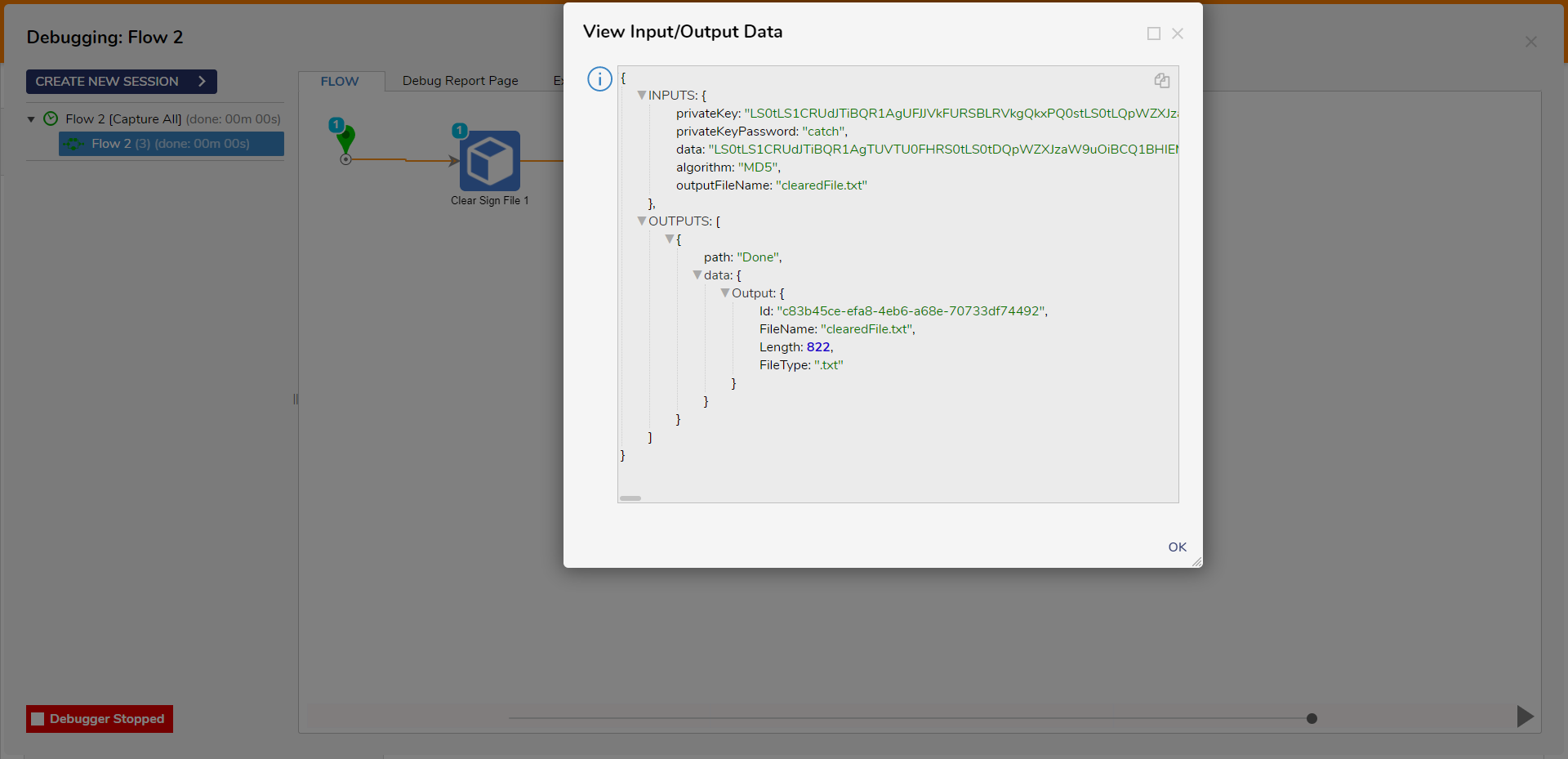
Example Inputs and Outputs
| Algorithm | Data | Output File Name | Private Key | Private Key Password | Output |
|---|---|---|---|---|---|
| Sha1 | lesson.txt | signedLesson.txt | priv-sec.asc | chart | Id: "4141afa7-f81f-4069-89ba-85417fdec462",FileName: "clearedFile.txt",Length: 412,FileType: ".txt" |
| MD5 | Null | package.txt | priv-sec.asc | chart | EXCEPTION MESSAGE |
| Sha256 | processing.xls | Empty | priv-sec.asc | chart | EXCEPTION MESSAGE |
| Sha384 | example.txt | exampleSign.txt | priv-sec.asc | Null | EXCEPTION MESSAGE |
| Null | showPage.html | signShow.html | priv-sec.asc | chart | EXCEPTION MESSAGE |
| MD2 | single.txt | exampleSingle.txt | preExpample.txt | chart | EXCEPTION MESSAGE |
Common Errors
Object reference not set to an instance of an object.
If the Private Key Password or Output File Name is null or empty, the step will cause an error.
To correct this, ensure that a value is entered or mapped to the field.
Exception Message:
Exception Stack Trace: DecisionsFramework.Design.Flow.ErrorRunningFlowStep: Error running step Clear Sign File 1[ClearSignFile] in flow [Flow 2]: Exception invoking method ClearSignFile on class PGPSteps
 ---> DecisionsFramework.LoggedException: Exception invoking method ClearSignFile on class PGPSteps
 ---> System.NullReferenceException: Object reference not set to an instance of an object.
 at Decsisions.PGP.Steps.Processor.GetPrivateKey(PgpSecretKey secretKey, String password
 at Decsisions.PGP.Steps.ClearSignedFileProcessor.ClearSignStream(Stream dataStream, Stream keyIn, String privateKeyPassword, HashAlgorithmTag digest, Stream outputStream
 at Decsisions.PGP.Steps.PGPSteps.ClearSignFile(Byte[] privateKey, String privateKeyPassword, Byte[] data, HashAlgorithmTag algorithm, String outputFileName)
   --- End of inner exception stack trace --- at DecisionsFramework.Design.Flow.StepImplementations.InvokeMethodStep.Run(StepStartData data
 at DecisionsFramework.Design.Flow.FlowStep.RunStepInternal(String flowTrackingID, String stepTrackingID, KeyValuePairDataStructure[] stepRunDataValues, AbstractFlowTrackingData trackingData
 at DecisionsFramework.Design.Flow.FlowStep.Start(String flowTrackingID, String stepTrackingID, FlowStateData data, AbstractFlowTrackingData trackingData, RunningStepData currentStepData)
   --- End of inner exception stack trace ---
The input is not a valid Base-64 string as it contains a non-base 64 character, more than two padding characters, or an illegal character among the padding characters
If the file uploaded or mapped to the Private Key is an invalid PGP Private Key file or any other file type (ie. .pdf, .docx, etc.), the step will cause an error.
To correct this, ensure that the only file being mapped or uploaded for the Private Key field is a correctly formatted PGP Private Key file.
Exception Message:
Exception Stack Trace: DecisionsFramework.Design.Flow.ErrorRunningFlowStep: Error running step Clear Sign File 1[ClearSignFile] in flow [Flow 2]: Exception invoking method ClearSignFile on class PGPSteps
 ---> DecisionsFramework.LoggedException: Exception invoking method ClearSignFile on class PGPSteps
 ---> System.IO.IOException: The input is not a valid Base-64 string as it contains a non-base 64 character, more than two padding characters, or an illegal character among the padding characters. at Org.BouncyCastle.Bcpg.OpenPgp.PgpUtilities.GetDecoderStream(Stream inputStream
 at Decsisions.PGP.Steps.Processor.GetSecretKeyRingBundle(Stream inputStream
 at Decsisions.PGP.Steps.Processor.GetPgpSecretKey(Stream stream
 at Decsisions.PGP.Steps.ClearSignedFileProcessor.ClearSignStream(Stream dataStream, Stream keyIn, String privateKeyPassword, HashAlgorithmTag digest, Stream outputStream
 at Decsisions.PGP.Steps.PGPSteps.ClearSignFile(Byte[] privateKey, String privateKeyPassword, Byte[] data, HashAlgorithmTag algorithm, String outputFileName)
   --- End of inner exception stack trace --- at DecisionsFramework.Design.Flow.StepImplementations.InvokeMethodStep.Run(StepStartData data
 at DecisionsFramework.Design.Flow.FlowStep.RunStepInternal(String flowTrackingID, String stepTrackingID, KeyValuePairDataStructure[] stepRunDataValues, AbstractFlowTrackingData trackingData
 at DecisionsFramework.Design.Flow.FlowStep.Start(String flowTrackingID, String stepTrackingID, FlowStateData data, AbstractFlowTrackingData trackingData, RunningStepData currentStepData)
   --- End of inner exception stack trace ---
Buffer cannot be null.
If the Data field is null or empty, the step will cause an error.
To correct this, ensure that a file is mapped or uploaded to the Data field.
Exception Message:
Exception Stack Trace: DecisionsFramework.Design.Flow.ErrorRunningFlowStep: Error running step Clear Sign File 1[ClearSignFile] in flow [Flow 2]: Exception invoking method ClearSignFile on class PGPSteps
 ---> DecisionsFramework.LoggedException: Exception invoking method ClearSignFile on class PGPSteps
 ---> System.ArgumentNullException: Buffer cannot be null. (Parameter 'buffer'
 at System.IO.MemoryStream..ctor(Byte[] buffer
 at Decsisions.PGP.Steps.PGPSteps.ClearSignFile(Byte[] privateKey, String privateKeyPassword, Byte[] data, HashAlgorithmTag algorithm, String outputFileName)
   --- End of inner exception stack trace --- at DecisionsFramework.Design.Flow.StepImplementations.InvokeMethodStep.Run(StepStartData data
 at DecisionsFramework.Design.Flow.FlowStep.RunStepInternal(String flowTrackingID, String stepTrackingID, KeyValuePairDataStructure[] stepRunDataValues, AbstractFlowTrackingData trackingData
 at DecisionsFramework.Design.Flow.FlowStep.Start(String flowTrackingID, String stepTrackingID, FlowStateData data, AbstractFlowTrackingData trackingData, RunningStepData currentStepData)
   --- End of inner exception stack trace ---
[BusinessRule] Parameter 'algorithm' of 'ClearSignFile' can not be null
If the Algorithm field is null or empty, the step will cause an error.
To correct this, set the mapping for the Algorithm field to Constant and select the desired option.
Step Changes
| Description | Version | Date | Developer Task |
|---|---|---|---|
| New steps have been added to the PGP Module. Existing steps have been added to the PGP Legacy category in the step toolbox. | 9.18 | December 2025 | [DT-046254] |
Documentation:
PGP Module
Forum Posts:
Email Encrypt / Decrypt With PGP Module
Error While Encrypting A File Using PGP
PGP Issues With Decrypting Using Private Key