Considerations
[DT-046184] Bug Fixing - Creating Backups on every Entity Save: In v9.18 and below, the Designer Setting 'Ignore Versions Less Than Age' was not respected. A fix has been implemented in this release. It is recommended that an Administrator observe the current settings and adjust accordingly. Please see more detailed information about the settings functionality here.
9.19 New Features (1/6/2026)
| Feature | Link | Description | Product Category | Screenshot |
|---|---|---|---|---|
| [DT-043339] Impact Viewer For AFF and Respective Form Controls | Active Form Flows Overview | The Form Rules category has been moved to the left-side panel and renamed Logic. The following actions have also been added:
| Forms | (2).gif) |
| [DT-044074] Document Thumbnail Previews on Gallery | Form Control Glossary | A new property, 'Is Single Select', has been added to enable single selection on the Image Gallery. This property has the following specifications:
| Forms |  |
| [DT-044473] Run Flow Drop-Down Control for Pages | Adding Run Flow Controls to a Page | A new control named Run Flow Dropdown has been introduced in the Page Designer. This control has the following specifications:
| Pages/Dashboards |  |
| [DT-045716] Add Action Names as Input Data to Visibility Rules | Entity Action Visibility | The Action Name node in visibility rules will now display User, group User, and shared User actions. This new feature has the following specifications:
| Rules | 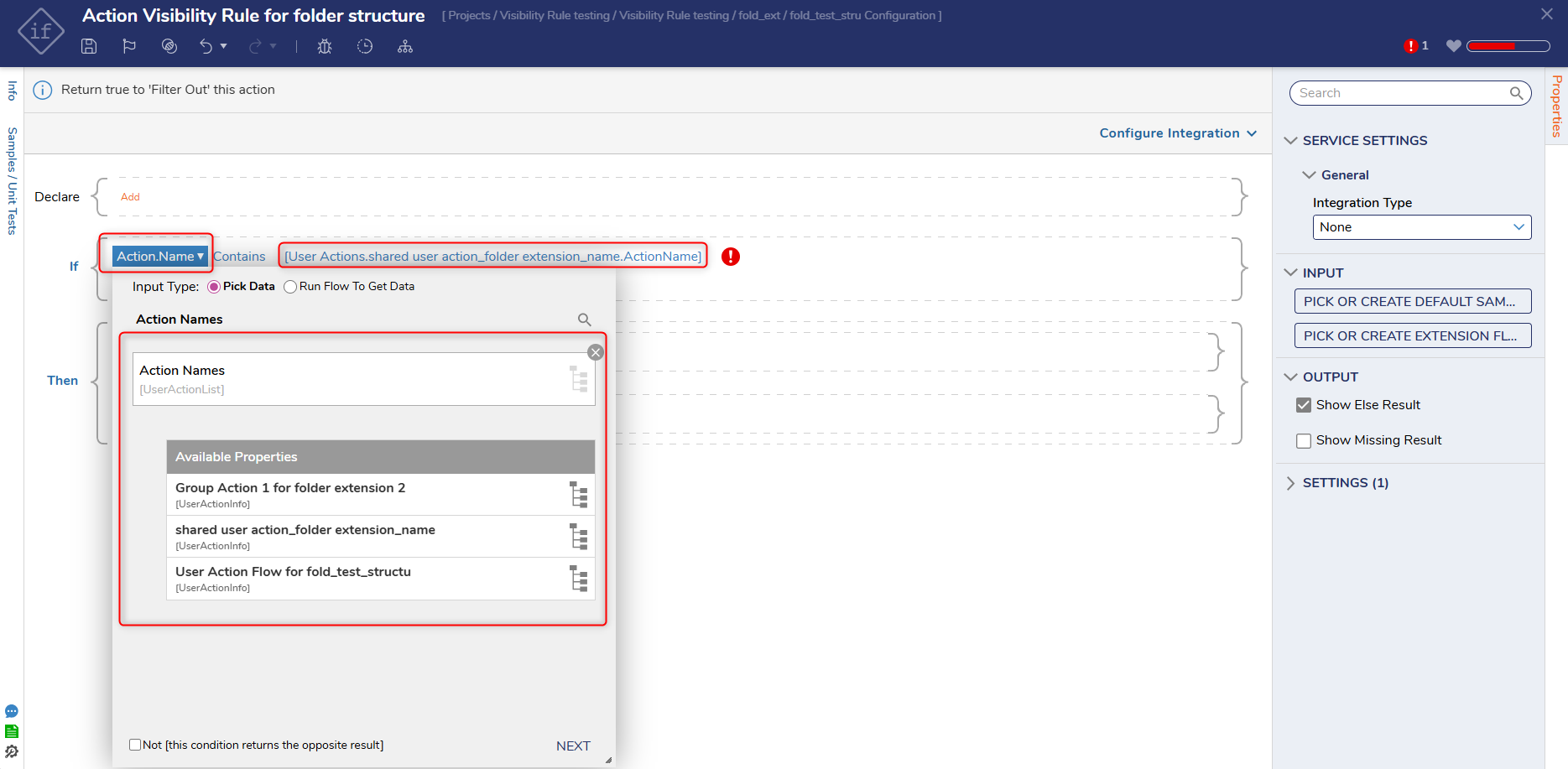 |
| [DT-046386] AI - Generate Description for External Truth Table | Generate and Iterate with AI | Users can now generate AI-based descriptions for External Truth Tables. These descriptions will be automatically created using the same AI integration that is currently used for element generation. To use this feature, click on the 'Generate Description Using AI' action in the Info panel. This action will automatically generate a description for the existing Designer Element. | Rules |  |
| [DT-046387] AI - Generate Description for Rule Table | Generate and Iterate with AI | Users can now generate AI-based descriptions for Rule Tables. Users can generate descriptions using AI on Rule Tables for Rule input, Rule verb, and Output actions. To use this feature, click on the 'Generate Description Using AI' action in the Info panel. This action will automatically generate a description for the existing Designer Element. | Rules | .png) |
| [DT-046388] AI - Generate Description for Report | Generate and Iterate with AI | Users can now generate AI-based descriptions for Reports. These descriptions will be automatically created using the same AI integration that is currently used for element generation. To use this feature, click on the 'Generate Description Using AI' action in the Info panel. | Reports |  |
| [DT-046100] AI - Generate Description for 'Flows' | Generate and Iterate with AI | Users can now generate AI-based descriptions for Flows. These descriptions will be automatically created using the same AI integration that is currently used for element generation. To use this feature, click on the 'Generate Description Using AI' action in the Info panel. | Flows | .png) |
| [DT-046101] AI - Generate Description for 'Forms' | Generate and Iterate with AI | Users can now generate AI-based descriptions for Forms. These descriptions will be automatically created using the same AI integration that is currently used for element generation. To use this feature, click on the 'Generate Description Using AI' action in the Info panel. | Forms | 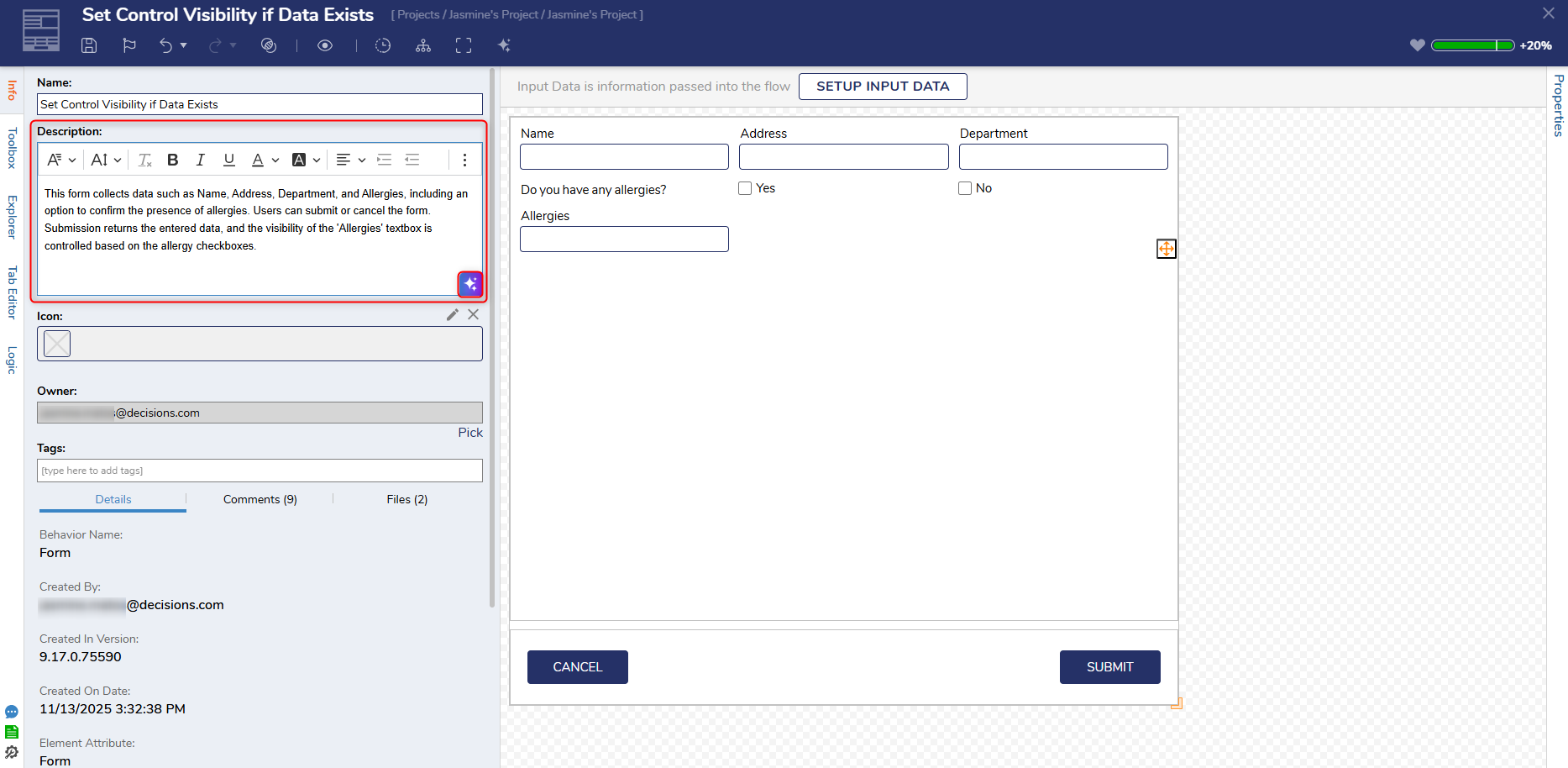 |
| [DT-046102] AI - Generate Description for 'Statement Rules' | Generate and Iterate with AI | Users can now generate AI-based descriptions for Statement Rules. These descriptions will be automatically created using the same AI integration that is currently used for element generation. To use this feature, click on the 'Generate Description Using AI' action in the Info panel. | Rules |  |
| [DT-046103] AI - Generate Description for 'Pages' | Generate and Iterate with AI | Users can now generate AI-based descriptions for Pages. These descriptions will be automatically created using the same AI integration that is currently used for element generation. To use this feature, click on the 'Generate Description Using AI' action in the Info panel. | Pages/Dashboards | 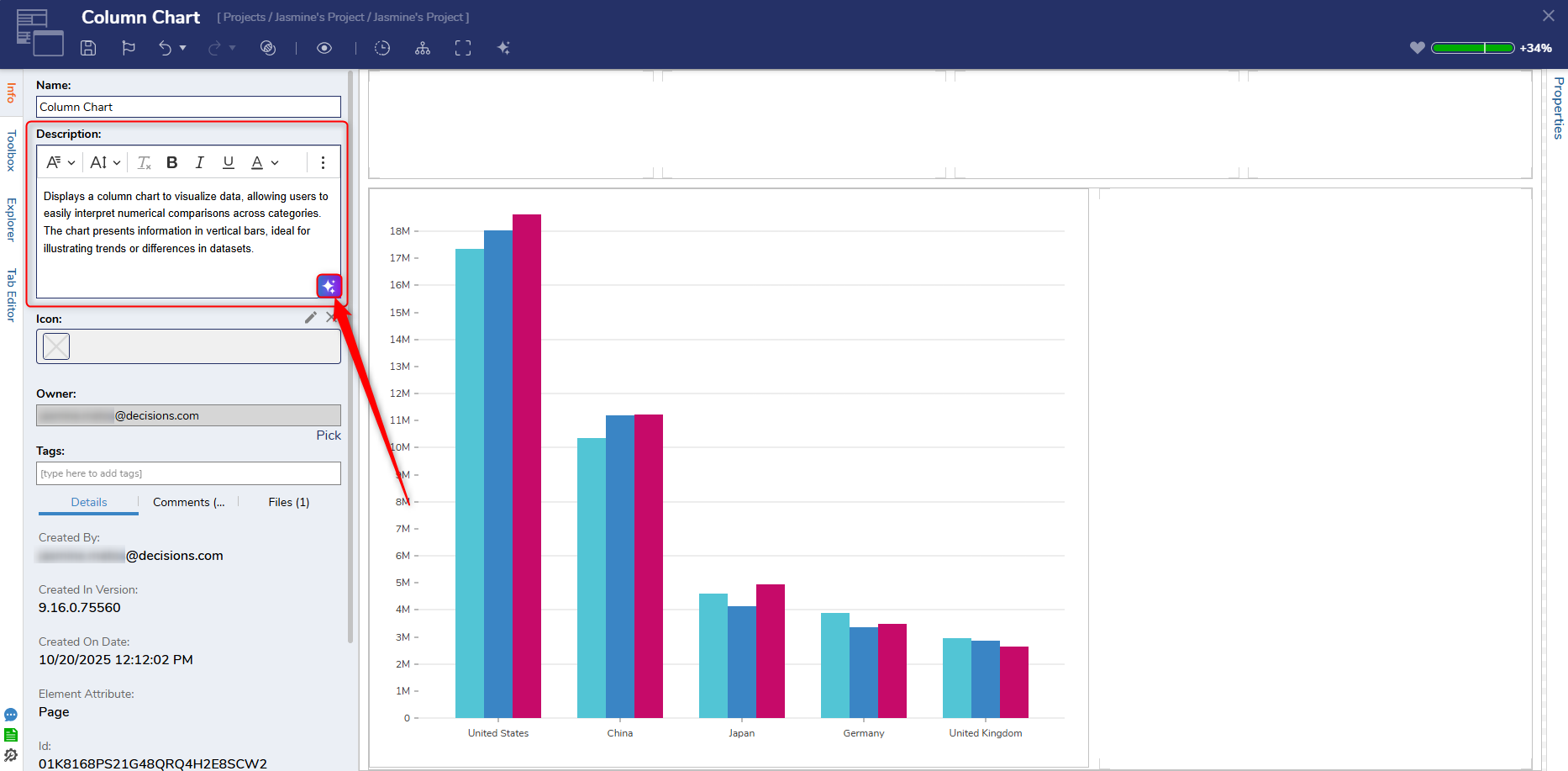 |
| [DT-046104] AI - Generate Description for 'Truth Table' | Generate and Iterate with AI | Users can now generate AI-based descriptions for the Truth Table. These descriptions will be automatically created using the same AI integration that is currently used for element generation. To use this feature, click on the 'Generate Description Using AI' action in the Info panel. | Rules |  |
Enhancements
| Feature | Link | Description | Product Category | Screenshot |
|---|---|---|---|---|
| [DT-044287] Improve Form Sizing and Responsiveness | Form Settings in the Flow Designer | A new property has been added to the Show Form step called 'Percentage Based Size' and is located under Form Setup > Sizing >Dialog> Size Type. This property introduces responsive dialog sizing, which allows developers to define dimensions as a percentage of the viewport (e.g., 80% width, 80% height). This also enables dialogs to scale automatically with screen size, remain centered during maximize/restore, and dynamically adjust when the browser window is resized. | Forms |  |
| [DT-046074] Enhance GraphQL Cert Settings | Integration with Services Via GraphQL | Users can now add a certificate to GraphQL settings. This update also enables Users to see information about the selected certificate. | Integrations |  |
| [DT-046237] Flow Designer - Graphical Comparison | Using The Comparison Utility | The Flow Designer Graphical Comparison has been redesigned with the following updates:
| Flows | 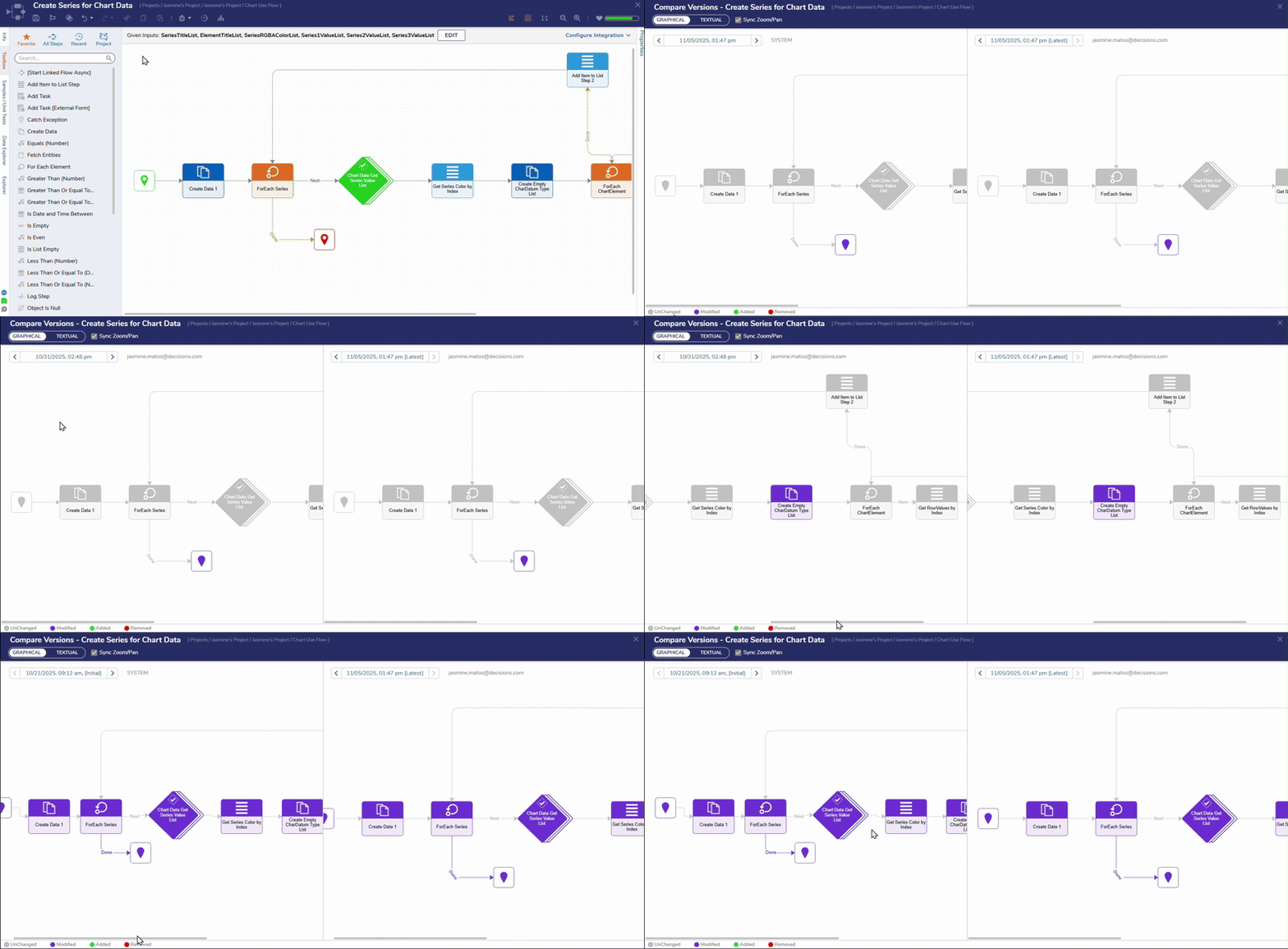 |
| [DT-046258] Compare Utility - Need to show Design Pattern Id or Name and ability to open in new window | Using The Comparison Utility | The Design Pattern name and ID will now be displayed in the compare utility of the designer element where the design pattern is used. | Flows |  |
| [DT-045129] GraphQL Service Does Not Allow For Dynamic Service URL | Integration with Services Via GraphQL | A new property has been added to the GraphQL Service dialog named 'Get Service URL from Constant'. This property gives Users the ability to use a String project constant containing the GraphQL service URL, allowing Users to dynamically update the constant to specify unique service URLs for different environments without the need to remake the GraphQL service. | Integrations |  |
Fixes
Various security and performance fixes have been made.
Infrastructure
| DT Title | Description | Occurs In |
|---|---|---|
| [DT-046506] AI Telemetry - Update reported fields for better filtering | Additional fields have been added to Telemetry data for the following generative AI features:
| 9.x |
Forms
| DT Title | Description | Occurs In |
|---|---|---|
| [DT-046124] View Completed Form action throws Context not found error when the completed form contains a property grid. | Viewing completed forms no longer throws an error when a PropertyGrid control is present. | 9.x |
| [DT-046401] Simple Forms: Errors Produced on Mobile When Closing Simple Form with File Download Control | Fixed an issue that caused an error to display for Simple Form submissions on the Mobile portal when the Form has a File Download control. | 9.x |
| [DT-046508] Auto Complete Text Area: Error When Enabling Static Text Property | Enabling static text and static list properties no longer causes an error. | 9.x |
| [DT-041847] Form Rich text editor doesn't maintain text color, sizing, and highlight when text is sent using Send email step | Updates have been made to the Rich Text Editor to prevent text size, background, and color formatting from not being respected in sent emails. These changes will now be reflected as expected. | 9.x |
Flows
| DT Title | Description | Occurs In |
|---|---|---|
| [DT-045891] Convert CSV to Excel: Try To Format Numbers doesn't keep decimal places | Decimal values will now be displayed correctly in Excel cells when downloaded. | 9.15-9.18 |
| [DT-046256] Flow Designer Compare Utility: Rename 'Rule Input Data' to 'Flow Input Data' under Flow Information | Flow Inputs will now be displayed in the Flow Input Data section in the Flow Designer Compare Utility. The Rule Input Data section has been removed. | 9.x |
| [DT-046260] Improve Start and End Step Alignment When Generating Sub-Flows from Grouped Steps | Users will see improved connector lines when creating sub-flows in the Flow Designer. | 9.x |
| [DT-046339] Update Backup Creation Logic Across All Designers | When Users save an entity, a backup of the entity before being saved will be generated, and the new version will be saved as 'latest.' | 9.x |
| [DT-046376] Compare Versions Dialog: Incorrect 'User Email' is displayed in drop down for backup version | Backups will now be created during checkpoints if the 'Archive Old Versions on Save' property is set to true and the Users save any designer entity within the configured time limit. If the property is set to false, no backup will be generated when creating checkpoints. If'Archive Old Versions on Save' is enabled and a time limit is specified, backups will be generated as expected. To view the changes from the Canvas, Users must select a previous version from the drop-down in the left panel. | 9.x |
| [DT-046407] Textual Compare: Change logic of text opacity | The Textual Compare utility has been updated to only highlight specific text that has been modified, added, or removed. | 9/x |
| [DT-046455] The NetworkReadAllBytes step fails intermittently when multiple concurrent calls are executed. | The NetworkReadAllBytes step will no longer fail intermittently and will now work as expected. | 9.x |
| [DT-046322] Flow Steps: The 'Edit' icon is not displayed on hover for various flow steps within Flow Designer and the Debugger | Previously, the 'Edit' icon and preview of the picked sub entity was not displaying on various Flow steps, such as:
| 9.x |
System / Portal Administration
| DT Title | Description | Occurs In |
|---|---|---|
| [DT-046184] Bug Fixing - Creating Backups on every Entity Save | The Designer setting 'Ignore Versions Less Than Age' will now be respected. This will prevent unnecessary backup creation on entity save. Users can define a time period in this setting, and a backup will be created when this threshold is exceeded. For example, if the 'Ignore Versions Less Than Age' setting is set to 10 min and a User saves the Flow after 10 minutes since the last backup, a new backup will be created. If the setting is set to 10 min, and a User saves the entity only after five minutes since the last backup, a new backup will not be created. Users who prefer the system to create a backup on every save must navigate to Designer Settings, ensure Archive Old versions on save is set to true, and adjust the 'Ignore versions less than age' to show "0" in each timeline. | 9.x |
| [DT-046071] Healthcheck Improper Resolution | Fixed an issue that caused the healthcheck page to improperly report DOWN status (non-200 code) when the Decisions service loses connection within the database backend. | 9.11-9.18 |
| [DT-046305] Unnecessary actions are displayed for the system-level Logging Settings. | Fixed an issue that caused unnecessary folder actions to display for system-level logging settings. | 9.x |
| [DT-046418] AEDT timezone in Linux shows incorrect time in Linux | Linux will now display the AEDT Timezone correctly. | 9.x |
Rules
| DT Title | Description | Occurs In |
|---|---|---|
| [DT-046503] Statement Rule Designer: Error is displayed when clicking on 'Select Data Element' on newly created rule containing design pattern. | An error will no longer be displayed when Users create a Statement Rule with a Design Pattern. | 9.x |
Reports
| DT Title | Description | Occurs In |
|---|---|---|
| [DT-044178] When adding an icon via "From URL" to a subfolder, the parent folder's report data becomes misaligned, and a new report column is added | Fixed an issue that caused the parent folder Report to be misaligned when adding an icon from a URL to a subfolder. | 9.x |