Breaking Changes
[DT-048574] Upgrading From V9 to V10 Does Not Disable Repository Actions: After upgrading, Show Repository Actions will now be disabled because the environment is using Deployment Tower features and the Repository Action Environment Variable is no longer supported.
10.2 New Features (9/15/2026)
| Feature | Link | Description | Product Category | Screenshot |
|---|---|---|---|---|
| [DT-047087] Statement Rule Updates: Add ability to enable/disable actions | Creating Statement Rules | Added the ability to enable or disable output actions in a statement rule. | Rules | 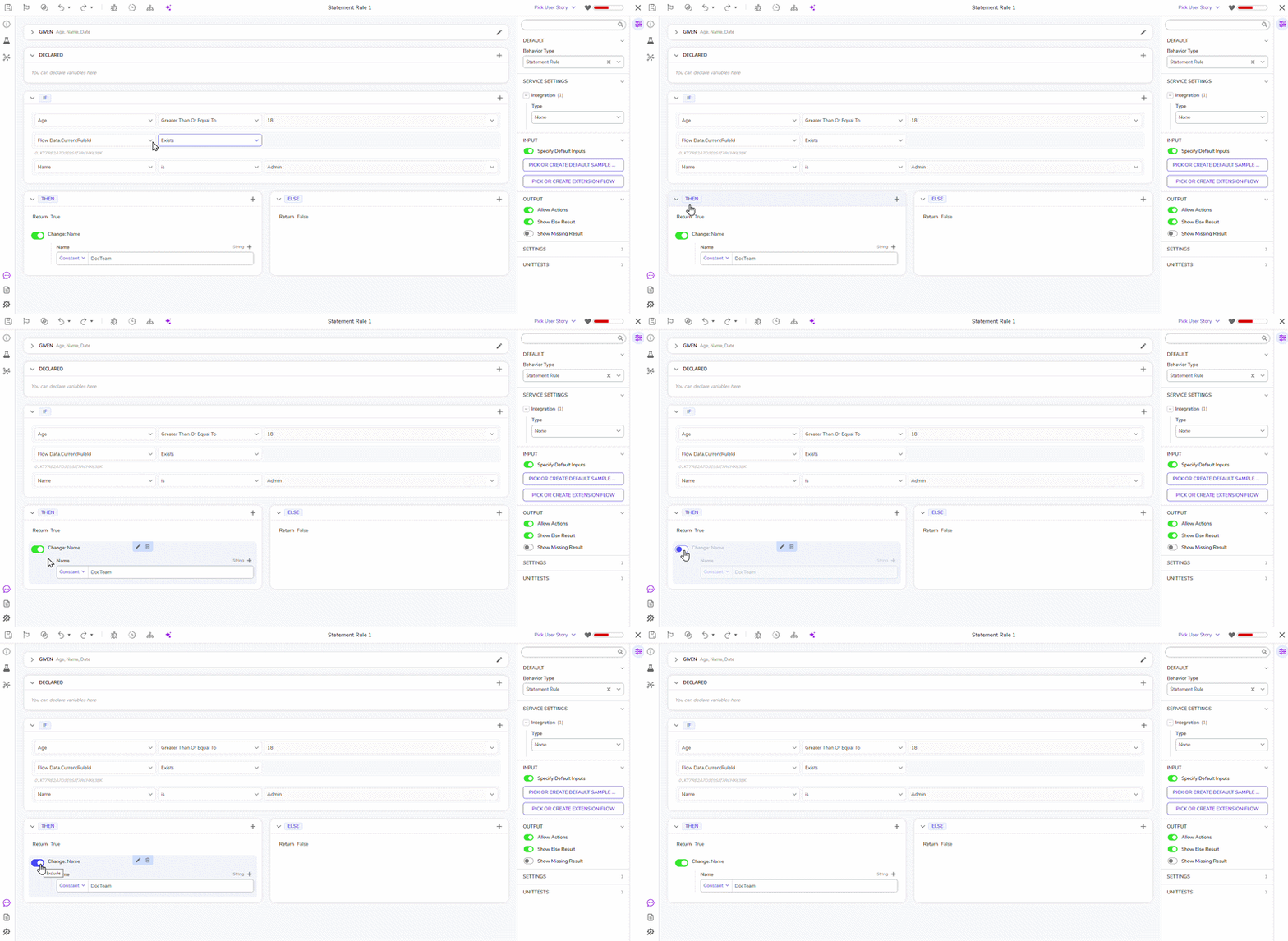 |
| [DT-047125] Support OAuth/Bearer Token Authentication for MCP Endpoints | Decisions MCP Server | Allows a Decisions MCP Server (In a Project, navigate to Public > Integrations > MCP Servers) to use OAuth authentication by leveraging the new functionality that allows Decisions to act as an OAuth Application. | Integrations | 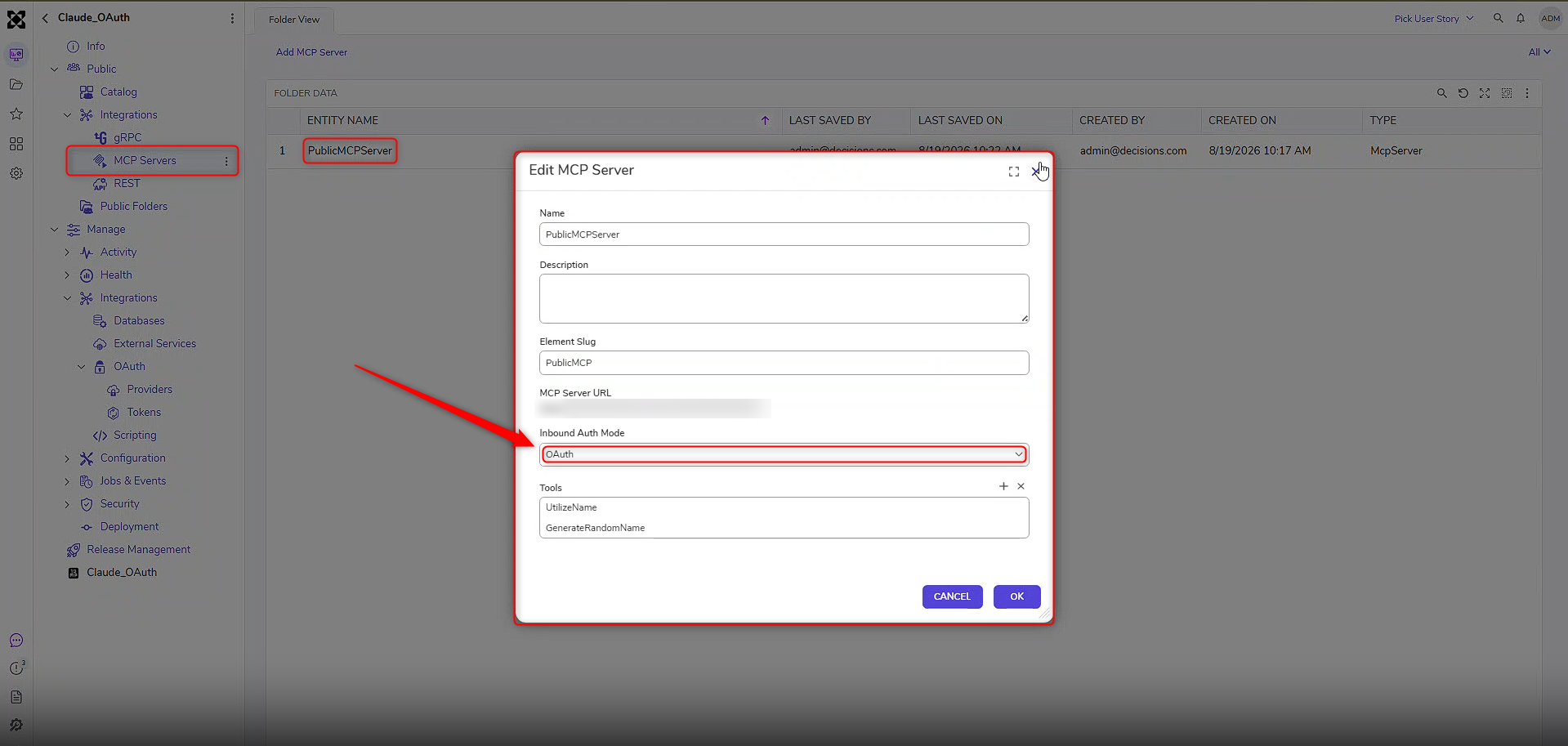 |
| [DT-047164] Ability to Navigate to Different Servers from the Portal Header | Environment Types | Users can navigate to assigned environments by clicking on the badge available in the portal. | System/Portal Administration | 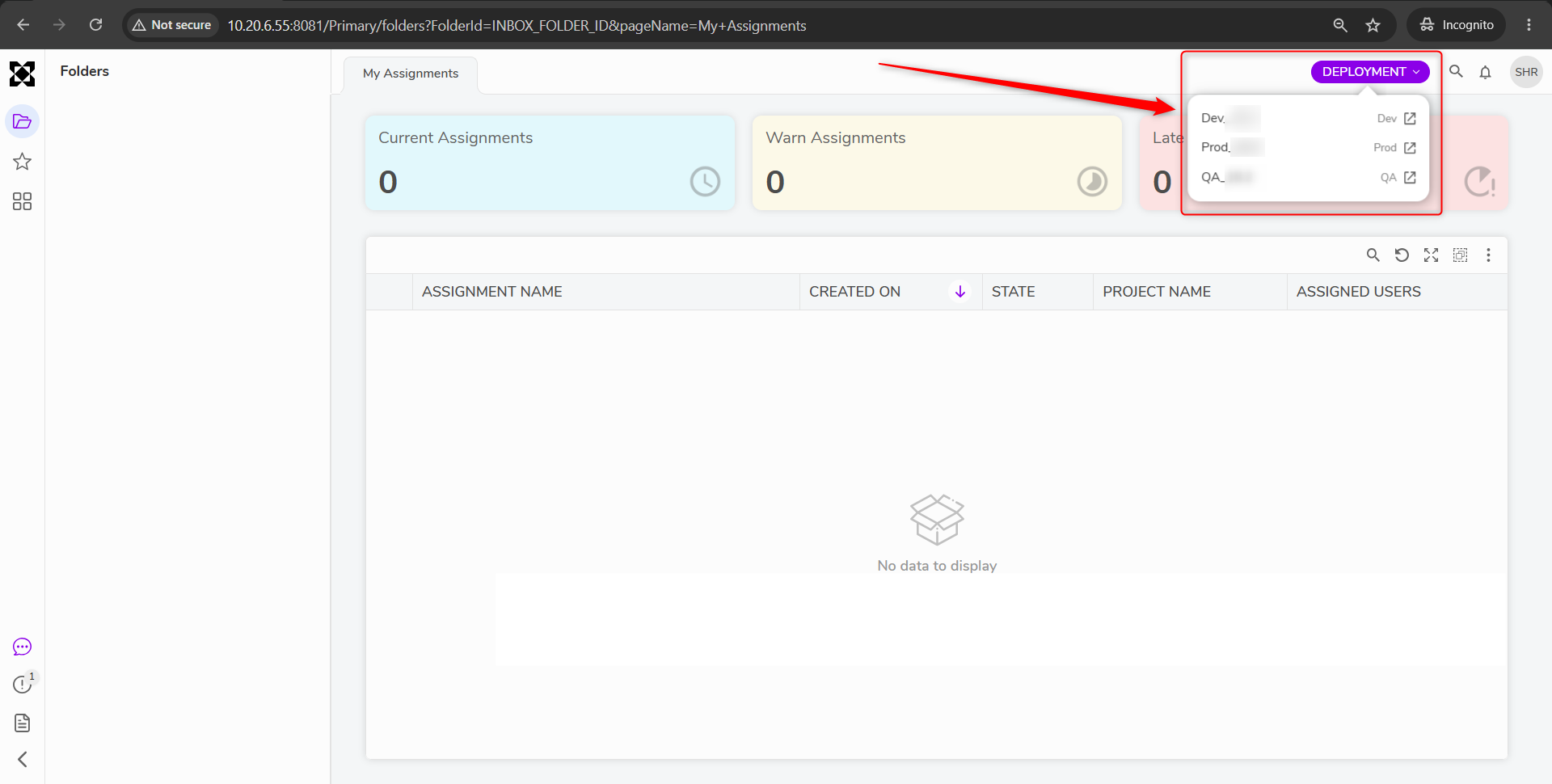 |
| [DT-046026] Converting .xlsm and .xlsb to .xlsx in Decisions | Convert Spreadsheet to XLSX | A new step has been added: ConvertSpreadsheetToXlsx, which converts the files from XLS, XLSM, XLSB, or XLSX to XLSX file format. This step has the following inputs:
| Flows | .png) |
Enhancements
| Feature | Link | Description | Product Category | Screenshot |
|---|---|---|---|---|
| [DT-048271] Custom Web Apps Update | Custom React Web Apps | Custom Web Apps now provide enhanced project management, deployment flexibility, and extensibility through expanded application development capabilities: Improved API client generation: Report filters now generate correctly in the API Client. Reliable download and app links: Links now use the portal URL instead of the internal cluster address, improving accessibility in supported environments. Enhanced Create Wizard experience: Wizard navigation and validation behavior now function correctly. Project Dashboard visibility: Custom Web App names now display on the Project Dashboard. Flexible Case Type management: Users can change the Case Types included in a Custom Web App project after it has been created. Project template access: Re-download a complete project template at any time after the app is created. File upload support: Generated Custom Web Apps now support file upload parameters, including chunked uploads and upload progress callbacks. Instance-aware deployments: Deployed Custom Web Apps now use an instance-scoped URL path, improving support for multi-instance environments. | Projects | 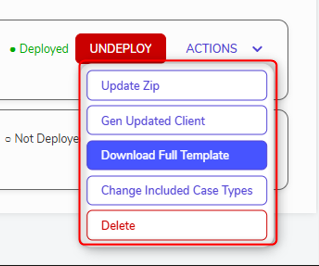 |
| [DT-047659] MHH: Adding a button on the Report to Run a Flow | Deployment Tower Actions | A button is now displayed when there is no data/no matching results after applying a filter to select Deployment Tower reports, i.e., Organization, Environment, Project, and Import Sprint. If data exists, these actions will be hidden. | Deployment Tower | (1).gif) |
| [DT-042432] Tag Editor UI Refresh | Tagging Overview | Tag editor styling has been redesigned. | Projects | 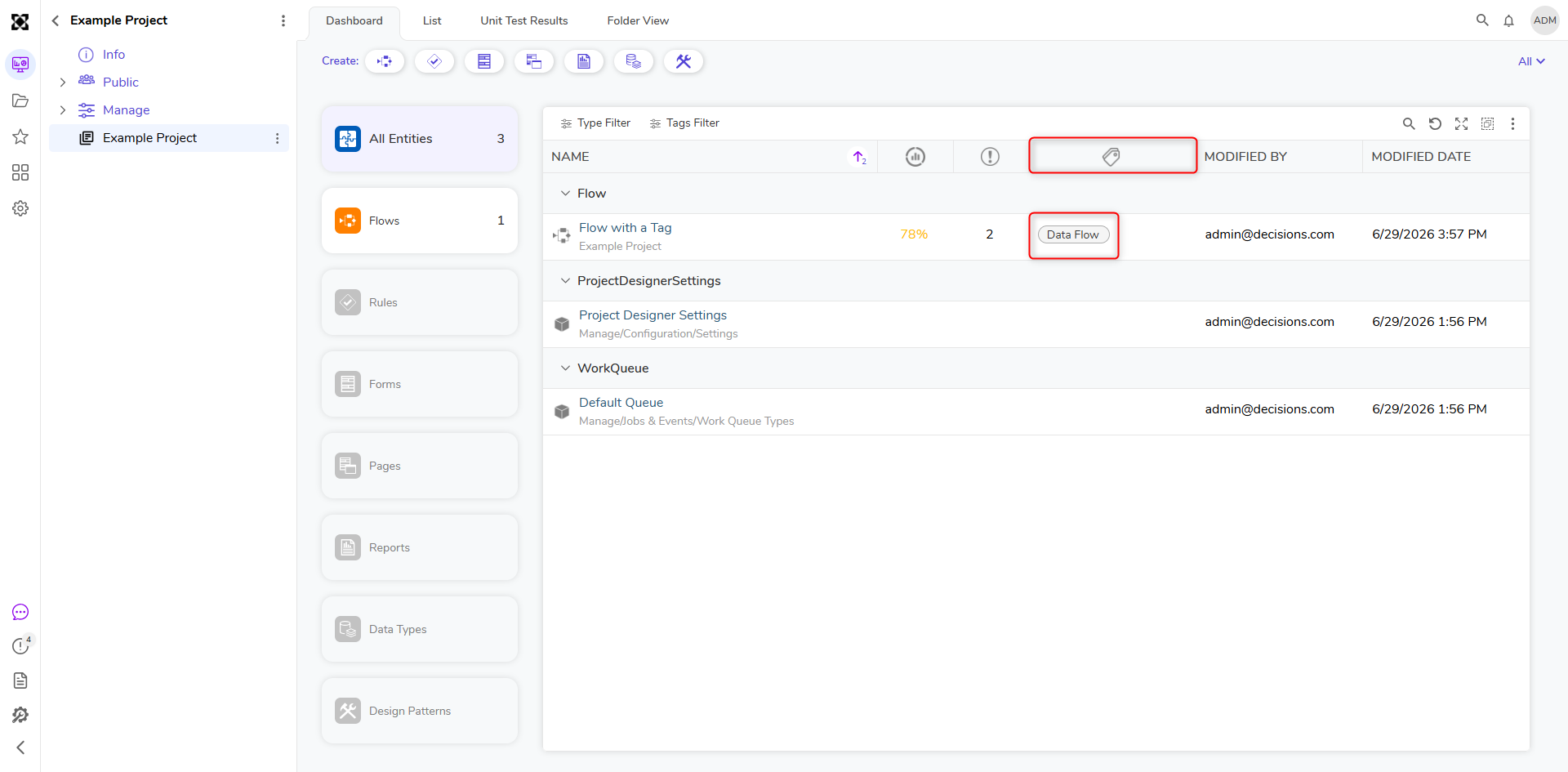 |
| [DT-046939] Output Token Count on Chat Completion Step | Utilizing AI Modules in Decisions | Chat completion steps now output the token count (Input, Output, Total) for each provider with AI Common. | Flows | 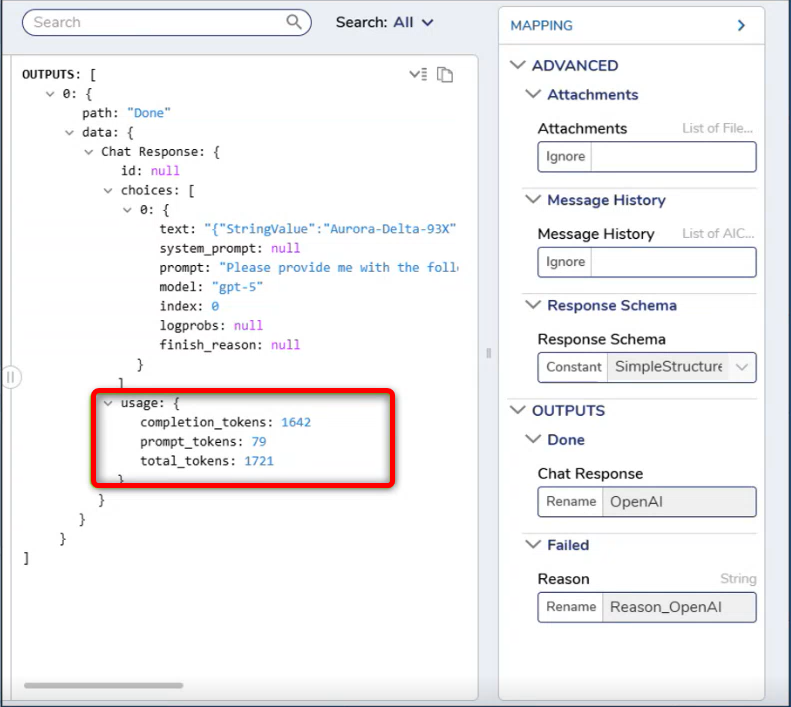 |
| [DT-047000] System>Administration>System Tools>Flow Management>Running Flows: Add a field to display FlowID | Flow Management Dashboard | The Main Flow ID is now included in the Running Flow Report, making it easier to identify and track the flow currently in execution. | System/Portal Administration | 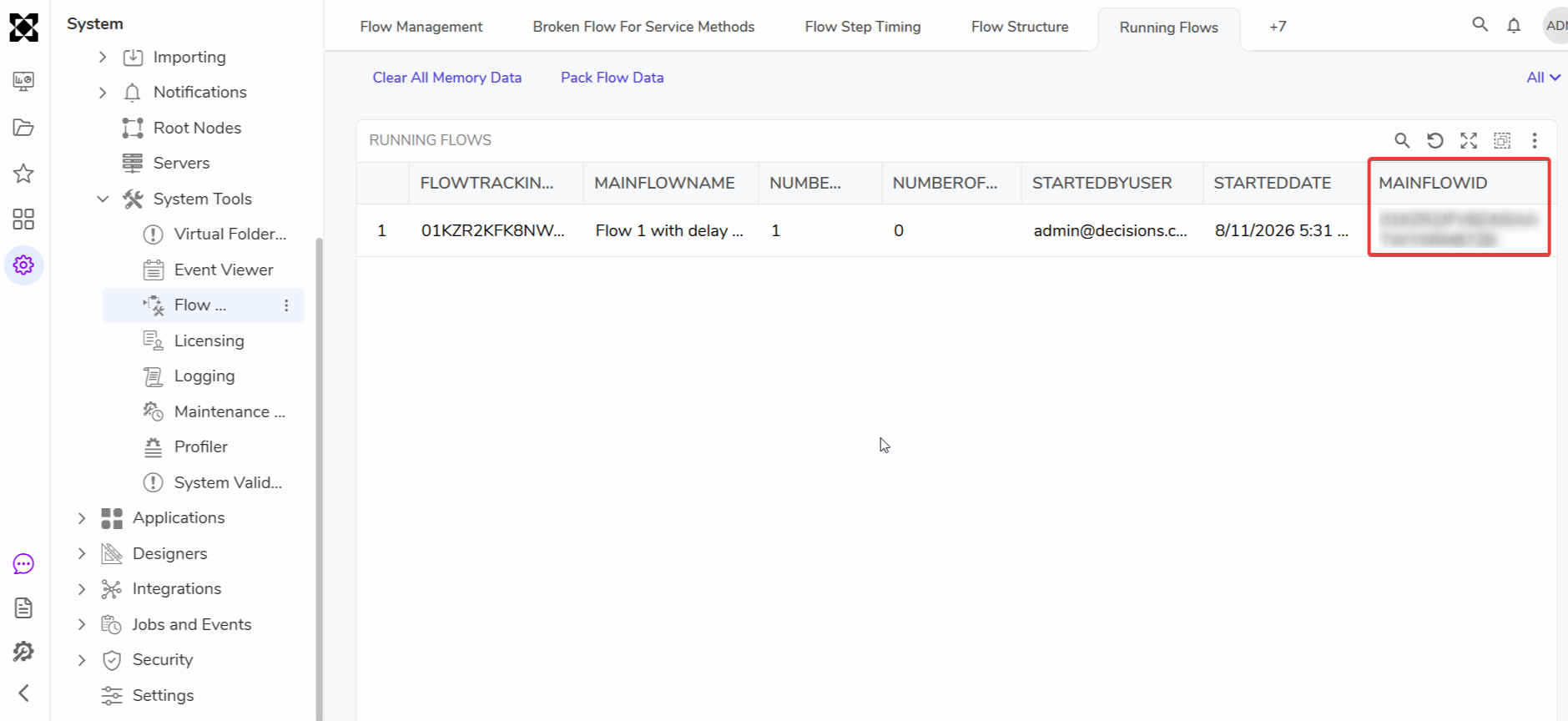 |
| [DT-047164] Ability to Navigate to Different Servers from the Portal Header | Environment Types | Users can now navigate to assigned environments by clicking on the badge available in the portal. | System/Portal Administration | 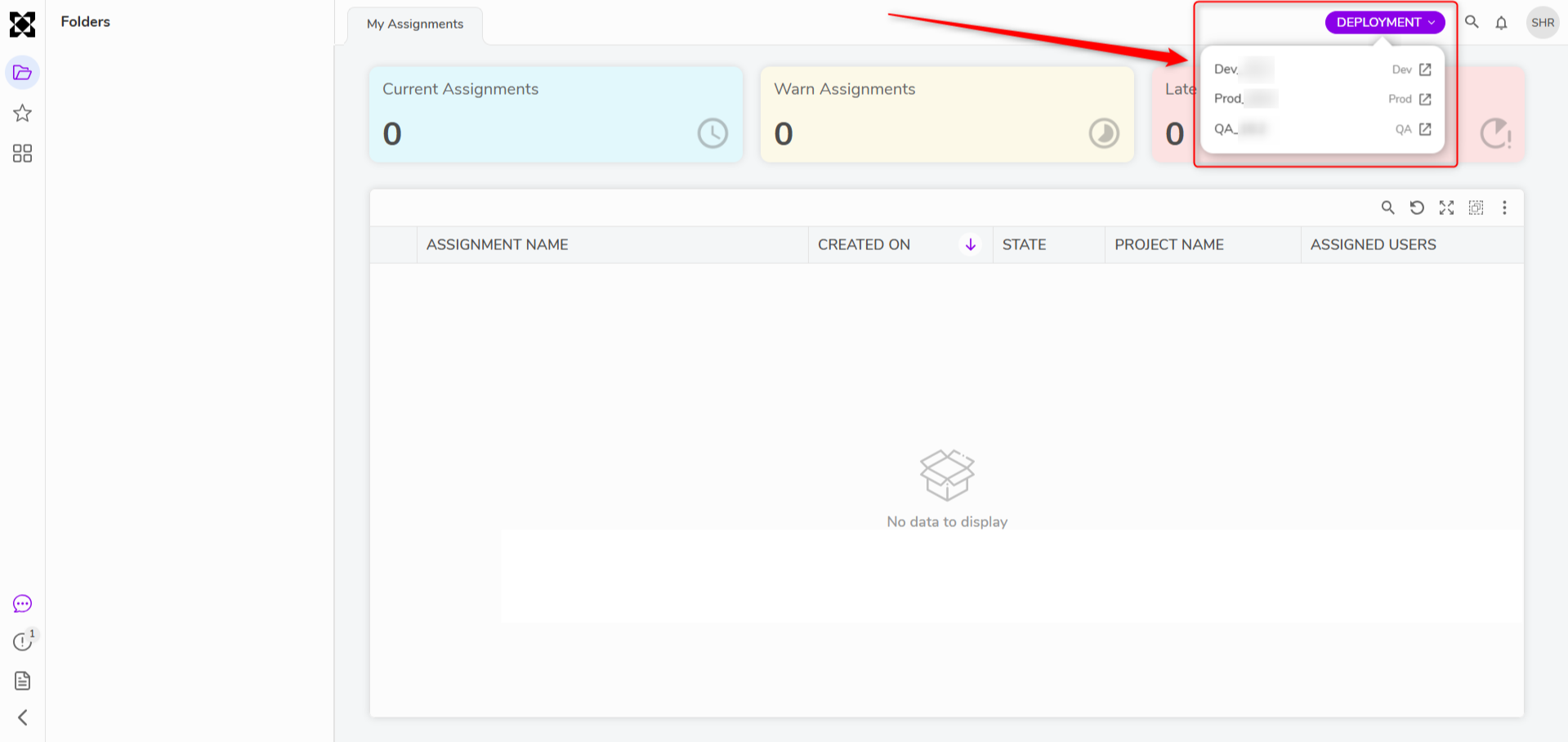 |
| [DT-047472] Action to 'Remove User Story From Package' is not available on the User Stories Dashboard in the Project | Deployment Tower Actions | A Remove from Package action has been added to the Project-level User Story Report. | Deployment Tower | 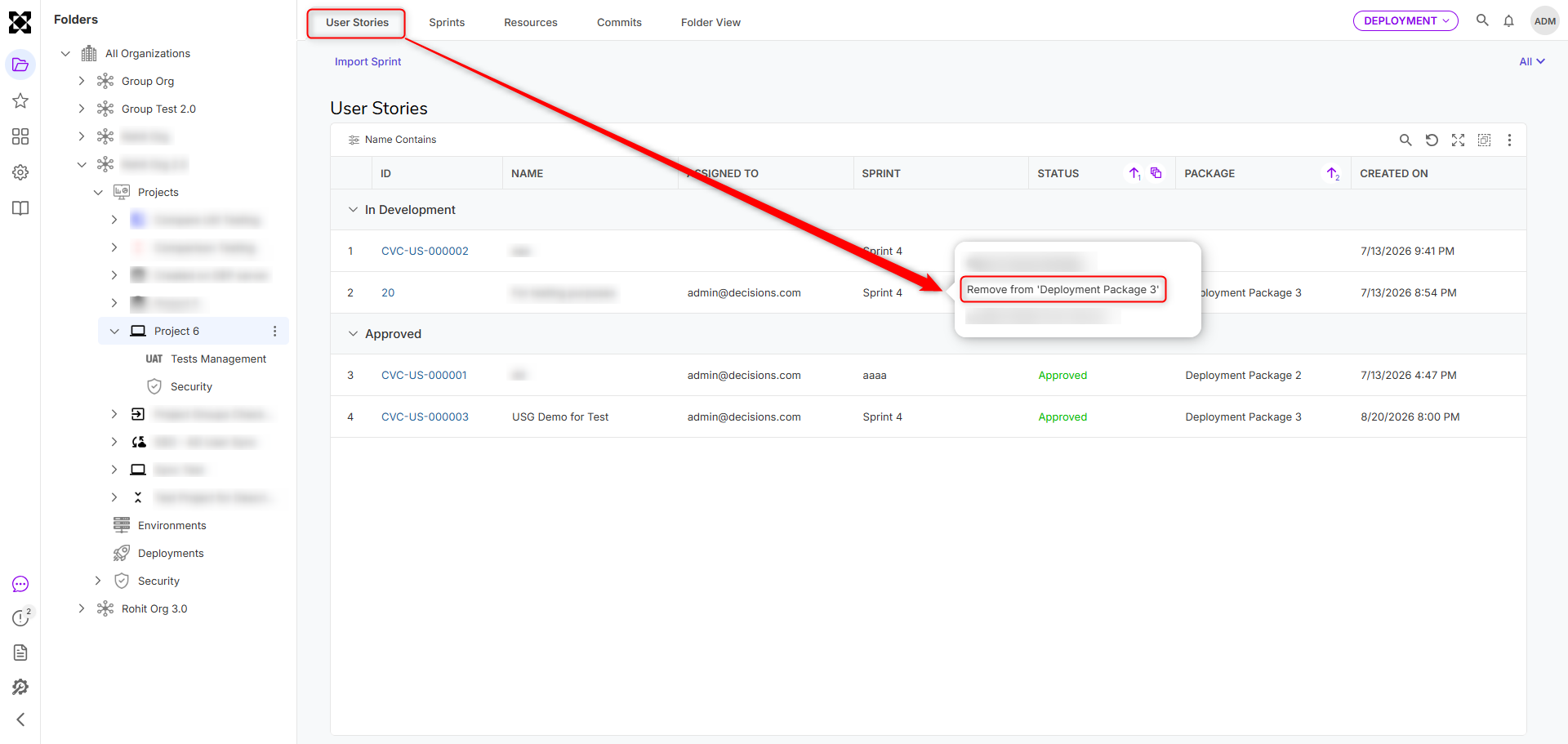 |
| [DT-047744] Allow Agent Creation to Use Project/System, Default Models | Utilizing AI Modules in Decisions | Agents can now be configured to use the Project or System default AI model instead of requiring a specific model to be picked at creation time. When an agent's provider has a default model set, the Agent Designer will show a message noting it's using that default and offers an "Override Model" option for Users that want to pick a different model instead. AI Common Chat Completion steps will show the default model when Override Default Provider is selected and the provider value is populated. | Modules | 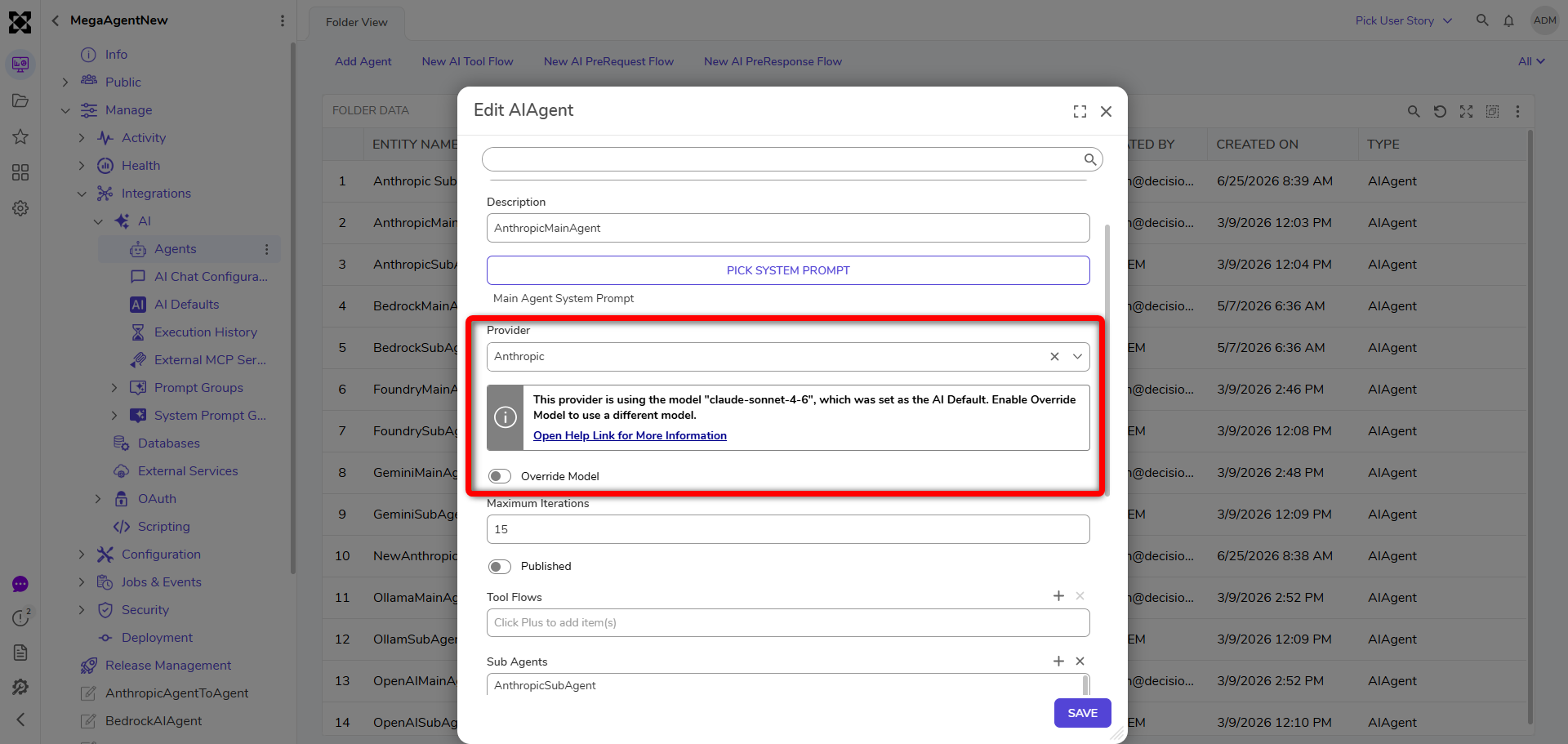 |
| [DT-047785] Adding Link Shortening to the Twilio Send SMS messages | Telephony Module | New settings have been added to Twilio for Link Shortening. | Modules | 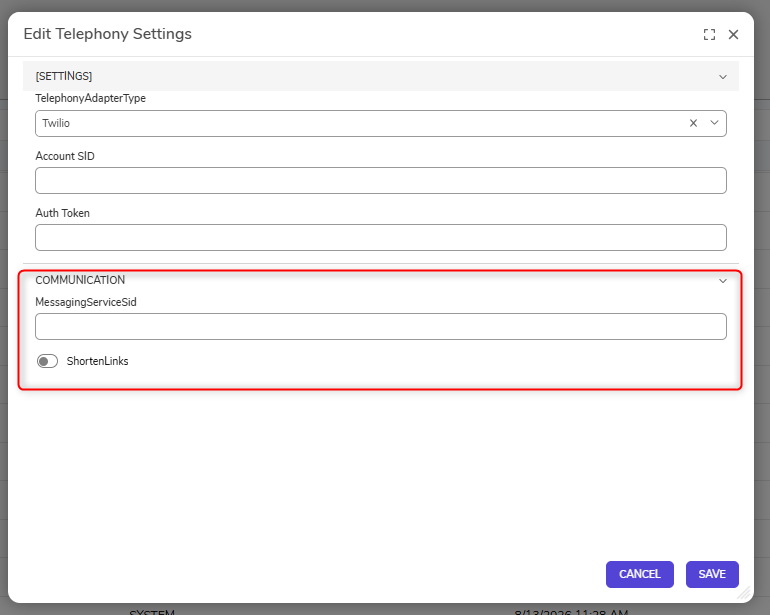 |
| [DT-048198] Projects > Manage > Configuration: Add ability to create or modify project categories from projects 'Settings' page | Creating a Project | User can now configure categories from the Settings Folder. | Projects | 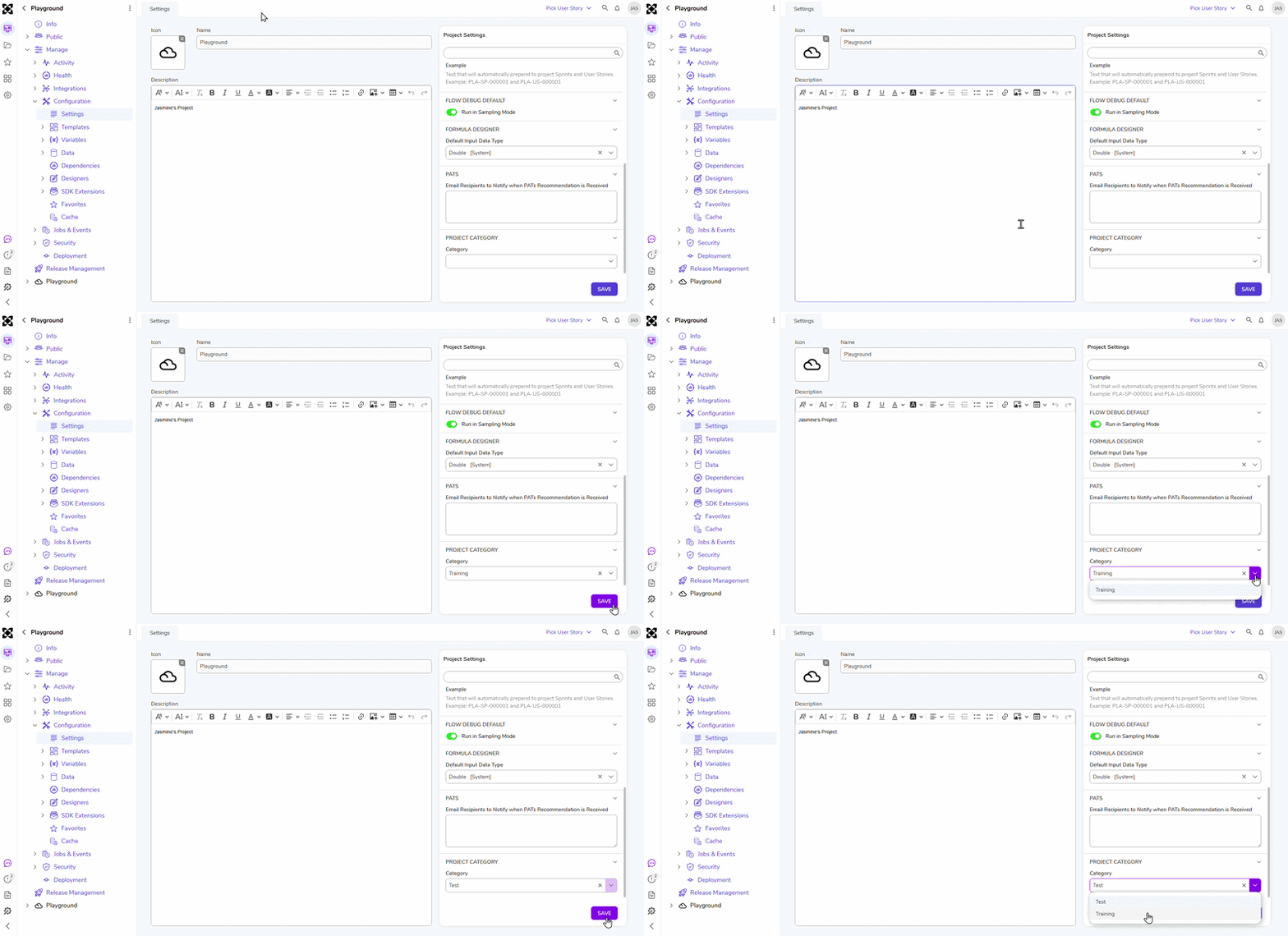 |
| [DT-048314] Add Python DLL path to container image | Python Module | Python settings will now be automatically populated in containers when the Python Module is installed. | Modules | 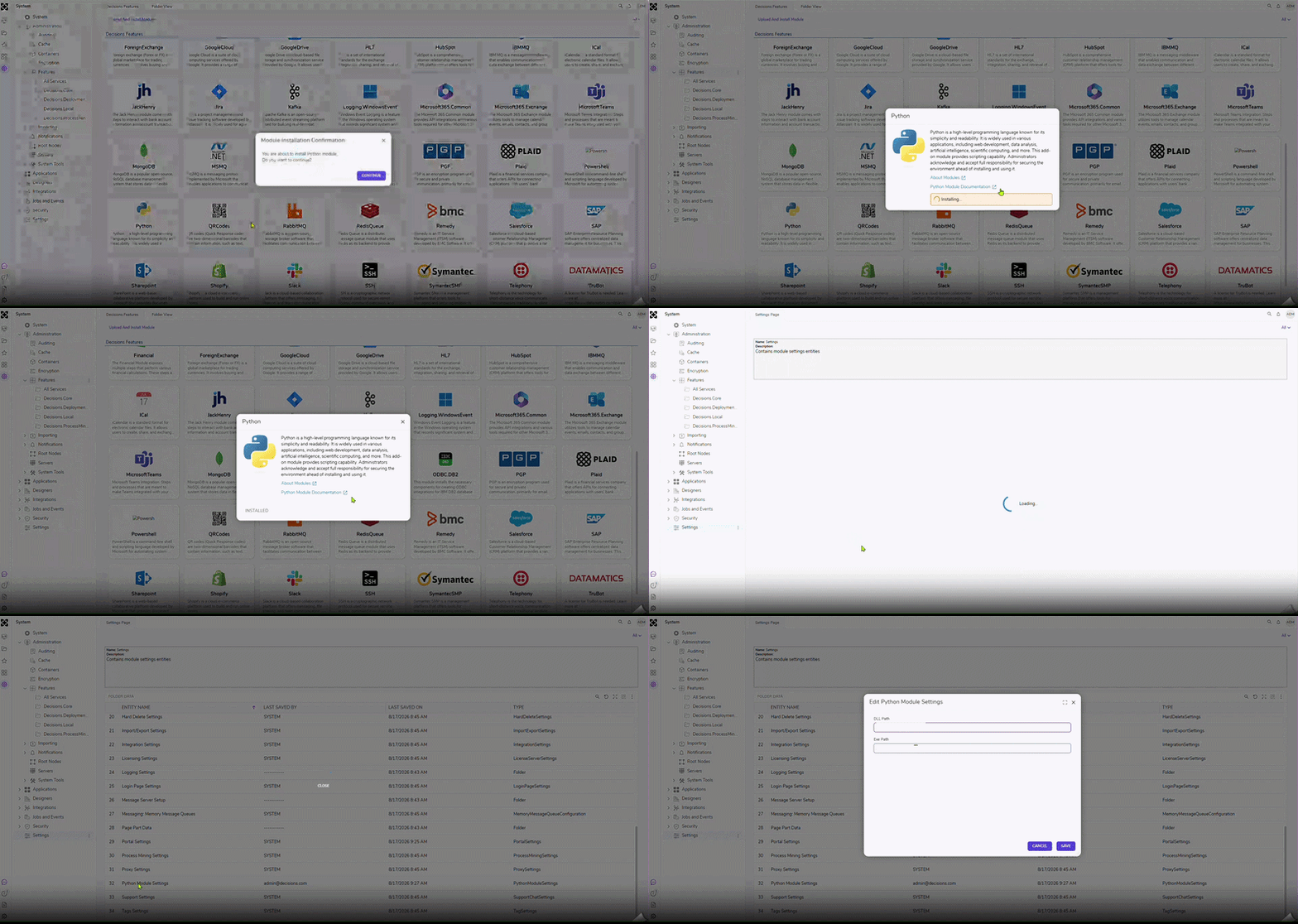 |
| [DT-048396] Flow Designer: Redesign the 'View Integration Details' page opened from the 'External Form' step properties. | Basic External Form Process | The View Integration Details page for External Form Flow Steps has been redesigned to align with the v10 platform redesign, providing a more consistent and modern User experience. | Flows | 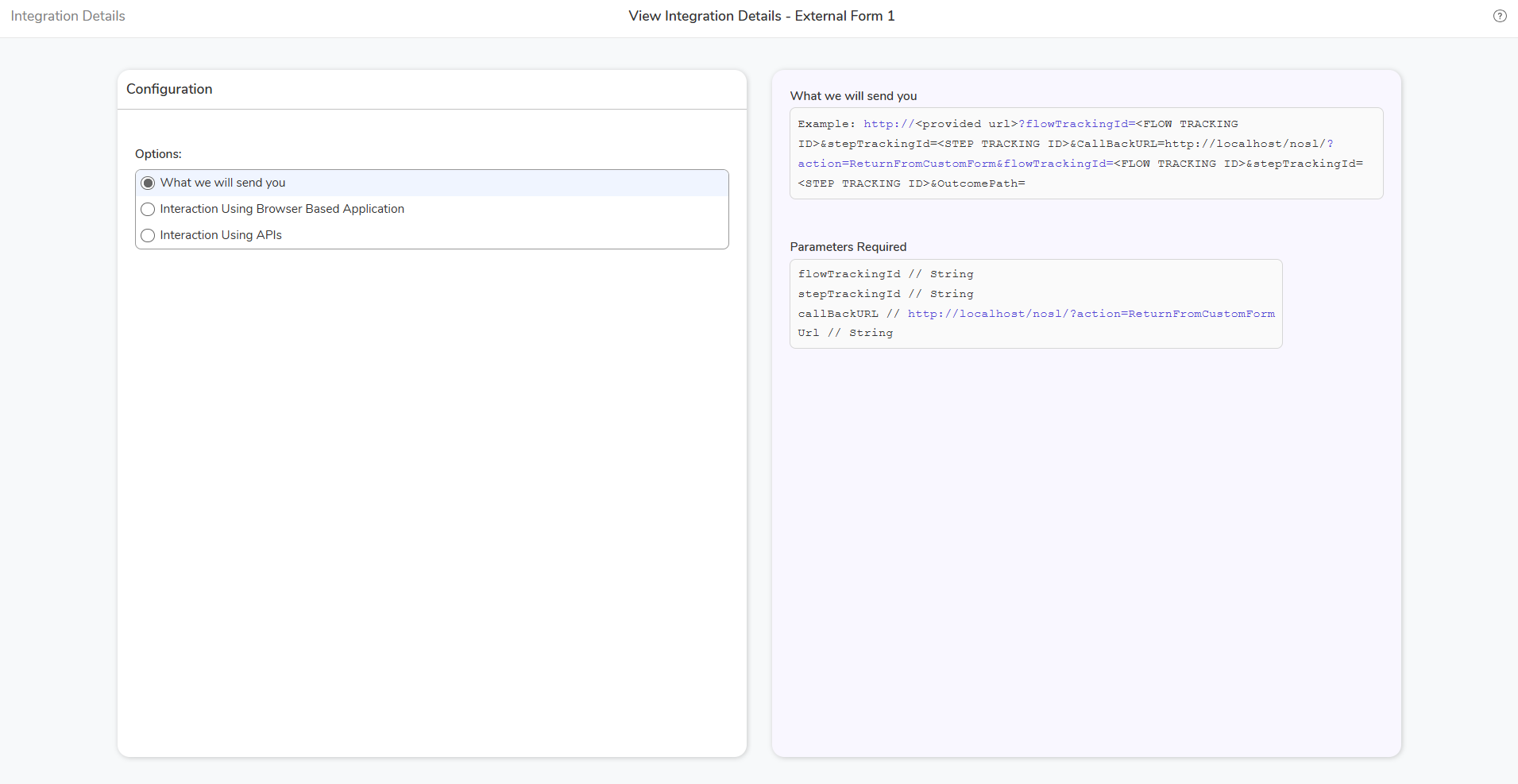 |
| [DT-048351] Services Page redesign and Design related to the Integration not configured page. | Decisions Core Services | The Services page has been redesigned. | System/Portal Administration | 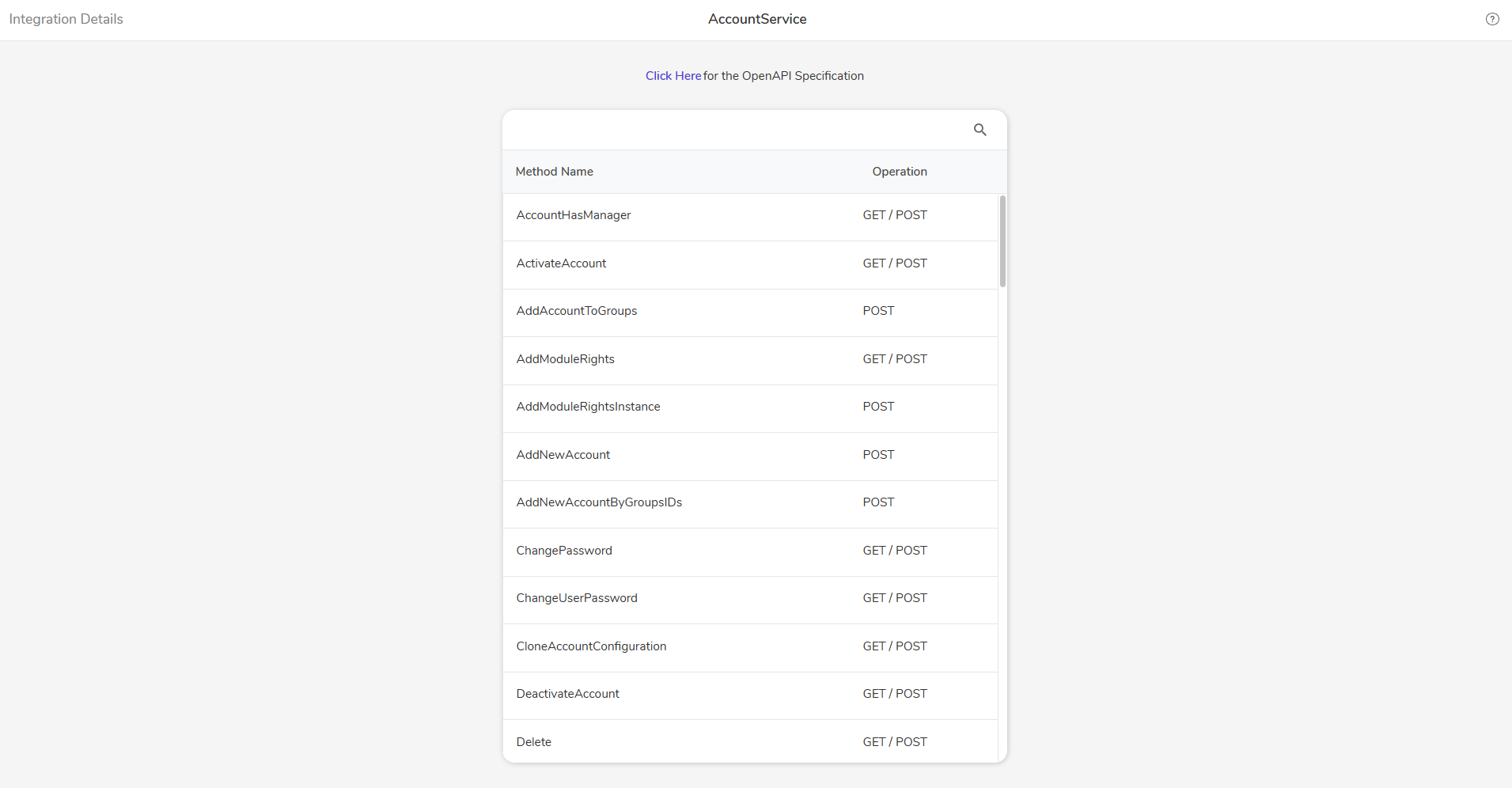 |
| [DT-048355] Syntax highlighting for Integration Dialog like what we have in debugger step inspection | View Integration Details | Syntax will now be highlighted for the View Integration Details Page. | System/Portal Administration | 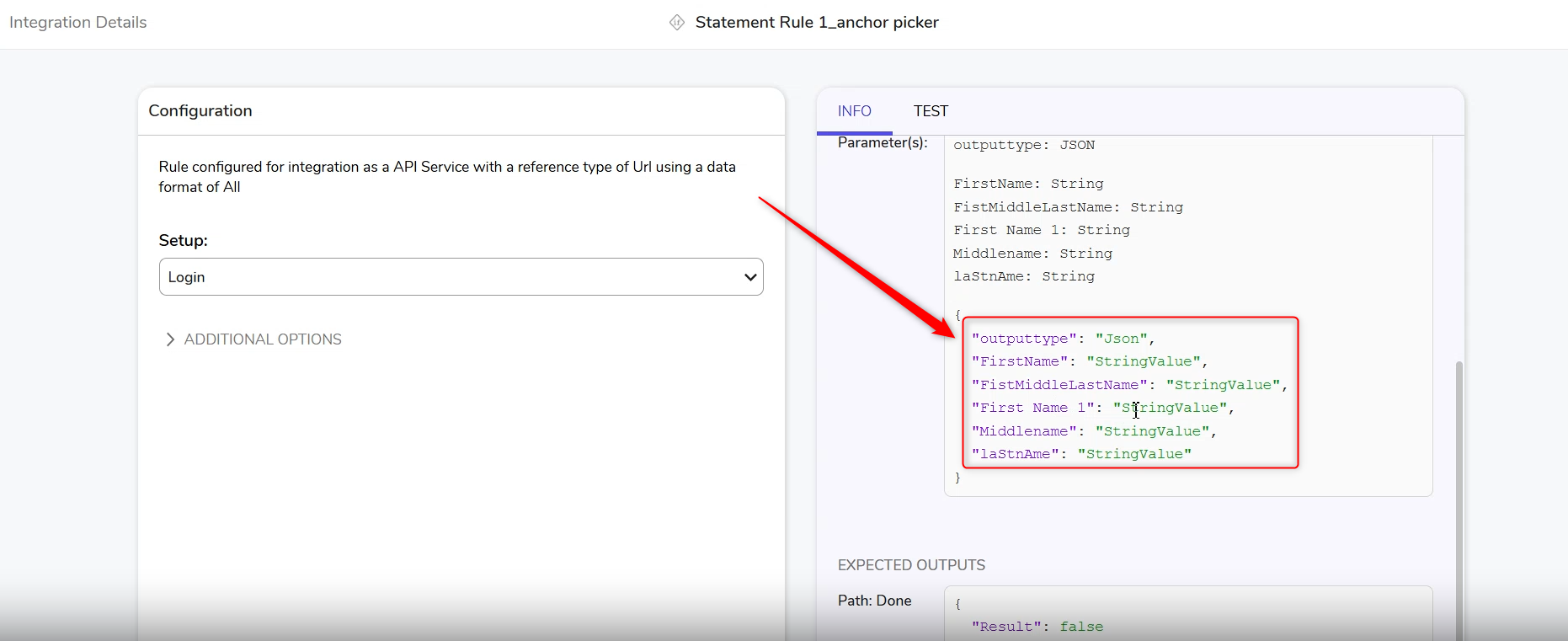 |
| [DT-048418] Prevent Reordering of Frozen Advanced Data Grid Columns | Report Properties | A new Allow freeze column reordering property has been added below the Freeze Column setting. By default, this property is on to maintain the existing behavior. When set to off, Users cannot swap or reorder the frozen columns, while non-frozen columns can still be moved among themselves. | Reports | 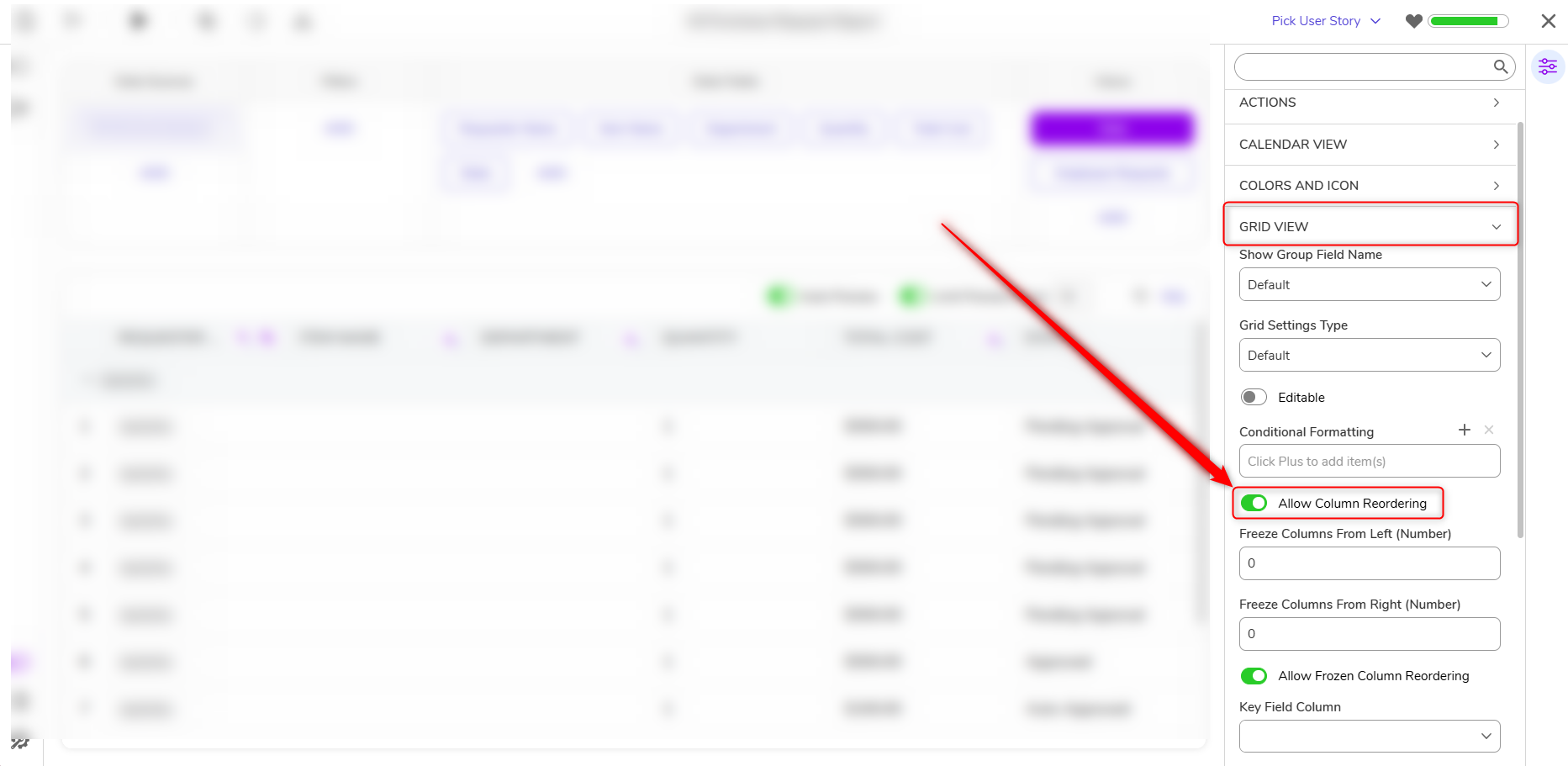 |
| [DT-047569] Act as OAuth 2.0 Provider | Establishing an OAuth Provider | Decisions can now act as an OAuth application. OAuth Application created under System > Security > OAuth Applications. | System/Portal Administration | 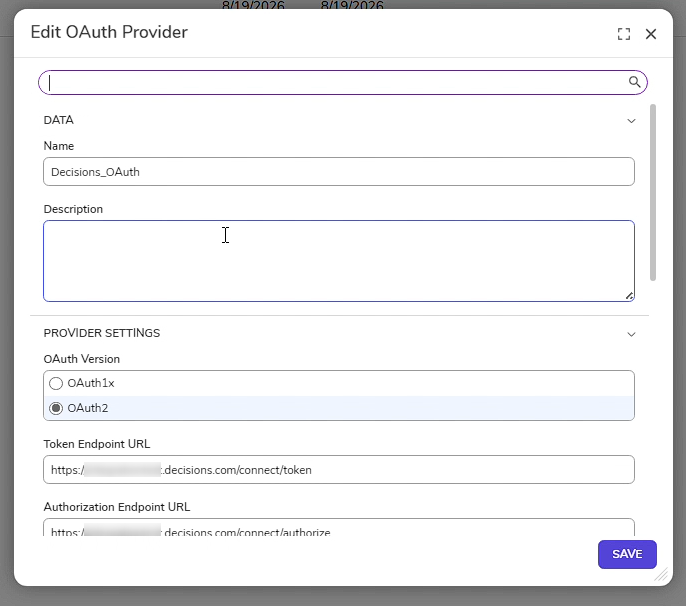 |
Fixes
Various security fixes have been made.
Forms
| DT Title | Description | Occurs In |
|---|---|---|
| [DT-045978] Radio Buttons Not Disabling with CSS Applied | A fix has been applied to the Radio Button List control on Forms to prevent the Radio Button List from not being disabled correctly when a custom CSS theme was applied to a Form. | 10.x |
| [DT-046354] Active Form values not updating correctly when default culture is Denmark | A fix has been applied to Number and Currency input fields on Forms. Previously, when the default culture was set to Denmark or other cultures using a period as the thousands separator, calculated values updated through an Active Form Flow did not always refresh correctly in the UI when input values contained zeros. Calculated fields now reliably update whenever their underlying values change, regardless of zero values or culture-specific formatting. | 10.x |
| [DT-047984] Fix Default Heights for Text Box and Drop-Down Controls | The height of the input box of Text Box, Drop Down Button, Drop Down List, and Multi-Select Drop Down is now consistent, both with and without labels. This change applies only to newly dragged controls and will not impact existing controls. | 10.x |
| [DT-048037] Form - JS Control Wizard: Upload File step displays unfilled '// TODO' placeholder text instead of stylesheet loading snippet | Updated the code snippet displayed for CSS files and corrected the file detection for JS files. | 10.x |
| [DT-048342] Number Box Bug When Culture is "fr-CA" | A fix has been applied to the Number Box form control and Portal Settings. Previously, when the group separator and decimal separator were configured to the same character, no warning was displayed. A warning is now shown in the Number Group Separator field within both the Number Box properties panel and Portal Settings when the group separator and decimal separator match, helping prevent invalid number formatting configurations. | 10.x |
| [DT-048399] Active Form Flow Highlight Position Gets Broken on Sidebar change | Active Form Flow control preview highlight positioning has been fixed to ensure it remains correct during sidebar actions such as switching, resizing, collapsing, and expanding. | 10.x |
Flows
| DT Title | Description | Occurs In |
|---|---|---|
| [DT-044758] Assignment Roles Do Not Work When Tickets Are Moved to New Folder | Fixed an issue where assignment roles would not work when an assignment was moved from one folder to another | 10.x |
| [DT-047954] Flow Designer_Rule Designer: Search shows 'No Search Results' for variable names with mixed-case letters | A fix has been applied to searching in the Flow Data Picker and Anchor Picker within Rules. Previously, searches did not work correctly when keywords contained mixed-case letters. Searching now works as expected for keywords with any combination of uppercase and lowercase characters. | 10.x |
| [DT-048250] Assignment Event Flow Changes Reverted when Imported with Parent Flow | Importing a 6x Project with "Assignment Event Flow" will no longer cause Flow Assignment Event Flow mappings to break. | 10.x |
| [DT-048295] Create Embeddings AI Defaults not respected by AWS Bedrock, Google Vertex, and OpenAI; default model does not reset on provider switch in AI Common | Fixed an issue where AI Defaults were not respected on Create Embeddings steps. | 10.x |
| [DT-048296] Create Embeddings: consolidate duplicate log categories and add missing logging for Bedrock and Vertex | Missing logs have been added for AWS Bedrock and Google Vertex Embedding steps. The Embedding Step logging categories have also been consolidated. | 10.x |
| [DT-048173] Flow Designer: Steps default color update | The Flow steps default color has been updated. | 10.x |
Modules
| DT Title | Description | Occurs in |
|---|---|---|
| [DT-043504] Run flow - 'Sync Okta Users, Groups, and Roles': Flow run error is displayed if a local account and OKTA account have the same email address. | If a local account has the same email address as an Okta account email address, the sync will skip over that account and no longer cause the Flow to fail. | 10.x |
| [DT-048653] Response Schemas with Anthropic do not work | Fixed an issue where Anthropic models did not consistently respect the configured response schema. Responses now correctly adhere to the defined schema requirements, ensuring structured outputs are generated as expected when schema enforcement is enabled. | 10.x |
| [DT-048683] OpenAI specific Prompt AI step fails when using Agent | Fixed an issue where the OpenAI Prompt AI step was failing when calling Agents. | 10.x |
Installer
| DT Title | Description | Occurs in |
|---|---|---|
| [DT-048457] Installer - Settings: 'Mail' configuration fields are disabled when selected from 'Edit Settings'. | Fixed an issue with mail configuration after editing settings from the installer. | 10.x |
System/Portal Administration
| DT Title | Description | Occurs In |
|---|---|---|
| [DT-046810] Download file action does not handle error correctly | In rare cases, an error will no longer be displayed when downloading a file. | 10.x |
| [DT-048164] File Reference Lookups Can Fail When Files Are Moved Between FileStorage Folders | Fixed an issue where reading or looking up a stored file could fail when a background process moved the file from the temporary storage folder to the flow-data folder at the same moment the file was being read. | 10.x |
| [DT-048293] A validationIssuesTable Query is Running For Every Entity In A Checkout | Fixed an issue where the validation query only ran once per checkout instead of running for each entity in the project. | 10.x |
| [DT-048299] Incorrect References in Log File | A fix has been applied to System Validation for clustered environments. Previously, when SMTP settings differed between two cluster nodes, System Validation displayed the Node ID instead of the node name. The node name is now clearly displayed in both System Validation and logs. This improvement also applies when differences are detected in Versions, CodeBucketAssembly, or file storage configurations across cluster nodes. | 10.x |
| [DT-048329] Update Features Page | UI when hovered and selecting features has been updated to align with v10 redesign. | 10.x |
| [DT-048551] Portal - Auto Lock Screen: Chrome options are removed from the URL after logging back in following an auto lock | Chrome options were getting removed after getting lockout that has been added back. | 10.x |
| [DT-045615] Remove PATs System Settings | Duplicate PATs settings have been removed from System > Settings. These settings can still be configured from the Recommendations Page. | 10.x |
| [DT-043827] Hide all the text fields from the 'Support Chat Settings' dialog | Text fields for PATs and Support Chat settings have been removed from System > Support Settings | 10.x |
| [DT-048654] Enable Single Sign On reverts to false in settings.json on upgrades in 10x | Fixed an issue where some settings were getting reset on upgrade, such as (ex: EnableSingleSignOn and AllowRawSQLQueryExecutionInSteps). The installer now preserves settings it doesn't manage instead of erasing them on upgrade | 10.x |
| [DT-048726] Login Page – Reset Password functionality does not work when 'custom headers' are configured in settings | Fixed an issue where custom headers in Settings prevented users from resetting their passwords. | 10.x |
Rules
| DT Title | Description | Occurs In |
|---|---|---|
| [DT-048247] Rule Designer: Textual comparison dialog is not displaying the modified changes when moving condition within same group | Textual comparison dialog now displays the modified changes when moving conditions within the same group. | 10.x |
| [DT-048277] Rule Table Designer: The corners of the warning icon are missing on the Anchor Picker layer | The warning icon will now be displayed correctly in the Rule Table Designer. | 10.x |
| [DT-048435] Statement Rule: no debounce for the verb search | A search will only be triggered when Users stop typing. | 10.x |
| [DT-048511] Statement Rule Designer: Condition drag and drop does not auto-scroll when dragged near the bottom of the screen | A fix has been made that allows Users to drag and drop conditions. The screen will also auto-scroll, allowing Users to place conditions in the IF section. | 10.x |
| [DT-048204] Statement Rule Designer: Collapsed group does not expand after dragging and dropping a condition inside it. | In the Statement Rule Designer, collapsed groups now expand after dragging and dropping a condition inside them. | 10.x |
Reports
| DT Title | Description | Occurs In |
|---|---|---|
| [DT-048382] Report Designer - Charts: The color picker can be editable in view mode | A fix has been applied to the Report Designer's Chart Settings panel. Previously, the Base Colors palette and color picker remained interactive while the Report Designer was in View Mode, allowing users to open the color picker dialog and interact with color swatches despite being in read-only mode. The Base Colors palette and its color picker are now non-interactive in View Mode, consistent with the read-only behavior of the Form and Page designers. | 10.x |
| [DT-048587] Browser console error when copying from a report | Fixed a bug where a browser console error would populate when trying to copy info from a report via Ctrl + C. | 10.x |
Dashboards
| DT Title | Description | Occurs In |
|---|---|---|
| [DT-048397] Navigate To Folder available for Mobile users with Chrome=Off | Chrome=Off and Force Default URL Parameter on Group will now work as expected on the mobile portal. | 10.x |
| [DT-048488] Actions Bar Part Action Order Inconsistent | Actions will now be displayed in alphabetical order, with single actions shown first, followed by group actions. More and All categories will also be displayed at the end. | 10.x |
Data Structures
| DT Title | Description | Occurs In |
|---|---|---|
| [DT-047179] Database Structure Throws Code Compile Error When Initialization Is After Rule Set With Return Type | A fix has been applied to the wrapper class namespace generation. Previously, creating a Data Structure after creating a Rule Set with the Return Type "FormControlValidationIssue" resulted in a code compile error. An alternative legacy namespace assignment has been added which prevents namespace collisions, allowing Data Structures to compile successfully regardless of the order in which they are created within a project. | 10.x |
Integrations
| DT Title | Description | Occurs In |
|---|---|---|
| [DT-048348] Dart Chat redesign | The DART chat has been redesigned with the following updates:
| 10.x |
| [DT-048368] View Integrations Details Page: Error page is shown instead of the helper page for an API Service integration when clicked on 'Type Serialization Helper' link | The Type Serialization Helper page can now be accessed. | 10.x |
| [DT-048400] Database Integration - Add Procedure/Table/View Integration Dialogs: Row hover and selection style is inconsistent with other dialogs | Hover and selection color have been updated for the table, view, and procedure dialogs. | 10.x |
| [DT-048534] Integration Details - Credentials Dropdown covers the entire window when there are many available options | The Credentials dropdown now covers properly when a lot of data exists in credentials on the View Integration Details page. Users can scroll through the list and select an input. | 10.x |
| [DT-048538] Type Serialization Helper - Select Type: Data types are not displayed in search results and console errors appear while searching | Searching has been fixed on the Type Serialization Helper. | 10.x |
| [DT-048393] Database Integration - Procedure Integration: Required field validation is not shown. | Fixed an issue in the Procedure Database Integration where required field validation messages were not displayed for mandatory inputs. Required field validation now appears correctly, helping Users identify and resolve missing input values before executing the procedure. | 10.x |
Deployment Tower
| DT Title | Description | Occurs In |
|---|---|---|
| [DT-045484] Deployment: Changing the 'Active User Story' from the Unit Test designer does not update the value in the parent designer | Changing the active User Story from a sub-designer, such as Unit Test or Active Form Flow, now automatically updates the active User Story in the parent designer. | 10.x |
| [DT-045841] Deployment Server - Deployment Package: The folder tree on the target environment does not refresh to show the new Projects after Deployment is completed | The Folder tree on the target environment now automatically displays newly deployed Projects after deployment completes, eliminating the need for a browser or page refresh. | 10.x |
| [DT-048206] Release Management - User Stories: 'Added In Package' status is not updated on the Dev server after including the User Story in the current Deployment Package | User Stories now automatically update their Added In Package status on the Development environment when they are included in the current Deployment Package. | 10.x |
| [DT-048268] Deployment Server: Selection on the project is removed after opening its user story. | When a project is checked in to the Deployment Server, opening its User Stories no longer clears the selected project. | 10.x |
| [DT-048286] Project - Custom Groups: Group name is displayed as 'Not Specified 'instead of its actual name after deploying to the target environment. | After deployment, groups are displayed using their actual names (for example, "Group A") in both the Groups list and the Manage Folder Permissions dialog. | 10.x |
| [DT-048310] Environments: 'Account in Selected Environment' report is not refreshed after adding or unassigning an account | The Account in Selected Environment Report now automatically refreshes and displays the updated account list immediately after an account is added or unassigned. | 10.x |
| [DT-048330] Deployment Tower - User Stories: Confirmation dialog title for 'Include in Current Deployment Package' is cut off and shows a generic message. | The dialog now displays the full title along with a clear, user-friendly message indicating that the selected User Story will be included in the current Deployment Package. | 10.x |
| [DT-048398] Okta Integration - Sync Flows: Stop running 'Sync Okta User', 'Sync Okta Group', and 'Sync Okta Users, Groups, and Roles' flow on a connected environment. | In environments connected to the Deployment Server, Okta synchronization flows no longer run locally, ensuring that Accounts and Groups are created and managed exclusively through the Deployment Server. | 10.x |
| [DT-048411] Check-In fails with 'initialization string' error when a database connection has invalid connection data | Check-In now validates database connections more effectively, allowing the operation to proceed when invalid connection data is unrelated to the committed changes. If validation fails, a clear error message identifies the specific invalid database connection before the commit is processed. | 10.x |
| [DT-048461] UI Updates - Environment Navigation on Portal header | The environment badge has been redesigned to enhance discoverability so Users can navigate between multiple connected environments. | 10.x |
| [DT-048496] Deployment Tower - Set Environment Configuration: Info text for 'Reset Test Status and Results on Commit' uses incorrect deployment terminology | Updated the informational text to use the correct deployment terminology, clarifying that builds are checked into a Deployment Package, which is then deployed to a target environment. | 10.x |
| [DT-048559] Thread Jobs: Resource Check Job throws 'Project folder not found' error when saving a Flow or Rule outside a Project | The Resource Check job now skips Deployment Tower revision checks for entities that do not belong to a Project, preventing unnecessary exceptions and warning messages. | 10.x |
| [DT-048574] Upgrading From V9 to V10 Does Not Disable Repository Actions | After upgrading, these actions are no longer displayed because the environment is using Deployment Tower features and the Repository Action Environment Variable is no longer supported.
| 10.x |
| [DT-048617] Deployment Tower Not Syncing Group Default URL Parameters | Fixed an issue where Default URL Parameters configured on a Deployment Tower Group were not synchronized to the connected environments assigned to that group. Group URL parameter settings now deploy and update correctly across associated environments, ensuring consistent navigation and URL parameter behavior. | 10.x |
| [DT-048618] Migration Tool: Update the app version on the Repo Migration Tool. | The App version has been updated in the Migration Tool. | 10.x |
| [DT-048647] Some of the local changes are not being removed even after check-in | Fixed an issue where entities appeared as Modified on the target environment after a project deployment, even though no changes had been made on the target environment. | 10.x |
| [DT-048599] Deployment Tower: Duplicate projects are created under the organization after checking in an existing migrated project | Duplicate Projects will no longer be created under an Organization after checking in an existing migrated Project. | 10.x |
| [DT-048308] Deployment Package - Mark as Ready: No confirmation notification is shown after marking a deployment package as ready | The confirmation dialog will now be displayed after a Deployment Package is marked as 'ready'. | 10.x |
| [DT-048460] Folder Extension entities added to a Case Entity are automatically added to check in. | Fixed an issue where folder extensions added to non-exportable folders were added to the project export (Check-in and Export). | 10.x |