Example Lab Article
While Example Lab projects are resources for public use, articles and assets are not actively maintained. Screenshots and features are from the specified version below. These references may become dated as new versions are released.
Overview
Example Lab Details | |
| Version | 6.9.0 |
| Root Folder | Example Lab - Populate Data Repeater with Excel file |
| Modules | None |
| Dependencies | None |
Users can populate a data repeater control on a Form with data from an Excel file.
Explanation
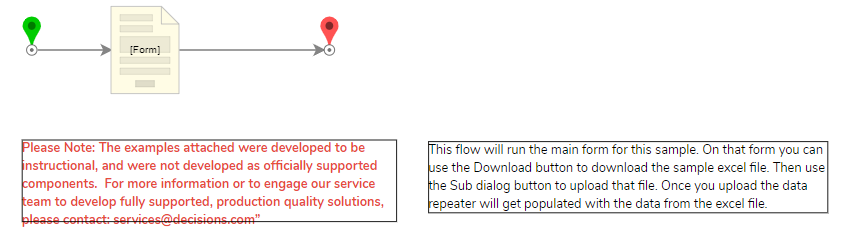
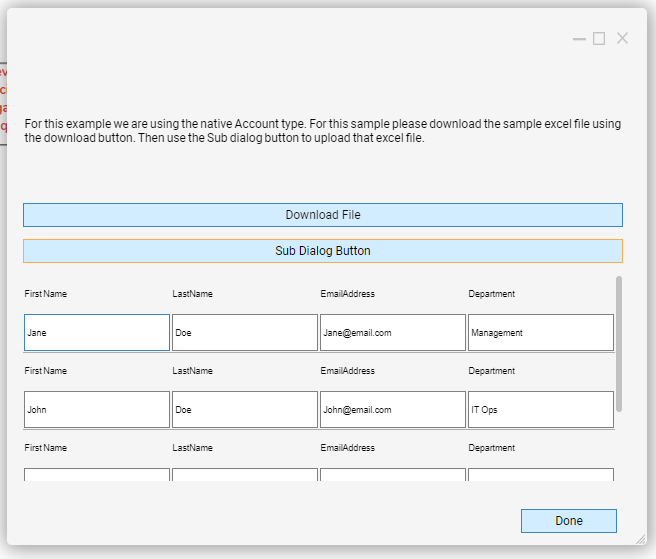
In this project, click Run Flow on the Main Flow. A dialog window will appear with a Download File button and a Sub Dialog Button. Click Download File to download a sample Excel file with data. After the file is downloaded, click the Sub Dialog Button to open another Form dialog window and click Select File. Attach the sample file that was downloaded and click Next. The data in the Excel file will be populated in the Data Repeater control under the Sub Dialog Button.
Reference Articles
Project Download
The examples attached were developed to be instructional and were not developed as officially supported components. For more information or to engage our service team to develop fully supported, production-quality solutions, please contact services@decisions.com. Import the project below to a Decisions environment on version 6.9.0 or later using our Importing/Exporting article.