Overview
Decisions supports AI-driven automation through features such as AI Agents and the Chat Completion step. Using the Chat Completion step and AI Agents, Decisions workflows can communicate directly with AI services to send prompts, receive responses, and act on AI-generated output without leaving the Decisions platform.
Because Decisions can communicate with AI directly, those AI calls often need access to tools beyond what is built into Decisions. For example, an Agent might need to search a file system, query an external database, look up records in a third-party CRM, send an email through a custom relay service, or trigger an action via an internal API. These capabilities live outside of Decisions, and that is exactly where External MCP Servers come in.
External MCP Servers allow Decisions-hosted AI features, such as Agents and Chat Completion steps, to reach outward and use tools hosted outside of Decisions. When a flow or agent sends a message to an AI service, that AI service can call back to the configured External MCP Server tools to gather information or take actions, then return a result to Decisions. This makes it possible to give Decisions AI workflows access to virtually any MCP-compatible tool or service available today.
Example External MCP Tools
There is a large and growing ecosystem of MCP-compatible servers available today. Some commonly used examples include:
- GitHub MCP Server: Manage pull requests, review code, create commits, and navigate repositories through natural language.
- Azure MCP Server: Interact with Azure Storage, Cosmos DB, Log Analytics, Azure Container Apps, and other Azure services.
- Microsoft 365 MCP Server: Access mail, calendar, files, and chat through Microsoft Graph APIs.
- Notion MCP Server: Search content, query databases, and manage pages in Notion.
- Jira / Confluence (Atlassian) MCP Server: Manage issues, projects, and documentation from Atlassian products.
- Database connectors — Natural language access to PostgreSQL, SQL Server, MongoDB, BigQuery, and others.
- Twilio MCP Server — Send messages and manage phone communications through the Twilio API.
Thousands of additional MCP servers are available for use cases ranging from cloud infrastructure and DevOps to content management, communications, and IoT. If a pre-built MCP server does not exist for a specific need, a development team can create a custom one. For example, if an organization uses a niche email relay service, an internal ticketing system, or a proprietary data source, developers can build a custom MCP server that exposes those API calls as tools, making them available to any Decisions Agent or Chat Completion step that needs them.
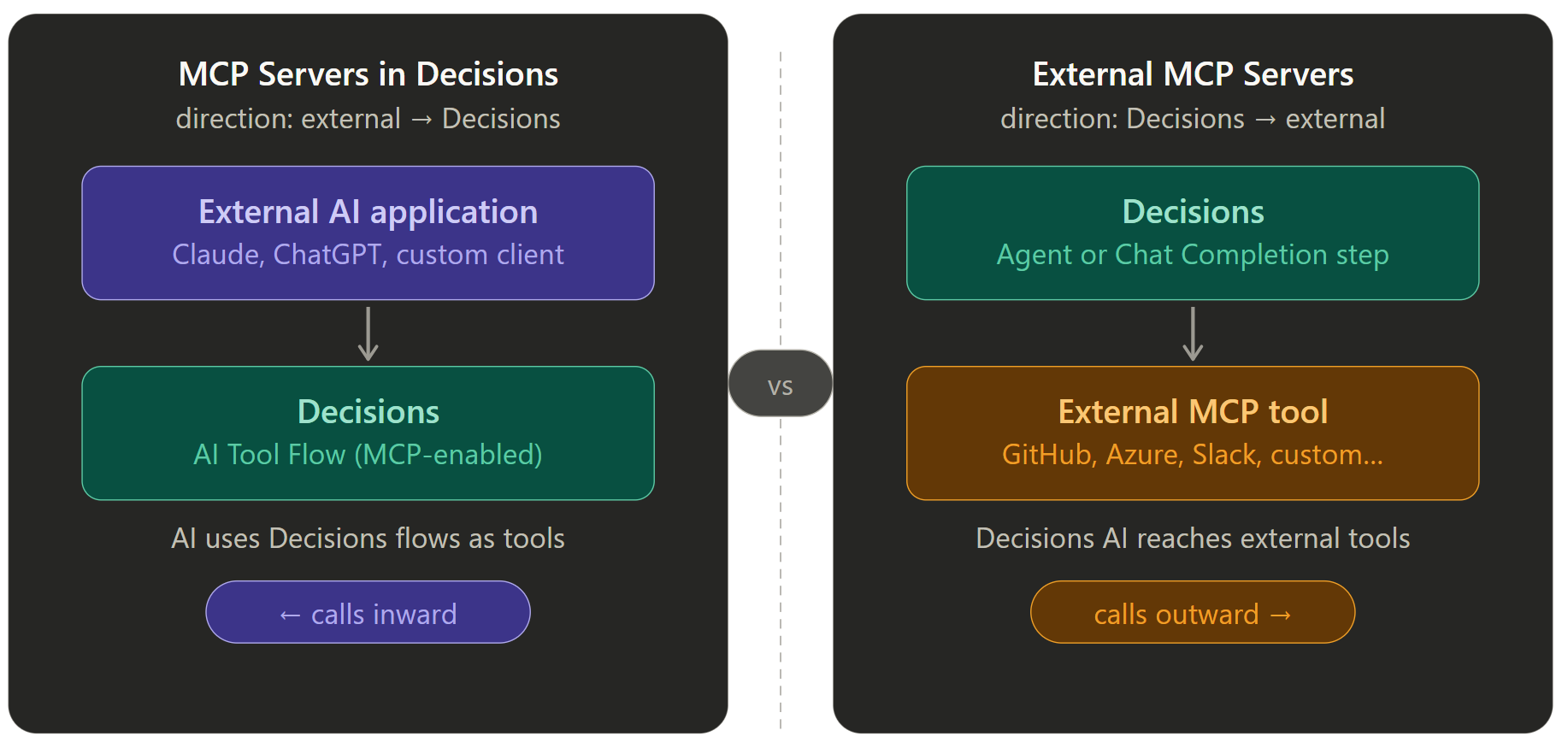
How External MCP Servers Differ from MCP Servers in Decisions
Decisions supports two MCP patterns, and they work in opposite directions:
- MCP Servers in Decisions work inward. They expose AI Tool Flows built inside Decisions so that external AI applications, such as Claude, ChatGPT, or a custom AI client, can call Decisions functionality as tools.
- External MCP Servers work outward. They allow Decisions workflows to connect to tools hosted outside of Decisions.
Creating an External MCP Server
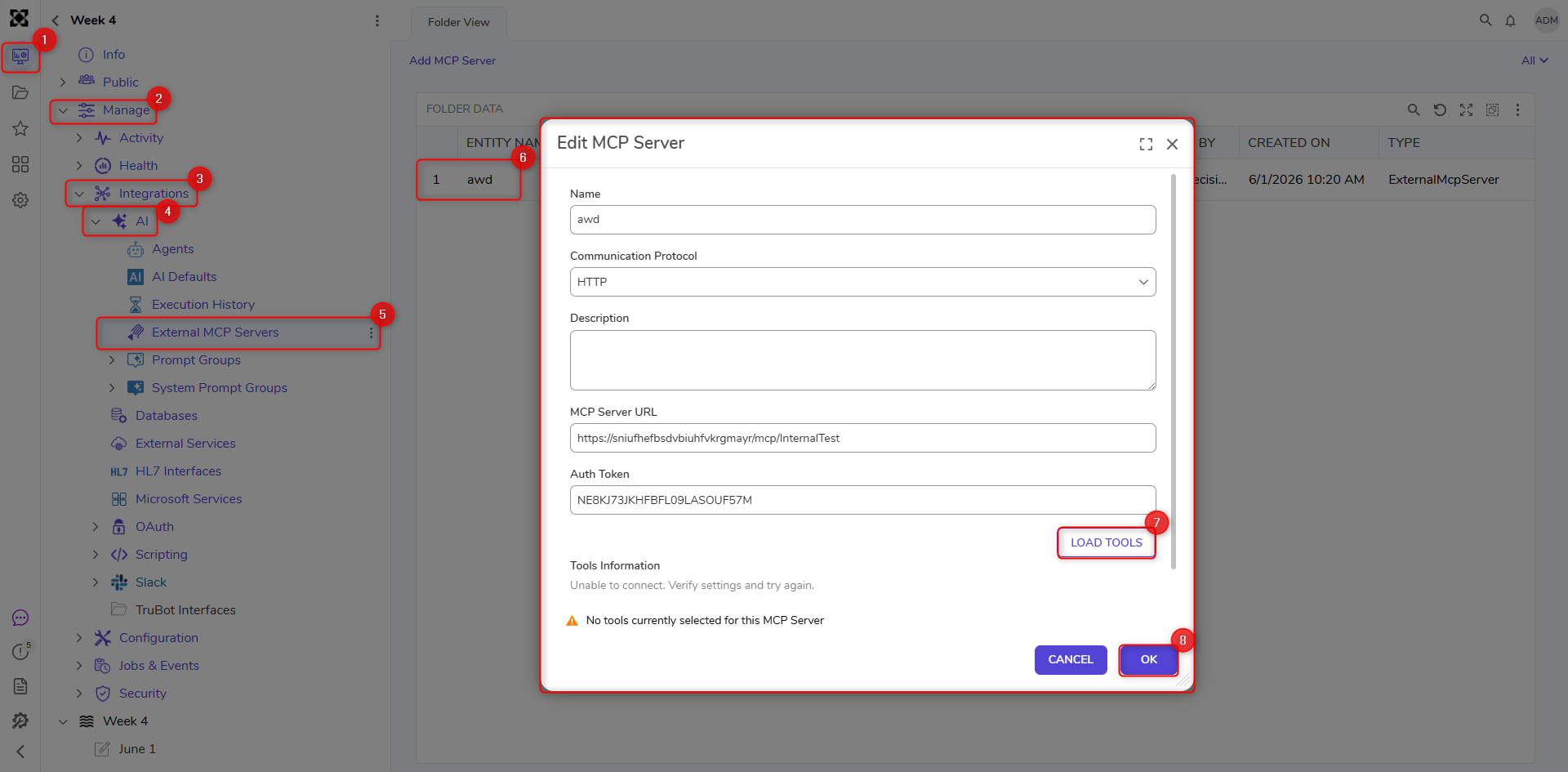
To configure an External MCP Server for use with Decisions AI features, such as Agents:
- Navigate to [Project] > Manage > Integrations > AI > External MCP Servers.
- Select Add MCP Server.
- Provide the required configuration details:
- Name
- Communication Protocol (HTTP or STDIO)
- Description (optional)
- MCP Server URL
- Auth Token (for example, an API Key if required by the external service)
- Select Load Tools to retrieve and choose the available tools from the MCP server.NoteTools are loaded only when you select Load Tools (for both HTTP and STDIO). This prevents issues caused by automatic tool discovery, which could impact environment stability.
- Save the configuration.
Once configured, the External MCP Server becomes available for use within Agents and other MCP-enabled features.