Session Management
Overview
When using APIs maintaining the security of the calls is paramount. Decisions supports various authentication methods for securing APIs, including basic authentication, session IDs, named user sessions, OAuth tokens, and JWT (JSON Web Token). These methods help control user access and apply advanced authentication protocols.
Sessions
Decisions uses session IDs to track user experience. All calls passed in with a particular session ID will give different users the same UX, UI, and permissions. There are many ways to generate sessions.
Why are Sessions important? The URL component functionality listed above can be added to a specified Session ID, and that particular Session can be called and replicated by many users. This provides ease of set up and consistency.
General Information
Below is some useful tricks for using Sessions.
A session ID can be accessed by adding it to the URL with &sessionid=[12345]. This is not a particularly secure method of getting to a specific session.
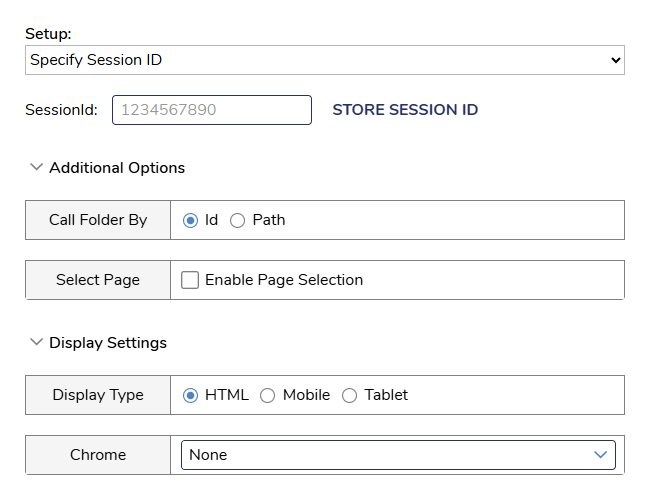
Unique Session IDs can also be created and stored. The Chrome settings mentioned in the previous section can be set under the Display Settings option.
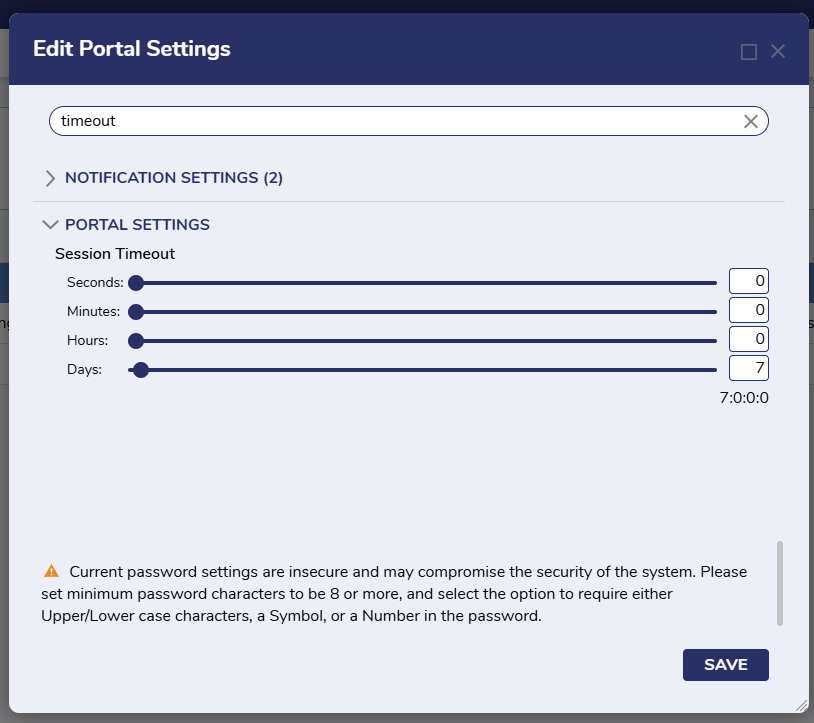
Session length can be set under System > Settings > Portal Settings. Look for the Session Timeout option.
Types of Sessions
Guest Session
Utilizes the guest account, when enabled, for REST calls.
Named Session
Named Sessions allow users to skip the login process and enter the platform directly. Named Sessions are Project specific, whereas specified Session IDs are for the full environment. These are useful for system to system connections.
Login Session
Uses the login credentials of the user for calling a Decisions element. The user is brought to a login page before proceeding with the integration.
Session ID
Uses the current login's Session ID for API call authentication. This is not useful for embedding.
Specify Session ID
Allows a user to specify a session Id for call authentication, which is set in the session Id box and stored via the STORE SESSION ID button.
Specify User Credentials
Allows the user to specify constant user credentials to be used for integration.
Retrieving a Session ID: Get JWT Token In An API Call
Once a Session has been established and configured, it needs to be retrieved and used. Below is a method for using JSON Web Tokens to get SessionIds.
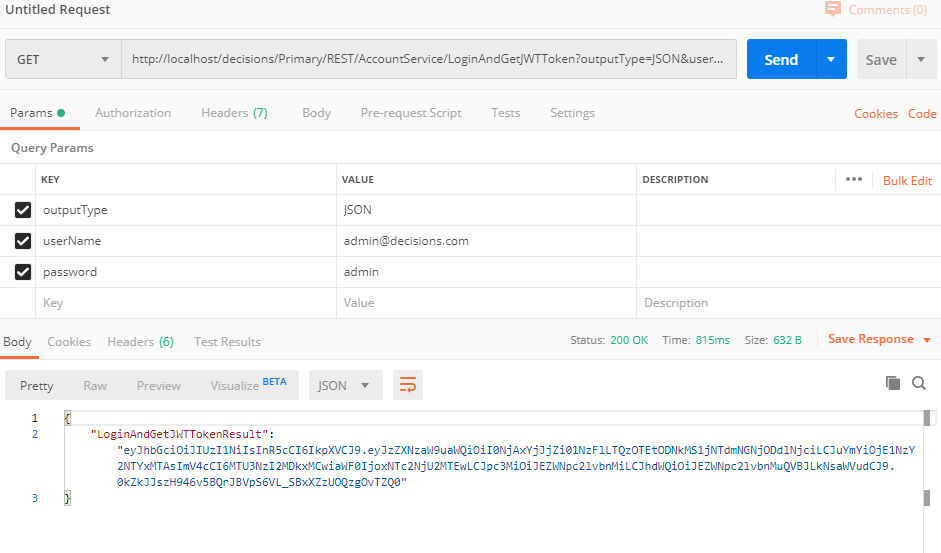
- To Access JWT token through API, a call needs to be made to the Account Service methods LoginAndGetJWTToken, Validate Token, Context Token, and Get JWKS:
http://{BasePortalURL}/Decisions/Primary/REST/AccountService/LoginAndGetJWTToken?outputType=JSON&userName=example@decisions.com&password=example - To find the BasePortalURL, open a web browser. Alternatively, the Base PortalURL can be found by searching for the BasePortalURL in the Settings.xml.
- The BasePortalURL will usually be the first two fields after the "http://" By default, local installs of Decisions will usually be "http://localhost/decisions" or "http://localhost" if it is a root install.
- In production environments, it may be "https://CompanyDNSname.com/decisions" or "https://CompanyDNSname.com/" if it is a root install.

- For local installs, this is how a call would look like:
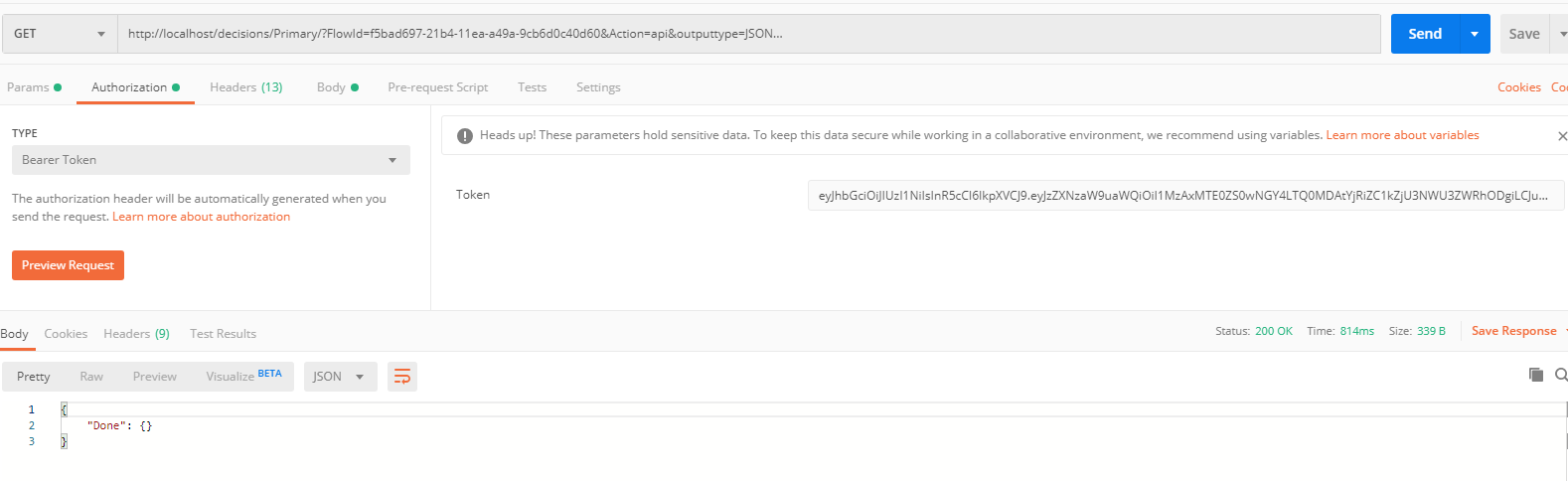
- Next, select the authorization header tab and input the following in the following fields:
- Type: “Bearer Token”
- Token: “Paste JWT Token Here”
Calling APIs to run Flow/Rule/Report
Once a JWT token is created, calls can be made to access Flows, Rules, and Reports. Below is an example highlighting accessing a specific flow on localhost.
- URL:
http://{BasePortalURL}/Decisions/Primary/?FlowId={FlowId/ReportId/RuleId/TruthTableId}&Action=api&outputtype=JSON - HTTP Header: Authorization: Bearer (JWT token)
- For instance, this is how a call to run a Flow with id
f5cc8ed9-216e-11ea-888b-b42e996c6738looks like on the localhost.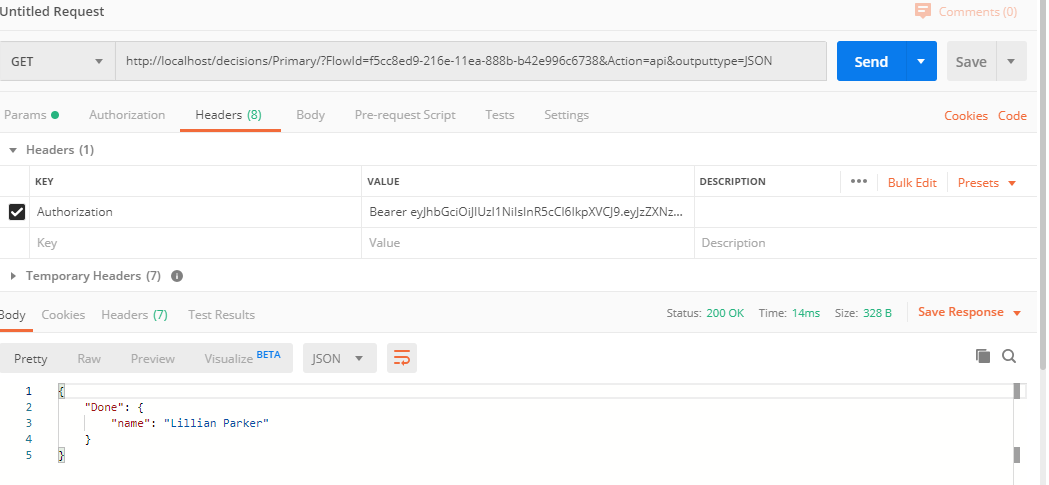
When to Use Types of Sessions (this section needs review, ask PS?)
The kind of session that is best will depend greatly on the use case. It is critical to understand how the end user will access the application. Does each user need their own session, or is there going to be a single session tied to a specific server?
Here are some examples of when to use the different types of Sessions.
Use Named Sessions if:
- Device Level: If the session is going to be specific to a particular server then Named Sessions are simple and easy to use.
- User-Specific Workflows: If the application requires users to interact with personalized workflows, Named Sessions can maintain the state and data specific to each user session.
- Cross-Application Integration: If the application integrates with multiple external systems, Named Sessions can help manage session data across these systems, ensuring a seamless user experience.
Use Specified ID Sessions if:
- Consistent User Experience: When you want to ensure a consistent user experience across different parts of the application, Specified Session IDs can help maintain the same session state, allowing users to navigate seamlessly.
- Session Tracking and Auditing: If the application requires tracking user activity for auditing purposes, using Specified Session IDs can help correlate actions and events to specific sessions.
- Integration with External Systems: When integrating Decisions with other systems that also use session management, Specified Session IDs can help synchronize session data between Decisions and these systems.
- Load Balancing and Failover: In environments with load balancing or failover mechanisms, Specified Session IDs can ensure that session data is preserved and accessible, even if the user is redirected to a different server.
- Custom Authentication Flows: If the application has custom authentication flows, using Specified Session IDs can help manage and maintain session states across different authentication steps.
Example: Passing a Session into an iFrame
To use sessions within an iFrame in Decisions, you need to generate a Decisions Integration URL and embed it in the HTML iframe tag. This allows you to access Decisions within the iFrame. Here are the steps:
- Generate Integration URL: Create an integration URL for the Decisions platform. This URL will be used to embed the platform within an iFrame.
- Embed in HTML: Use the generated URL in an HTML file with an iFrame tag. For example:Text
<iframe src='your_integration_url' height='80%' width='50%'></iframe> - Server-Side Setup: Modify the
Settings.xmlfile on the Decisions server to allow embedding. Add custom headers and setDefaultSameSiteCookieModetoNoneto ensure cookies are transmitted correctly. - Security Considerations: Ensure that the server is configured to handle cookies securely, especially if SSL termination occurs at a load balancer or proxy.
Embedding Session Management Patterns
Session Proxy Pattern
Pattern: The host application acts as a "session orchestrator" and maintains a copy of the Decisions session ID in its state (typically in memory or browser storage).
Usage: Fetch or refresh the Decisions session token before embedding. Monitor iFrame events to detect when a session might be nearing expiry. Optionally expose a refresh endpoint that renews sessions before they expire.
Token Injection Pattern
Pattern: The host application retrieves a short-lived token or session ID from Decisions via API and injects it into the iFrame load request (e.g., as a query param or via postMessage).
Usage: Before rendering the iFrame, make a call to a Decisions authentication endpoint. Pass the token as a secure query parameter or via postMessage to the iFrame. Decisions validates the token and starts a session.
Heartbeat or Keepalive Pattern
Pattern: The host application regularly pings the Decisions iFrame (or a lightweight Decisions endpoint) to keep the session alive.
Usage: A timer in the host app pings an endpoint like /keepalive every N minutes. If the session is invalid, prompt a re-authentication or automatically request a new session token.
Event-Based Session Lifecycle Hooks
Pattern: The iFrame and the host application communicate using window.postMessage to coordinate lifecycle events.
Usage: Decisions iFrame emits events like sessionStarted, sessionExpired, or userLoggedOut. Host application listens and responds (e.g., refreshing tokens, closing modals).