Step Details
|
| Introduced in Version | 9.20.0 |
| Last Modified in Version | 9.20.0 |
| Location | Data > Excel & CSV |
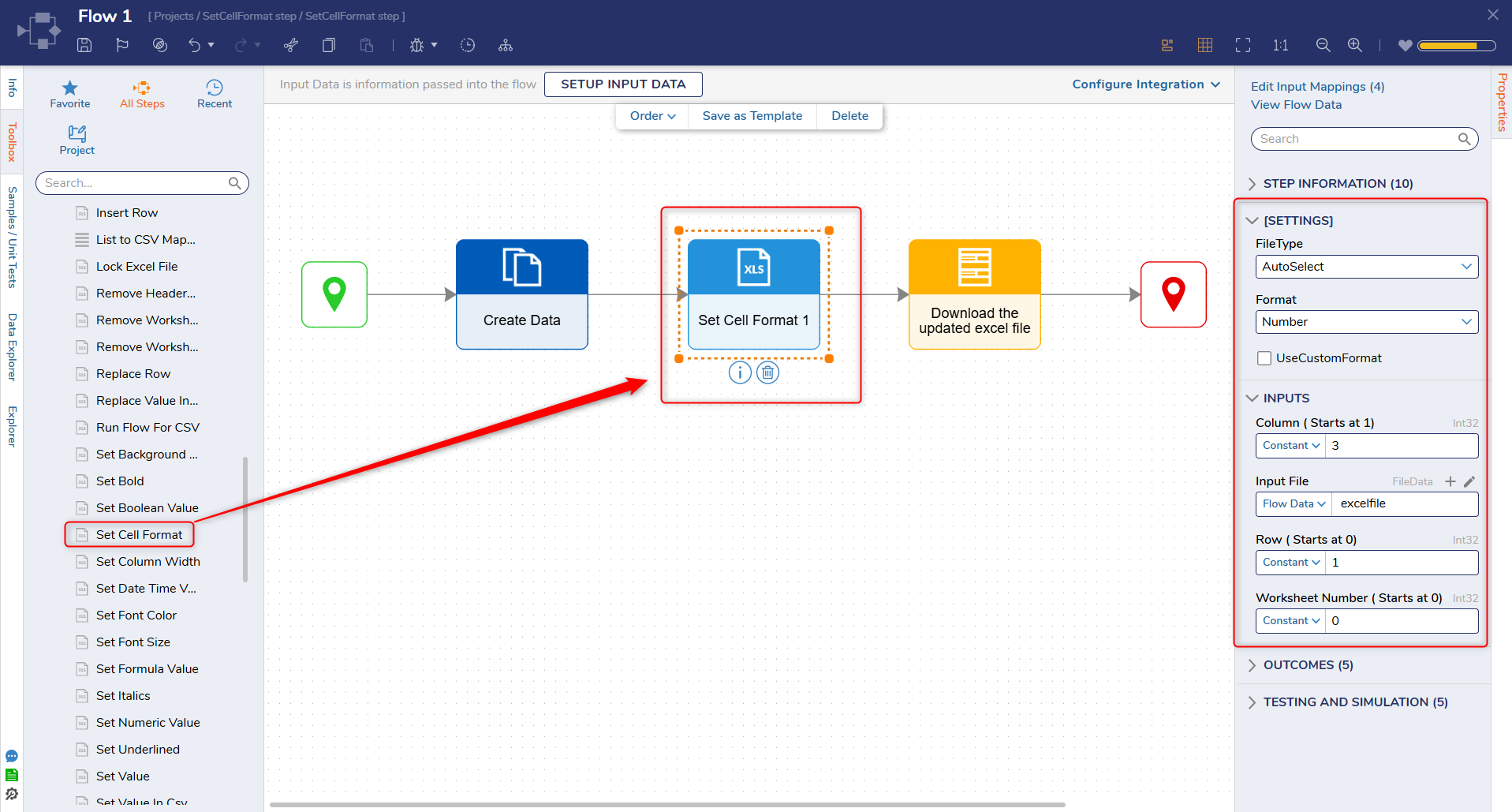
Set Cell Format Step updates the display formatting of a specific cell in an Excel workbook (for example, showing a serial date value as a readable date, or displaying numbers as currency or percentages). This step changes how the value appears in Excel without changing the underlying value stored in the cell.
This step is useful when generating or updating Excel files in a Flow, and the output must be readable. Because Excel stores dates as numbers, a DateTime value can appear as a numeric serial value until a date format is applied (for example, m/d/yyyy or m/d/yyyy h:mm).
Configuration requires the worksheet, row, and column of the target cell, the Excel file type (or AutoSelect), and either a built-in format option or a custom Excel format string.
Properties
Settings
| Property | Description | Data Type |
|---|
| FileType | Selects the Excel file type to process (Excel_xls, Excel_xlsx) or uses AutoSelect to detect the type from the Input File. | - |
| Format | Specifies the built-in display format applied to the target cell (for example, Integer, Currency, Percentage, or date/time patterns such as m/d/yyyy or m/d/yyyy h:mm). This setting is typically used when UseCustomFormat is not enabled. | - |
| UseCustomFormat | Determines whether a custom Excel number format string is used. When enabled, the Custom Format input becomes available. | Boolean |
Inputs
| Property | Description | Data Type |
|---|
| Column (Starts at 1) | One-based column index of the target cell (1 = column A, 2 = column B, 3 = column C). | Int32 |
| Input File | Excel file to update. | FileData |
| Row (Starts at 0) | Zero-based row index of the target cell (0 = first row). | Int32 |
| Worksheet (Starts at 0) | Zero-based worksheet index of the target cell (0 = first worksheet). | Int32
|
| Custom Format | Custom Excel number format string applied to the target cell when UseCustomFormat is enabled (for example, $#,##0.00, 0.00%, m/d/yyyy). | String |
Example Inputs and Outputs
Property
| Input | Output |
|---|
Column (Starts at 1)
| 3 | Updated Excel file with the specified cell format applied. |
Input File
| Excel_file |
Row (Starts at 0)
| 28 |
Worksheet (Starts at 0)
| 0 |
| FileType | AutoSelect |
| Format | m/d/yyyy h:mm |
Step Changes
| Description | Version | Date | Developer Task |
|---|
| Add Excel Step To Set Format For Cell. | 9.20 | February 2, 2026 | DT-046147 |