Contact: Please work directly with your assigned Account Executive and Solutions Consultant.
Released/Updated: 2026-10-09
Implementation
Duration
It is crucial to supply all necessary integration details as soon as possible to provide the best possible service and the fastest implementation time.
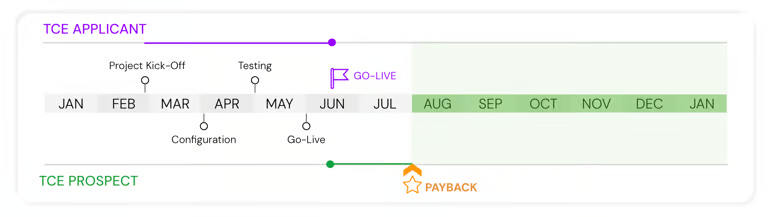
The implementation timeline varies based on the installed solutions (TCE for Prospects and TCE for Applicants), the integration method, and optional SSO configuration.
The initial setup and rollout can be completed in as little as 14 days. However, most implementations range from 1 to 2 months, depending on resource availability and collaboration timelines.
Timeline: TCE for Prospects and Applicants
 https://1673751894-
ProcessMaker and Colleague Integration
Please note that this edition of the Transfer Credit Evaluation (TCE) Technical Documentation applies specifically to integrations with Ellucian Colleague.
Colleague integration is part of ProcessMaker's broader Student Information System (SIS) Integration offering.
Supported Colleague Integration Methods
Ellucian Ethos (APIs) - Primary and recommended integration method. Ethos provides a modern, secure, and standardized API framework for managing data exchange between ProcessMaker and Colleague.
VPN Integration - Alternative integration option for institutions that require connectivity to on-premises Colleague environments.
Built-In Integration - Alternative integration option available for specific deployment and technical requirements.
While VPN and Built-In integrations are supported, they are considered secondary options. ProcessMaker recommends Ellucian Ethos (API-based integration) as the preferred approach for new Colleague implementations.
How It Works
Course equivalency rules are managed directly within ProcessMaker.
The process is transparent to students and institutional users.
Once equivalencies are determined, ProcessMaker automatically posts the results to the student's record in Colleague.
This ensures that academic records remain accurate and up to date across systems.
If you operate a different SIS, please contact ProcessMaker to obtain the appropriate integration documentation for your environment.
Watch the following product tour to learn more about the Colleague application.
Integration via Ellucian Ethos
Ellucian Colleague (through Ethos) provides an extensive selection of APIs to enable seamless integrations with third-party systems. These APIs allow external systems to communicate effectively with Colleague, promoting efficient data exchange and enhanced functionality.
This section provides an overview of all APIs used within the TCE solution process, outlining their purposes, functions, and contributions to overall system integration.
Prerequisites and Required Information
Optional Components
Single Sign-On (SSO) allows users to authenticate through a centralized identity provider rather than maintaining separate credentials for ProcessMaker.
ProcessMaker supports integrations with Microsoft (Azure AD), Google, Okta, and other SAML-compatible providers using OAuth and SAML protocols.
Registration & Resource Mapping
To enable the integration, the application must be registered within the Ellucian Ethos Integration (EEI) portal to establish a secure handshake with the Colleague environment.
Application Provisioning: Registering a new application instance in the Ethos portal and selecting the REST API Proxy setup to route requests to the Colleague WebAPI.
Identity Association: Linking the application to a pre-configured Colleague Service Account to define the security context for data access.
API Key Generation: Generating the External API Key, which serves as the primary credential for obtaining temporary JWT access tokens.
Resource Authorization (Scope): Explicitly whitelist required Colleague resources (e.g., students, courses) within the application’s Owned Resources profile. Without this mapping, the API key will return a forbidden status even if the authentication is successful.
IP Address Whitelisting (Optional): To enhance connection security, you may whitelist the Banner API gateway addresses. ProcessMaker will provide the specific IP addresses for both Development and Production instances to be registered on the Colleague Application.
Please refer to your Ellucian Colleague/Ethos administrator to gather the above information.
Authentication
The following settings/credentials are required to access and utilize the Colleague/Ethos API. These credentials ensure secure and authorized interaction with the API, enabling seamless data exchange and integration with third-party systems (here, ProcessMaker TCE).
Parameter | Description |
|---|---|
Server URL |
|
API Token | ProcessMaker integration components utilize the Ellucian Ethos API token to retrieve JWT access tokens. |
Please refer to your Ellucian Colleague/Ethos administrator to gather the above information.
API Documentation from Colleague
This section lists all APIs utilized by ProcessMaker’s TCE solution. Please confirm that the API Token provides access to all API endpoints listed below.
Student Management
Method | Endpoint | Purpose | Permissions |
|---|---|---|---|
GET | /api/students | Retrieve a list of students by specific criteria (for example, Student Type). | VIEW.STUDENT.INFORMATION (READ) |
GET | /api/students/{id} | Retrieve a student's details by Colleague ID. | VIEW.STUDENT.INFORMATION (READ) |
GET | /api/persons | Retrieve person entities by specific criteria. | VIEW.ANY.PERSON (READ) |
GET | /api/persons/{id} | Retrieve a person's details by Colleague ID. | VIEW.ANY.PERSON (READ) |
GET | /api/student-types | Retrieve student types registered in Colleague. | VIEW.STUDENT.INFORMATION (READ) |
GET | /api/student-classifications | Retrieve student classifications registered in Colleague. | VIEW.STUDENT.INFORMATION (READ) |
GET | /api/academic-levels | Retrieve academic levels registered in Colleague. | VIEW.STUDENT.ACADEMIC.PROGRAM (READ) |
GET | /api/student-academic-programs | Retrieve academic programs associated with a student. | VIEW.STUDENT.ACADEMIC.PROGRAM (READ) |
GET | /api/academic-programs | Retrieve academic programs registered in Colleague. | VIEW.STUDENT.ACADEMIC.PERIOD.PROFILE (READ) |
Course Management
Method | Endpoint | Purpose | Permissions |
|---|---|---|---|
GET | /api/courses | Retrieve courses based on search criteria. | CREATE.UPDATE.COURSE (READ) |
GET | /api/course-statuses | Retrieve course statuses registered in Colleague. | CREATE.UPDATE.COURSE (READ) |
GET | /api/subjects | Retrieve subjects based on search criteria. | CREATE.UPDATE.COURSE (READ) |
GET | /api/subjects/{id} | Retrieve the subject associated with a course. | CREATE.UPDATE.COURSE (READ) |
GET | /api/course-title-types | Retrieve course title types registered in Colleague. | CREATE.UPDATE.COURSE (READ) |
Course Equivalency
Method | Endpoint | Purpose | Permissions |
|---|---|---|---|
GET | /api/educational-institutions | Retrieve an institution's assigned code. | VIEW.EDUCATIONAL.INSTITUTION (READ) |
GET | /api/course-transfer-equivalencies | Retrieve course equivalencies. | VIEW.TRANSFER.EQUIVALENCIES (READ) |
POST | /api/transfer-equivalencies | Create course equivalencies. | VIEW.TRANSFER.EQUIVALENCY.TEMPLATES, UPDATE.TRANSFER.EQUIVALENCY.TEMPLATES |
Course Articulation
Method | Endpoint | Purpose | Permissions |
|---|---|---|---|
GET | /api/person-external-education | Retrieve external institutions associated with a person. | VIEW.EXTERNAL.EDUCATION |
POST | /api/person-external-education | Create or update external institution information. | UPDATE.EXTERNAL.EDUCATION |
GET | /api/transcript-types | Retrieve transcript types. | UPDATE.EXTERNAL.EDUCATION |
GET | /api/transcript-statuses | Retrieve transcript statuses. | UPDATE.EXTERNAL.EDUCATION |
GET | /api/graduation-types | Retrieve graduation types. | UPDATE.EXTERNAL.EDUCATION |
GET | /api/person-external-education-credentials | Retrieve external education credentials. | VIEW.PER.EXT.EDUC.CREDENTIAL |
POST | /api/person-external-education-credentials | Create or update external education credentials. | UPDATE.PER.EXT.EDUC.CREDENTIAL |
GET | /api/academic-credentials | Retrieve academic credentials. | UPDATE.EXTERNAL.EDUCATION |
GET | /api/grade-schemes | Retrieve grading schemes. | UPDATE.EXTERNAL.EDUCATION |
GET | /api/educational-institution-units | List educational institution units. | VIEW.EXTERNAL.COURSES |
GET | /api/external-institution-courses | Retrieve student external courses. | UPDATE.EXTERNAL.COURSES |
POST | /api/external-institution-courses | Register student external courses. | UPDATE.PER.EXT.EDUC.CREDENTIAL |
GET | /api/transfer-equivalency-evaluations | Retrieve transfer equivalency evaluations. | VIEW.PER.EXT.EDUC.CREDENTIAL |
POST | /api/transfer-equivalency-evaluations | Create transfer equivalency evaluations. | UPDATE.PER.EXT.EDUC.CREDENTIAL |
These APIs allow external transcripts, course details, and course-to-equivalency mappings to be created, updated, and retrieved programmatically while aligning with Colleague's native data structures and business rules.
These APIs support TCE workflows by ensuring that:
Student external courses are accurately recorded.
Course equivalencies are evaluated and maintained consistently.
Credit mapping is synchronized between systems.
Validation, permissions, and institutional rules are enforced at the API level.
The integration relies on the following core REST resources.
Transfer Equivalency Evaluations API
Download the file below to learn more about this API:
External Institution Courses API
Download the file below to learn more about this API:
SIS Modifications and Update
 https://lh7-
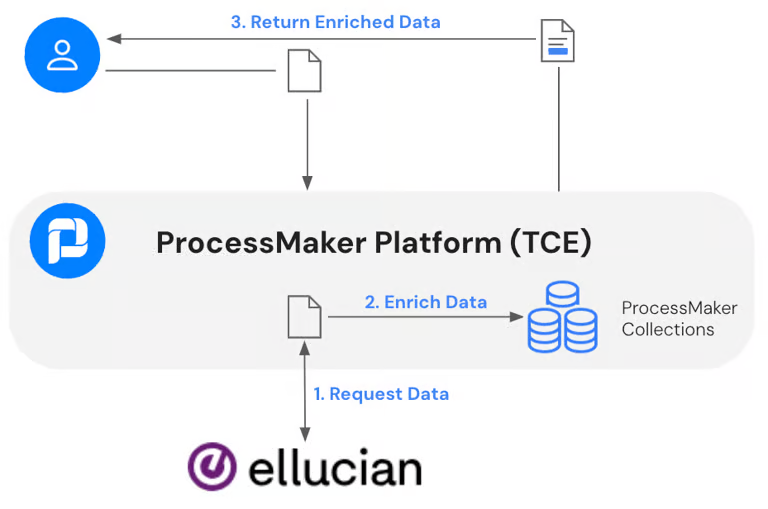
ProcessMaker functions as an intermediary between users and the SIS. It stores new and updated data within its Collections, a table-like structure integrated into the ProcessMaker BPA platform. Information sourced from the SIS is enriched with data maintained in ProcessMaker Collections. TCE users are not restricted, and exports and reports can be generated whenever stored information is required for review.
VPN-Based Colleague Access - Alternative Integration
The ProcessMaker integration server can be configured to securely interact with the Colleague system through a dedicated VPN connection.
The server resides in an isolated private network and connects securely to your VPN.
The VPN must be configured in full-tunnel mode, with timeouts disabled, and must allow connectivity to the Colleague system.
You provide a Colleague Service Account used for write operations.
All interactions with Colleague are executed using browser-based automation.