Integration Activities
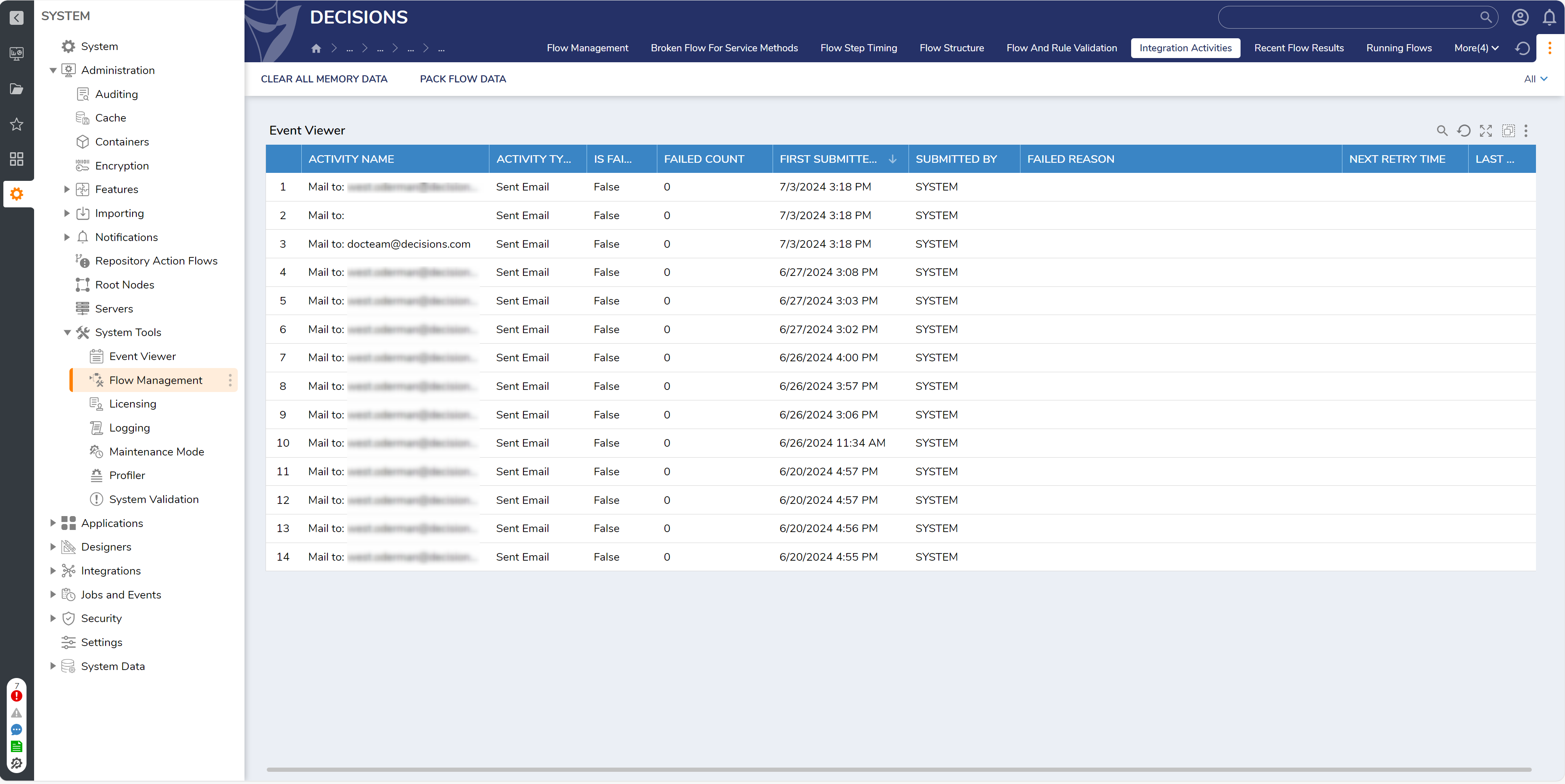
To observe any activity pertaining to messaging integrations, access the integration_activity table. This table displays in the Integration Activities tab in the System > Administration > System Tools > Flow Management folder.
The table contains information on the activity including:
- Activity Name: The Name/description for the activity.
- Activity Type: The type of activity, ie. Sent Email.
- Is Failed/Failed Count: Whether the activity failed and how many times it failed on execution.
- First Submitted On/Submitted By: DateTime value representing when the activity occurred/who ran the activity.
- Failed Reason: The reason/cause of why the activity failed on run.
- Next Retry Time/Last Retry: The next scheduled retry DateTime value, and the last retry DateTime value.
In the event of failure, access troubleshooting and/or rerunning actions by right-clicking on an activity to open its Action Menu.
These actions allow the ability to clear the message's SMTP settings, delete the activity, re-run the activity now, reset the failed count, show all message recipients, show message sender, or stop retrying the activity.