Overview
Decisions has historically supported designer version control and cross-environment promotion through a Repository Server. Repository Server workflows focus on project-level check-in/check-out, revision history, and branching to support parallel development and controlled merges.
The Deployment Tower provides a centralized deployment workflow for managing, tracking, and automating the promotion of validated changes across environments (such as Development, QA, and Production) in a controlled, traceable, and scalable way.
A fully integrated, enterprise-grade control plane for project management, environment management, deployment, testing, and observability.
What is the Deployment Tower?
The Deployment Tower is a centralized system designed to manage, track, and automate the promotion of changes across different environments (such as Development, QA, and Production) in a controlled, traceable, and scalable manner.
It acts as the backbone of the release management process, ensuring that all changes, whether they are features, bug fixes, or configuration updates, are packaged, versioned, reviewed, and deployed systematically.
The primary goal of the Deployment Tower is to bring consistency, visibility, and governance to the deployment lifecycle while reducing manual effort and risk.
Project Management (PMIS)
The Deployment Tower supports a PMIS-aligned workflow using User Stories and Sprints to plan, organize, and track development work that is promoted through the deployment pipeline.
User stories act as structured units of work that capture requirements, track progress, and link development changes (such as flows or forms) to deployments. These stories are grouped into sprints to support time-based planning and execution.
User stories are created and managed on the Development Server and synced with the Deployment Server, where they are included in deployment packages and builds to maintain traceability between planned work and deployed changes.
User stories can be created through multiple methods depending on workflow needs:
- Manual creation: Creating individual user stories directly within a sprint.
- Bulk CSV import: Importing multiple user stories at once using a CSV file.
- PMIS integration: Importing work items(user stories) from external systems such as Jira and Azure DevOps.
This flexible approach allows teams to align Decisions development with existing project management tools while maintaining end-to-end deployment traceability.
Reference: User Stories, Sprints
Environment Management & Secure Connection
The Deployment Tower manages promotion across Development, QA, and Production by registering environments through secure, key-based connections. Environments can be tagged to support identification and routing for promotion.
- Secure keys: Environments connect to the Deployment Tower using key-based registration.
- Environment tags: Tags help identify environments and support routing.
- Environment types: Development supports a single instance and PMIS-driven workflows; QA supports testing and flexible deployment schedules; and Production supports final promotion and release management. QA and Production support multiple instances.
Reference: Connecting an Environment to Deployment Server
Deployment & Testing
The Deployment Tower packages and promotes validated changes through Deployment Packages and Builds. Packages provide the review and promotion container; builds provide traceability and quality indicators as work progresses toward QA and Production.
- Deployment Packages group related work for review, audit, and promotion.
- Builds track Project–User Story changes and can surface readiness signals such as unit test and QA indicators.
Reference: Deployment Packages, Builds
Observability
The Deployment Tower provides visibility into the lifecycle of changes across environments by tracking key artifacts such as commits, builds, deployment packages, deployments, and user stories.
Builds and deployment packages provide detailed insights into what changes are included, their validation status (such as unit tests and QA), and how they progress through environments.
This end-to-end visibility supports auditability, troubleshooting, and deployment confidence by allowing teams to review what changed, when it changed, and how it was promoted across Development, QA, and Production.
Account Management
The Deployment Tower provides centralized account management, allowing administrators to create and manage user accounts across all connected environments (such as Development, QA, and Production) from a single location.
Accounts can be assigned to specific environments, where they are synchronized automatically, enabling consistent access without needing to configure users separately in each environment.
While account access is managed centrally, environment-specific permissions (such as project or folder security) are still configured within each target environment.
Reference: Managing Accounts with the Deployment Server
Conflict Detection & Resolution
Deployment Tower identifies conflicts when an entity in a target environment (such as QA or Production) differs from the version included in a Deployment Package, typically due to changes made outside the standard deployment flow.
Conflicts can be reviewed at the package level or resolved during deployment or checkout. Each conflict requires selecting whether to keep the existing version in the target environment or replace it with the package version.
This ensures controlled, predictable deployments while maintaining consistency, visibility, and traceability across environments.
Reference: Conflict Resolution
Repository Server vs Deployment Tower
| Category | Repository Server | Deployment Tower |
|---|---|---|
| Primary Purpose | Designer project version control and promotion via check-in/check-out. | Structured packaging, review, and promotion of changes across environments. |
| Core Units | Projects, branches, revisions (commit history), tags. | Organizations, deployment packages, builds, projects/sprints/user stories. |
| Change Grouping | Commits (revisions) are created when projects are checked in, or via an optional selective check-in via the Check-In Wizard. | User stories included in a deployment package; builds accumulate and track changes for a project–user story combination. |
| Parallel Work | Branching and merging support parallel development and controlled promotions. | Multiple builds and packages support iterative promotion; emphasis is on validated readiness and traceability. |
| Rollback / Immutability | Rollback to a date or revision supported through branch/project actions. | Builds are immutable once created; deletion or rollback is not supported to preserve audit history. |
| Readiness Signals | Repository health signals exist, but deployment gating is workflow-driven and branch/revision-centric. | Unit test indicators, QA indicators, and package readiness rules determine promotion eligibility. |
| Server-to-Server Registration | Repository Server URL configured in Designer Repository Settings; optional Repo-SSO proxy configuration. | Key-based environment registration per instance, with time-bound authentication keys. |
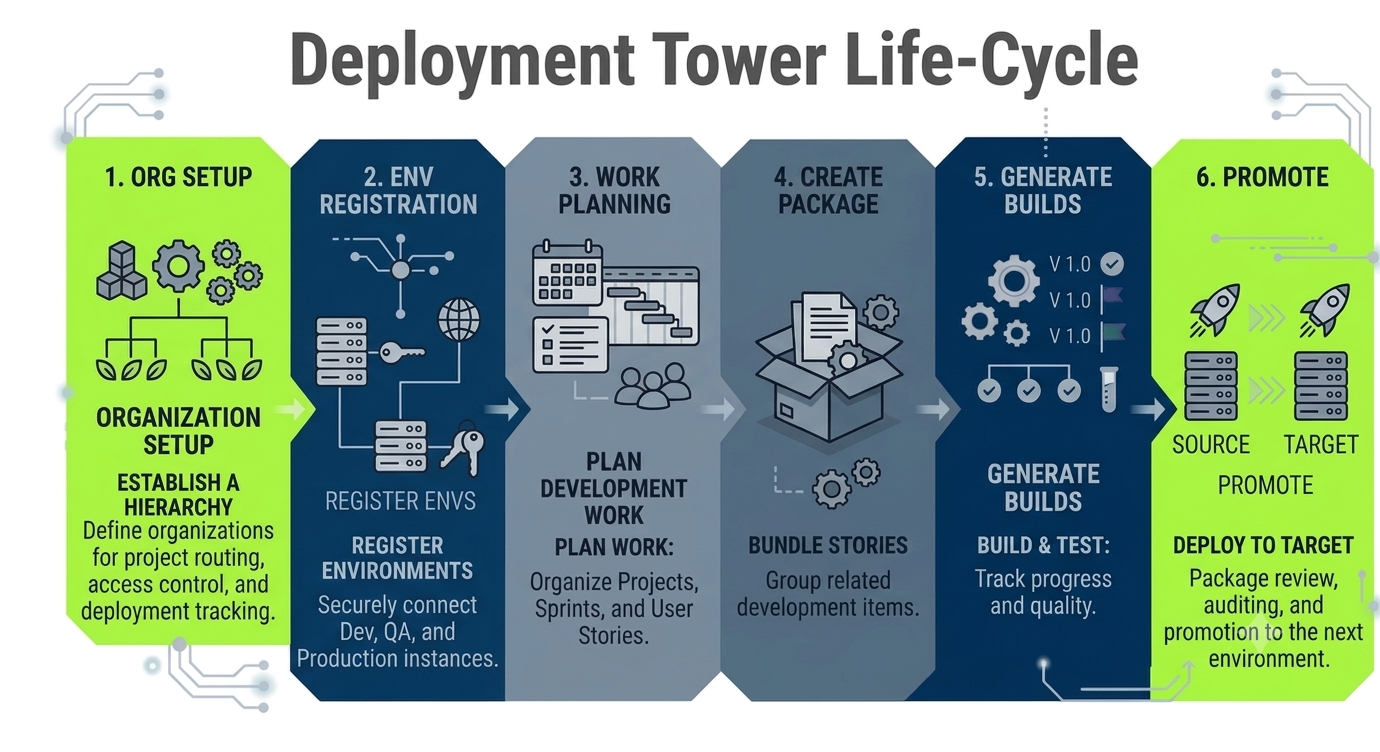
Deployment Tower Workflow Summary
- Create an Organization on the Deployment Tower to establish the top-level container for project routing, access control, and deployment tracking.
- Register environments (Development/QA/Production) to the Deployment Tower using key-based registration under Deployment Tower Connection Parameters.
- Plan work on the Development Server using Projects and Sprints. Sprints group user stories into time-bound cycles for organized execution and tracking.
- Include user stories in a Deployment Package using the user story option to include work in the current active package, or by editing the package to select the required stories.
- Generate Builds as work is committed to the deployment package. Builds provide traceability (Build ID, project, user story) and quality control signals (unit tests and QA indicators).
- Promote changes by deploying a deployment package to the next target environment. Deployment package versioning communicates the progression of major/package/build across the lifecycle.
The following infographic summarizes how work moves through the Deployment Tower lifecycle.