| Step Details | |
| Introduced in Version | 8.10 |
| Last Modified in Version | -- |
| Location | System > Assignment |
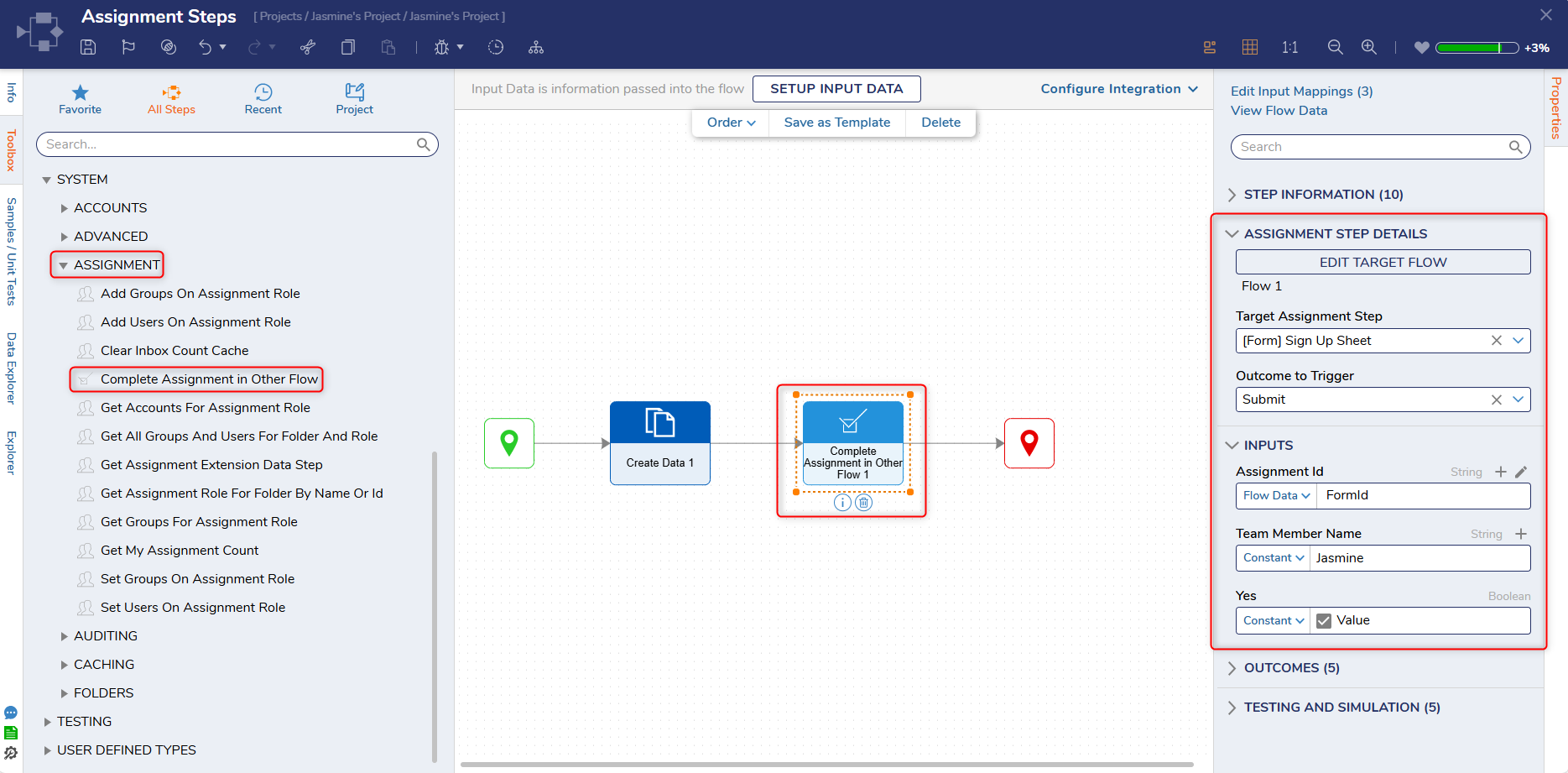
The Complete Assignment in Other Flow step allows Users to select a Flow and complete an assignment. Users will start by creating or selecting an existing Flow from the Pick or Create Target Flow property. After a Flow is selected, Users can choose any Form or Add Task step from the selected Flow. The selection will then appear on the Target Assignment Step property. Users can then choose a desired outcome via the Outcome to Trigger property.
Properties
Assignment Step Details
| Property | Description | Data Type |
|---|---|---|
| Pick or Create Target Flow | Allows Users to create or select an existing Flow. This Flow must contain either a Form or Add Task step. | -- |
| Target Assignment Step | This dropdown will automatically populate with the selected Form once the Flow has been selected. | -- |
| Outcome to Trigger | This dropdown wll automatically populate with outcomes added to the selected Form. Once Users select a desired outcome, it will affect the fields displayed in the Input section. | -- |
Inputs
| Property | Description | Data Type |
|---|---|---|
| Assignment Id | Allows Users to select the Assignment Id. The Assignment Id can be found by running the target Flow and copying the Form Assignment Id. | String |
| Additional Fields | Any fields that appear after Assignment Id will mirror the fields included on the selected Form. The following example has fields to enter a Team Member name and a check box to answer yes or no to signing up for an event. | Varies |
Step Changes
| Description | Version | Release Date | Developer Task |
|---|---|---|---|
| Added Complete Assignment for Flow to replace Complete Assignment and Complete Assignment with Notes steps that have been removed from the platform. | 8.10 | December 2025 | [DT-037184] |
Related Information