| Step Details | |
| Introduced in Version | 9.13 |
| Last Modified in Version | 9.27 |
| Location | AI > Common |
The Get Embedding for Text step generates numerical vector representations (embeddings) for input text. These embeddings capture the semantic meaning of the text and can be used in downstream tasks such as similarity search, clustering, classification, and retrieval-augmented workflows.
This step in the AI.Common module provides a unified interface for generating embeddings across supported AI providers.
Prerequisites
This step requires installing the AI.Common module along with a supported provider module.
All provider modules must be added as Project Dependencies before they are available for selection.
Each provider must also be configured in System > Settings with the required credentials (such as API keys, endpoints, or project configurations).
Only the OpenAI provider supports this step and must be added as a Project Dependency to be available for selection.
Properties
Settings
| Property | Description | Data Type |
|---|---|---|
| Override Default Provider (v9.27+) | Enables selection of a specific AI provider configured in the system. | Boolean |
| Provider | Specifies the AI provider used to generate embeddings. Only providers added as project dependencies are available. | --- |
| Get Provider from Flow | Allows the embedding provider to be passed dynamically from the Flow. Disables Override Default Provider when enabled. | Boolean |
| Select Model | Enables selection of the embedding model. | Boolean |
| Model | Specifies the embedding model used to generate vector representations. | --- |
| Get Model from Flow | Allows the model name to be passed dynamically from the Flow. Disables Select Model when enabled. | Boolean |
| System Prompt | Defines instructions for how the input text should be processed when generating embeddings. | String |
| Select System Prompt | Allows selection of a predefined system prompt. Disables manual System Prompt input when enabled. | Boolean |
| Get System Prompt from Flow | Allows the system prompt to be passed dynamically from the Flow. Disables Select System Prompt when enabled. | Boolean |
| Use TextMerge System Prompt | Enables the use of a TextMerge-based system prompt. Disables Get System Prompt from Flow when enabled. | Boolean |
| TextMerge System Prompt | Displays the "Pick or Create TextMerge System Prompt" option when Use TextMerge System Prompt is enabled. | --- |
| Prompt | Specifies the input text for which the embedding is generated. | String |
| Select Prompt | Allows selection of a predefined input text from the AI Prompt Manager. Disables direct Prompt input when enabled. | Boolean |
| Get Prompt from Flow | Allows the input text to be passed dynamically from the Flow. Disables Select Prompt when enabled. | Boolean |
| Use TextMerge Prompt | Enables the use of a TextMerge-based input for generating embeddings. Disables Get Prompt from Flow when enabled. | Boolean |
| TextMerge Prompt | Displays the "Pick or Create TextMerge Prompt" option when Use TextMerge Prompt is enabled. | --- |
Inputs
| Property | Description | Data Type |
|---|---|---|
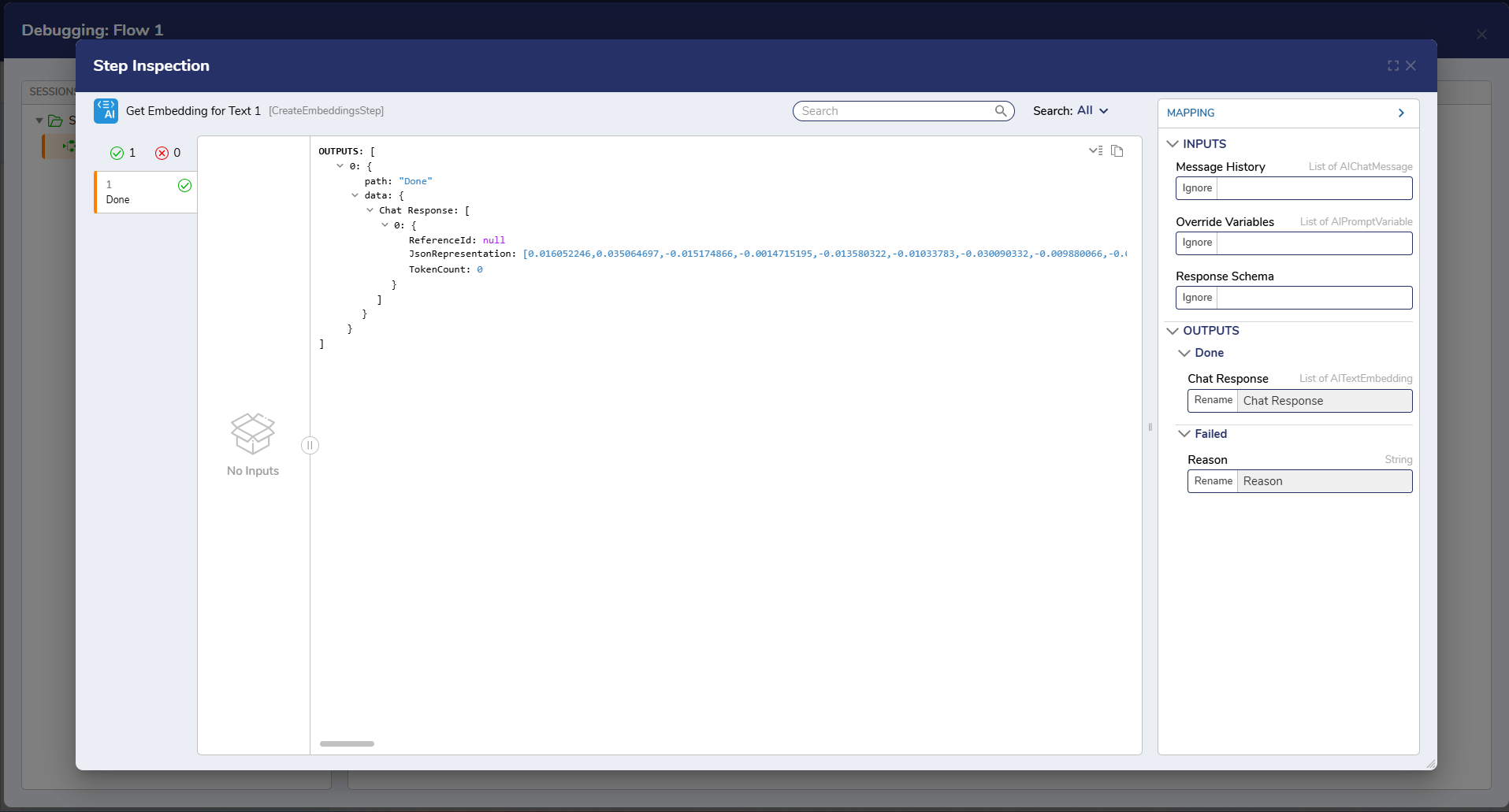
| Message History | Provides prior conversation context to generate more accurate and contextual responses. | String |
| Response Schema (v9.15+) | Defines the structured JSON format the response must follow, enabling consistent and machine-readable outputs. | Any |
Outputs
| Property | Description | Data Type |
|---|---|---|
| Chat Response | The generated response returned by the AI provider based on the provided input. | String |
| Reason (Failed outcome) | The reason for failure if the request does not complete successfully. | String |
Example Inputs and Outputs
The following images demonstrate how text input is converted into embeddings and returned as vector output: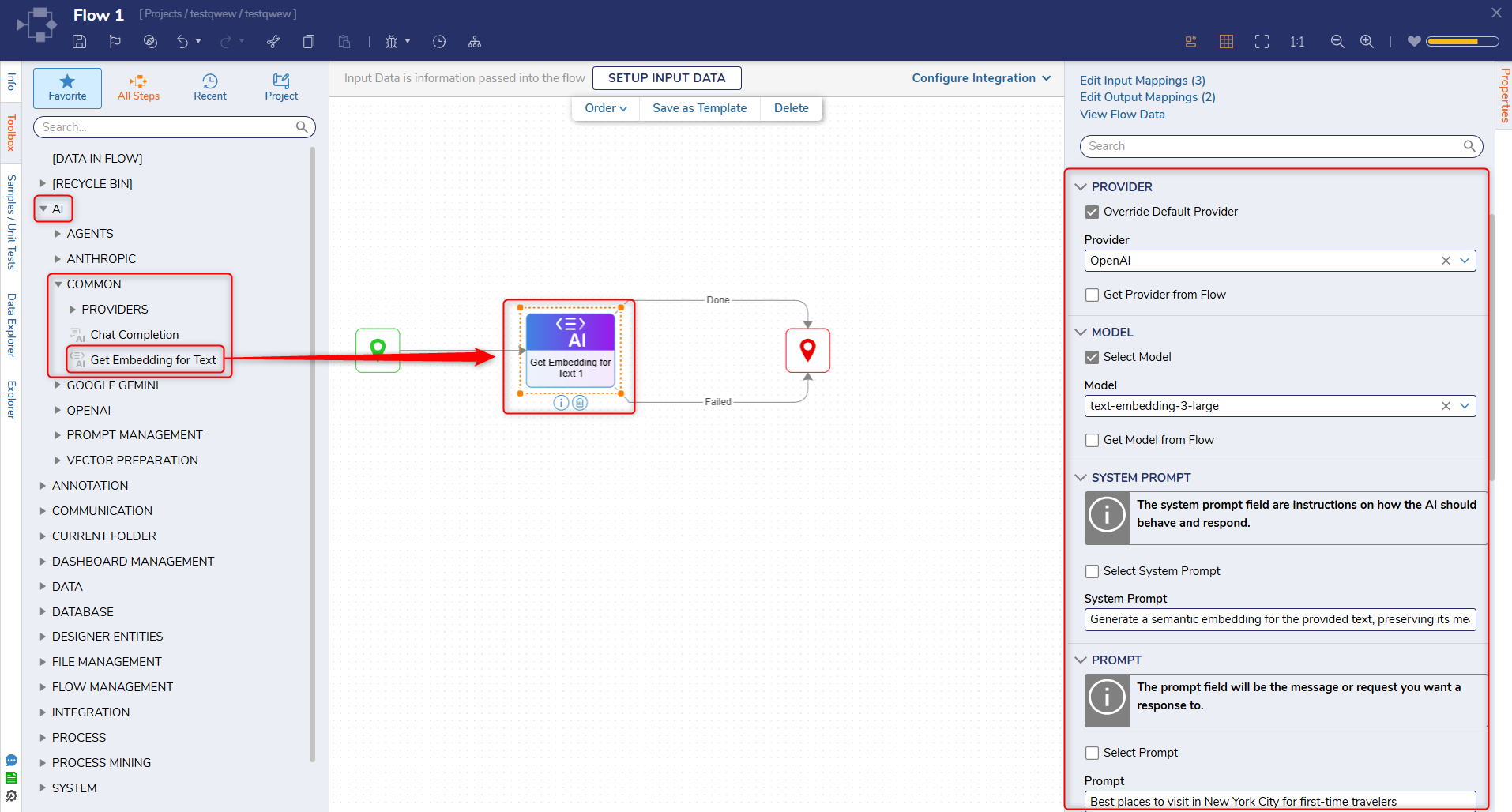
Step Changes
| Description | Version | Release Date | Developer Task |
|---|---|---|---|
| Removed the "Decisions.AI" prefix from LLM provider names in the provider picker and updated the default Max Iterations value to 5. | 9.27 | June 2026 | [DT-047294] |
| Updated Properties panel UI and restricted provider selection to project dependencies. | 9.27 | June 2026 | [DT-046761] |