Using MCP Servers with AI Agents
AI Agents can use tools from an MCP Server as part of their available tool set. This includes internal MCP servers (Decisions-created servers) and external MCP servers (non-Decisions MCP servers). Both internal and external MCP servers are accessed via HTTP or STDIO.
When an MCP Server is attached to an Agent, the Agent can access the AI Tool Flows exposed by that server. During execution, if the LLM selects a tool provided by the configured MCP Server, the Agent invokes that tool and uses the returned output in its response.
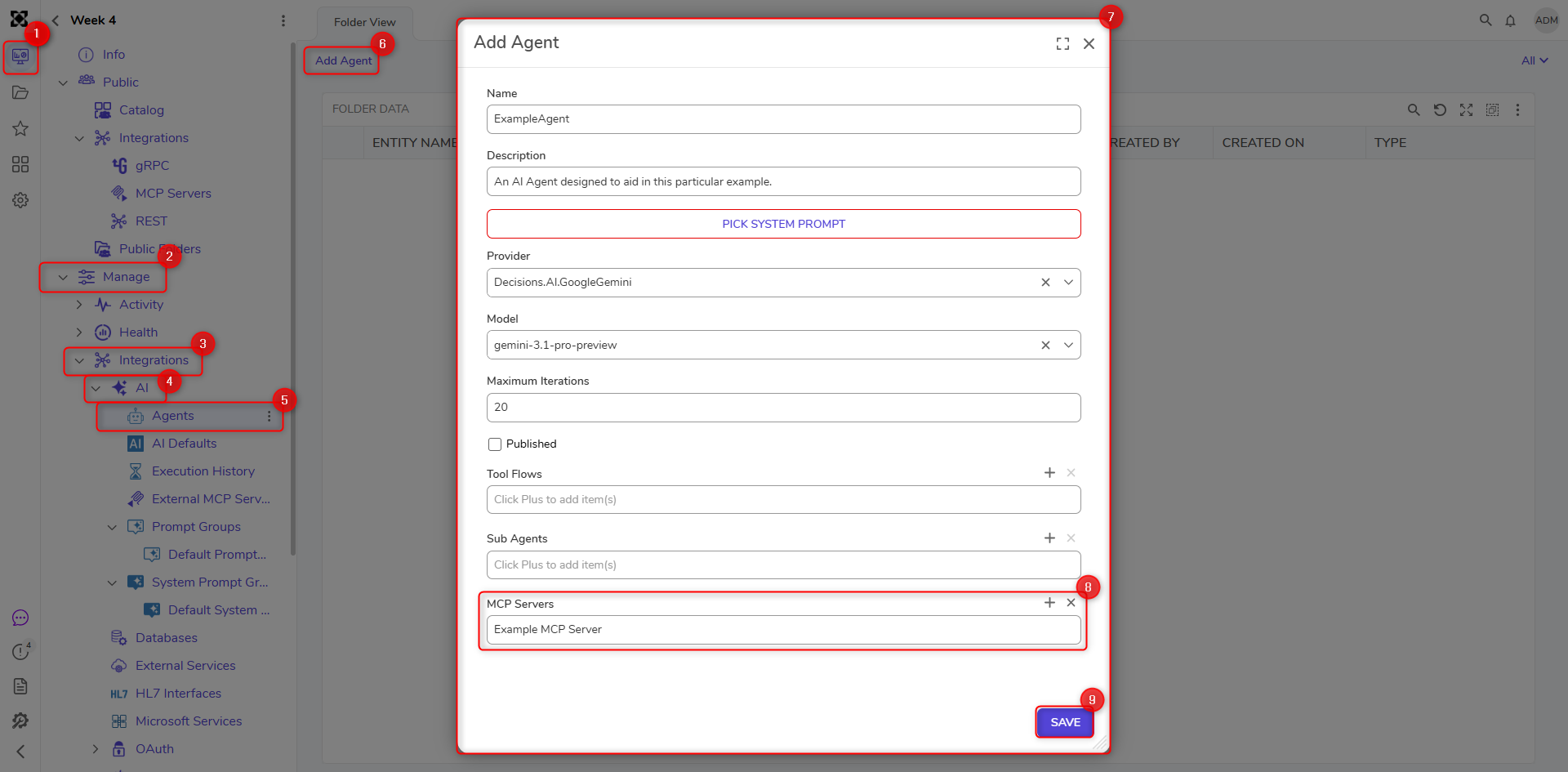
Follow the steps below to add MCP Servers for use with AI Agents:
- Navigate to [Designer Project] > Manage > Integrations > AI > Agents.
- Click Add Agent to open the Add Agent dialog window.
- Configure the Agent by providing:
- Name
- Description
- System Prompt
- Provider (AI model provider)
- Model
- Maximum Iterations (numeric value)
- Published (optional checkbox)
- Tool Flows
- Sub Agents (if available)
- MCP Servers (select from the list)
- Click Save.
The Agent can now use AI Tool Flows from the selected MCP Server(s).