---
title: "Get List Directories Azure Storage Blob"
slug: "get-list-directories-azure-storage-blob"
updated: 2025-01-22T21:32:21Z
published: 2025-01-22T21:32:21Z
canonical: "documentation.decisions.com/get-list-directories-azure-storage-blob"
---
> ## Documentation Index
> Fetch the complete documentation index at: https://documentation.decisions.com/llms.txt
> Use this file to discover all available pages before exploring further.
# Get List Directories Azure Storage Blob
| Step Details |
| --- |
| **Introduced in Version** | 4.0.0 |
| **Last Modified in Version** | 9.4.0 |
| **Location** | Integration > Azure Storage |
The Get List Directories Azure Storage Blob step retrieves a list of directories within a container or directory in an Azure Storage Account.
### Prerequisites
This step requires the Azure module to be [installed](https://documentation.decisions.com/docs/installing-modules-decisions) before it will be available in the toolbox. In addition, the step will require the connection string for an Azure Storage account that has access to the container.
---
## Properties
#### Settings
| Property | Description | Data Type |
| --- | --- | --- |
| Timeout | This property allows Users to set the Network Timeout Period. | --- |
#### Inputs
| Property | Description | Data Type |
| --- | --- | --- |
| Connection String | The connection string for an Azure Storage account. This can be located by navigating to the Storage Account within the Azure Portal, then selecting Access Keys to display the connection string. | String |
| Container Name | The name of the container as it appears in Azure. | String |
#### Outputs
| Property | Description | Data Type |
| --- | --- | --- |
| Error Message | Provides a detailed error message, including the [Status and Error Codes](https://learn.microsoft.com/en-us/rest/api/storageservices/status-and-error-codes2). | String |
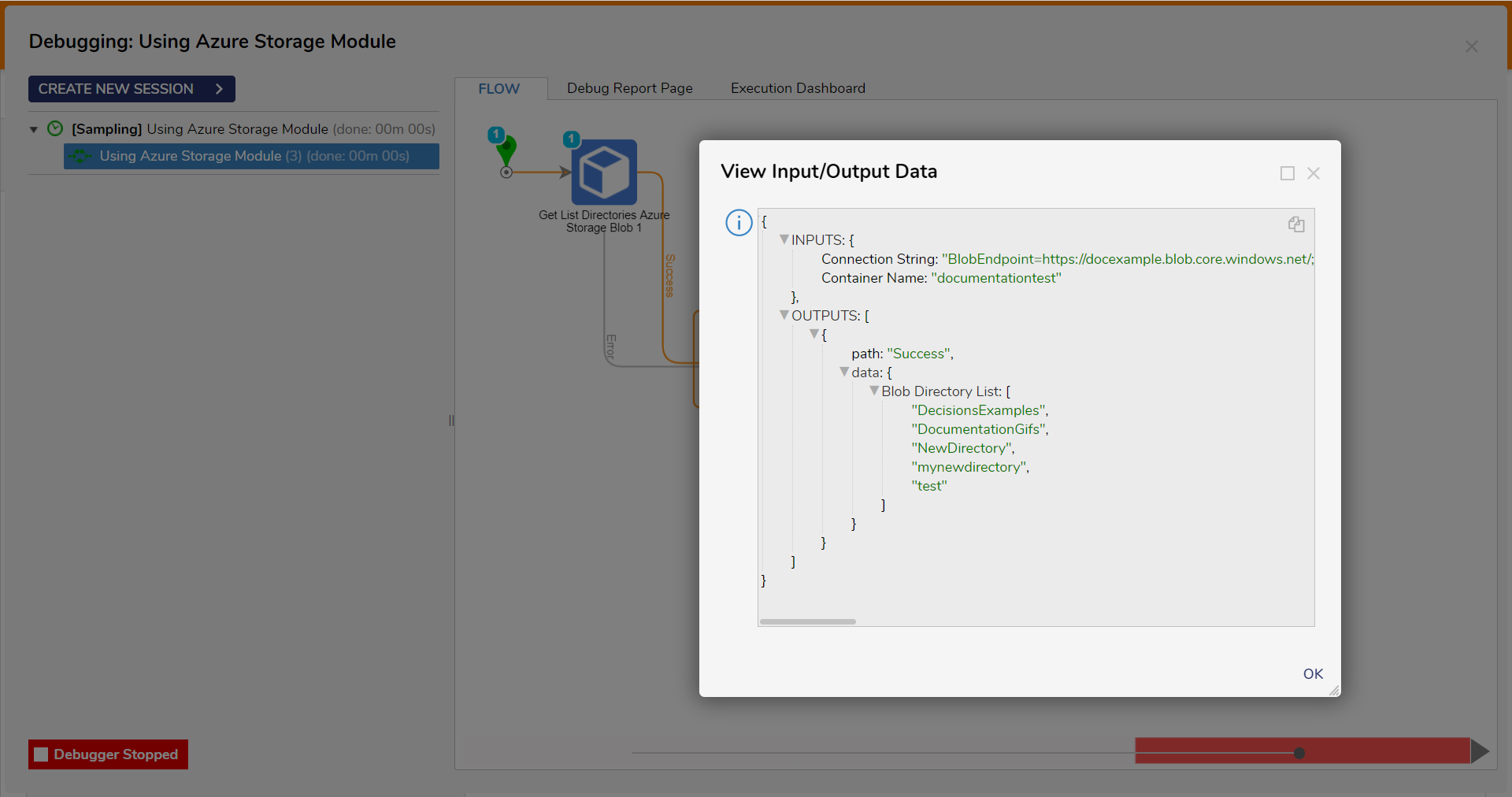
| Blob Directory List | List of existing directories within the container. | List of String |
---
## 
---
## Common Errors
### Server failed to authenticate the request
If the connection string is formatted improperly or the token used within the string has expired, the step will return the following error message. To correct this, confirm the accuracy of the Connection string, and evaluate the expiration dates of the SAS token used in the connection string.
#### Exception Message:
```csharp
{
Error Message: "Server failed to authenticate the request. Make sure the value of Authorization header is formed correctly including the signature.
RequestId:
Time:2023-04-11T15:37:57.2796755Z
Status: 403 (Server failed to authenticate the request. Make sure the value of Authorization header is formed correctly including the signature.)
ErrorCode: AuthenticationFailed
Additional Information:
AuthenticationErrorDetail: Signature not valid in the specified time frame: Start [Tue, 11 Apr 2023 15:34:10 GMT] - Expiry [Tue, 11 Apr 2023 15:36:10 GMT] - Current [Tue, 11 Apr 2023 15:37:57 GMT]
Content:
AuthenticationFailedServer failed to authenticate the request. Make sure the value of Authorization header is formed correctly including the signature.
RequestId:
Time:
Signature not valid in the specified time frame: Start [Tue, 11 Apr 2023 15:34:10 GMT] - Expiry [Tue, 11 Apr 2023 15:36:10 GMT] - Current [Tue, 11 Apr 2023 15:37:57 GMT]
Headers:
Server: Microsoft-HTTPAPI/2.0
x-ms-request-id:
x-ms-error-code: AuthenticationFailed
Date: Tue, 11 Apr 2023 15:37:57 GMT
Content-Length: 544
Content-Type: application/xml
"
}
```
### The specified container does not exist
If the container name does not exist in Azure Storage Blob, the step will return the following error message. To correct this, confirm the spelling of the container, and evaluate if the container is a part of the Azure Storage Account.
#### Exception Message:
```csharp
{
Error Message: "The specified container does not exist.
RequestId:
Time:2023-04-11T17:30:45.7730128Z
Status: 404 (The specified container does not exist.)
ErrorCode: ContainerNotFound
Content:
ContainerNotFoundThe specified container does not exist.
RequestId:
Time:2023-04-11T17:30:45.7730128Z
Headers:
Server: Windows-Azure-Blob/1.0,Microsoft-HTTPAPI/2.0
x-ms-request-id:
x-ms-client-request-id:
x-ms-version: 2021-10-04
x-ms-error-code: ContainerNotFound
Date: Tue, 11 Apr 2023 17:30:45 GMT
Content-Length: 225
Content-Type: application/xml
"
}
```
---
## Feature Changes
| Description | Version | Release Date | Developer Task |
| --- | --- | --- | --- |
| Added the Network Timeout property to all Azure Storage Steps. | [9.4](https://documentation.decisions.com/v99/docs/version-94x-release-notes?highlight=DT-042418%5D%20Expose%20Network%20Timeout%20and%20Retries%20for) | November 6, 2024 | [DT-042418] |
Related Information
Articles: [Azure Storage Module](https://documentation.decisions.com/docs/azure-storage-module)