Example Lab Article
While Example Lab projects are resources for public use, articles and assets are not actively maintained. Screenshots and features are from the specified version below. These references may become dated as new versions are released.
Overview
Example Lab Details | |
| Version | 6.9.2 |
| Root Folder | Example Lab - Displaying Images |
| Modules | None |
| Dependencies | None |
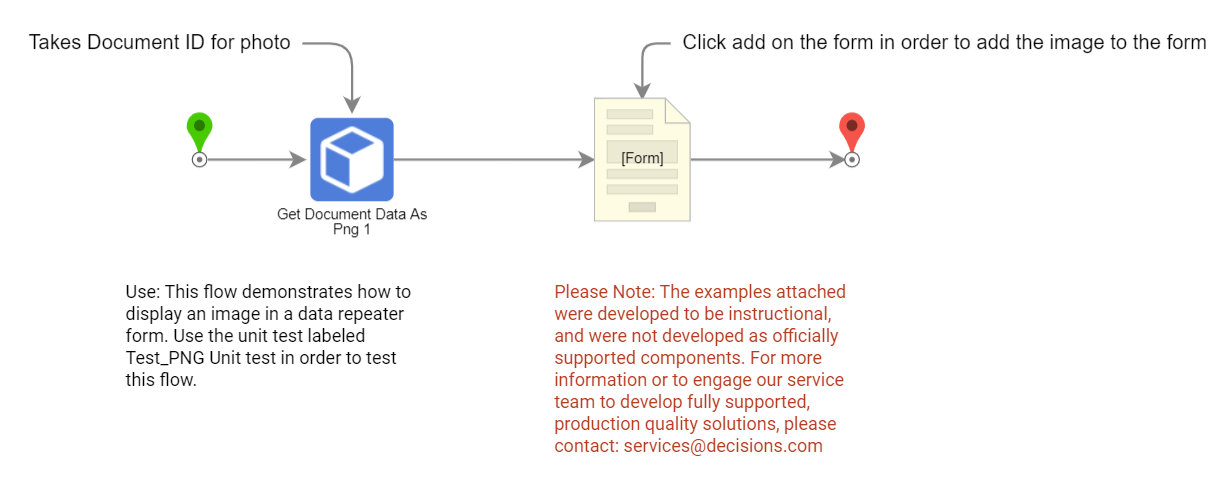
This Example Lab project demonstrates how to display an image in a Form by inputting its document ID.
Explanation
This project works by passing a document ID input by the user to Get Document Data as PNG step. This step then outputs the file data for that document ID upon completion. The Form's image viewer then uses that file data to display the image to the user in a data repeater. The user can then add relevant text alongside the Image before completing the Flow.
This project requires the input of a document ID to begin. There is a unit test saved in the debugger that has an example document ID that can be used for testing.
Reference Articles
Project Download
The examples attached were developed to be instructional and were not developed as officially supported components. For more information or to engage our service team to develop fully supported, production quality solutions, please contact services@decisions.com. Import the project below to a Decisions environment on version 6.9.2 or later using our Importing/Exporting article.